3ENGLISH
WARNING:
Stop the car before operating the unit.
Caution:
Adjust the volume so that you can hear sounds
outside the car. Driving with the volume too
high may cause an accident.
Caution on volume setting:
Discs produce very little noise compared
with other sources. Lower the volume before
playing a disc to avoid damaging the speakers
by the sudden increase of the output level.
Caution for DualDisc playback:
The Non-DVD side of a “DualDisc” does not
comply with the “Compact Disc Digital Audio”
standard. Therefore, the use of Non-DVD side
of a DualDisc on this product may not be
recommended.
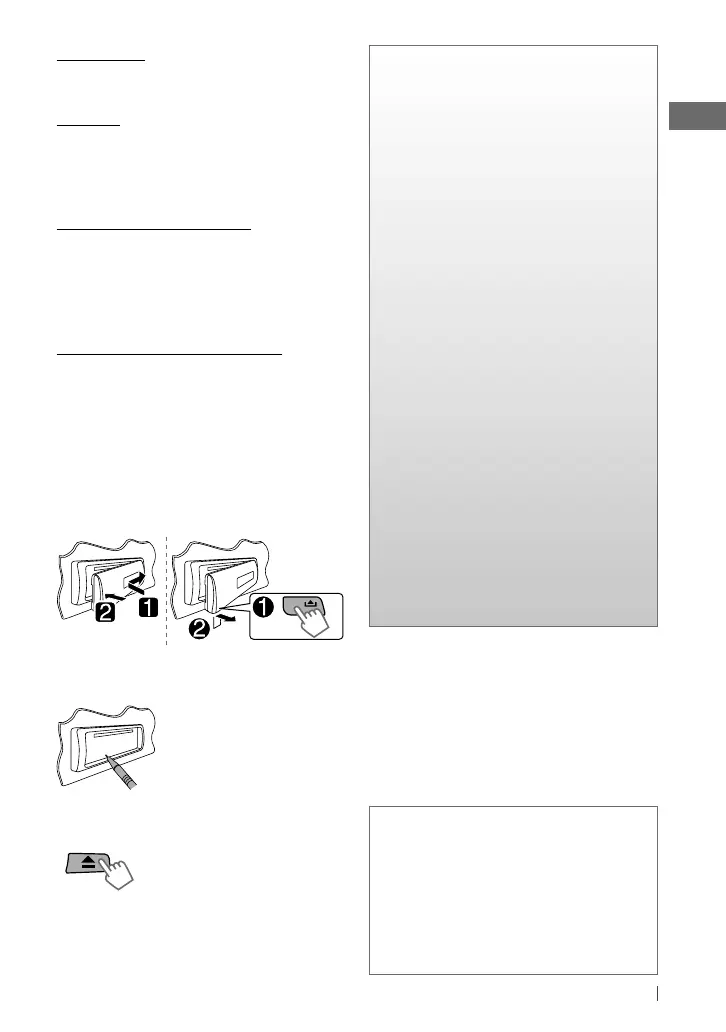
How to attach/detach the control
panel
How to reset your unit
Your preset adjustments will
also be erased.
How to forcibly eject a disc
• Be careful not to drop the disc when it ejects.
• If this does not work, reset your unit.
CONTENTS
3 How to attach/detach the control
panel
3 How to reset your unit
3 How to forcibly eject a disc
3 Maintenance
4 Canceling the display
demonstration
4 Setting the clock
5 Preparing the remote controller
5 About discs
6 Basic operations
7 Listening to the radio
8 Listening to a disc
9 Connecting the other external
components
9 Listening to the other external
components
10 Selecting a preset sound mode
10 Menu operations
13 Troubleshooting
14 Using Bluetooth ® devices
15 Specifications
Condensation : When the car is air-
conditioned, moisture may collect on the
laser lens. This may cause disc read errors. In
this case, remove the disc and wait for the
moisture to evaporate.
Temperature inside the car : If you have
parked the car for a long time in hot or cold
weather, wait until the temperature in the car
becomes normal before operating the unit.
[Hold]
Maintenance
Cleaning the unit: Wipe off the dirt on the
panel with a dry silicon or soft cloth. Failure to
observe this precaution may result in damage
to the monitor or unit.
Cleaning the connector: Wipe off dirt on the
connector of the unit and panel. Use a cotton
swab or cloth.
EN02-15_KD-S19[J]_1.indd 3EN02-15_KD-S19[J]_1.indd 3 5/14/12 2:16:56 PM5/14/12 2:16:56 PM


 To Next Page