EasyManua.ls Logo

JVC KD-LX30 - User Manual

JVC KD-LX30
42 pages
Print Icon
To Next Page IconTo Next Page
Loading...
ENGLISH
LVT0408-001A
[J]
ESPAÑOL
FRANÇAIS
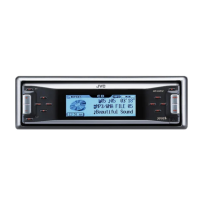
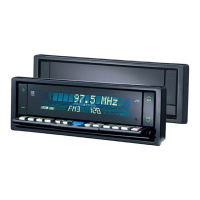
CD RECEIVER KD-LX30
RECEPTOR CON CD KD-LX30
RECEPTEUR CD KD-LX30
For customer Use:
Enter below the Model No. and
Serial No. which are located on
the top or bottom of the cabinet.
Retain this information for future
reference.
Model No.
Serial No.
INSTRUCTIONS
MANUAL DE INSTRUCCIONES
MANUEL D’INSTRUCTIONS
For installation and connections, refer to the separate manual.
Para la instalación y las conexiones, refiérase al manual separado.
Pour l’installation et les raccordements, se référer au manuel séparé.
ATT
S
S
M
KD-LX30
SOURCE
BBE
MODE
BAND
DISP
INTLOCALMONOSCM
10789 11 12
RPT RND
OFFSEL
EN00.KD-LX30[J]/1 99.12.21, 3:17 PM3

Questions and Answers

  • R
    Ralph WagnerAug 17, 2025
    Why no sound from JVC KD-LX30 speakers?
    • J
      James BarnettAug 17, 2025
      If you can't hear any sound from the speakers of your JVC Car Stereo System, there might be a couple of reasons: * The volume level might be set to the minimum. Try increasing the volume to a more audible level. * There could be incorrect connections. Make sure to check all the cords and connections to ensure they are properly connected.
  • J
    Jennifer JacksonAug 20, 2025
    What does 'RESET 8' mean on JVC Car Stereo System?
    • J
      jessicakhanAug 20, 2025
      If your JVC Car Stereo System displays 'RESET 8', it indicates that the unit is not correctly connected to the CD changer. You should connect the unit and the CD changer correctly and then press the reset button on the CD changer.
  • K
    Katelyn HernandezAug 23, 2025
    What to do if JVC KD-LX30 Car Stereo System displays 'RESET 1-RESET 7'?
    • S
      scott70Aug 23, 2025
      If your JVC Car Stereo System displays 'RESET 1-RESET 7', press the reset button of the CD changer.
  • P
    pchangAug 26, 2025
    What to do if JVC Car Stereo System CD sound is interrupted?
    • R
      roy52Aug 26, 2025
      If the CD sound in your JVC Car Stereo System is getting interrupted, here are a few things to consider: * If you're driving on rough roads, this could be the cause. Stop CD playback while driving on uneven surfaces. * The CD itself might be scratched, try changing the CD. * Incorrect connections can also cause interruptions. Double-check all the cords and connections.
  • A
    Adriana HallAug 28, 2025
    Why static noise when listening to JVC KD-LX30 radio?
    • J
      Jessica NovakAug 28, 2025
      If you're experiencing static noise while listening to the radio on your JVC Car Stereo System, it's likely due to the antenna not being connected firmly. Make sure the antenna is securely connected.
  • R
    Regina ClementsAug 31, 2025
    What to do if JVC KD-LX30 shows 'NO DISC'?
    • A
      Albert AndersonAug 31, 2025
      If your JVC Car Stereo System displays 'NO DISC', it means that there is no CD currently inserted in the magazine. Insert a CD into the system.
  • S
    Samantha PorterSep 2, 2025
    How to fix JVC Car Stereo System when CD cannot be played back?
    • E
      Ethan PriceSep 3, 2025
      If your JVC Car Stereo System isn't playing CDs, the CD might be inserted upside down. Make sure to insert the CD correctly.
  • J
    johnbentleySep 5, 2025
    What to do if JVC Car Stereo System shows 'EJECT ERROR'?
    • H
      hollowayheatherSep 5, 2025
      If your JVC Car Stereo System displays 'EJECT ERROR' and the CD won't eject, the CD player may be malfunctioning. Press and hold the '–' button of the '+ / –' button for more than 5 seconds.
  • J
    Justin LloydSep 8, 2025
    Why JVC KD-LX30 SSM automatic preset does not work?
    • C
      Christopher BuckSep 8, 2025
      If the SSM (Strong-station Sequential Memory) automatic preset isn't working on your JVC Car Stereo System, it's likely because the signals are too weak. Try storing the stations manually.
  • Q
    qlaneSep 12, 2025
    What to do if JVC Car Stereo System won't eject CD with no message?
    • A
      Anthony KennedySep 12, 2025
      While holding ¢, press the reset button. Release the reset button, then release ¢. Be careful not to drop the CD when ejecting.

Summary

Radio Operations

Searching a station automatically: Auto search

Automatically scan and tune to radio stations.

Searching a station manually: Manual search

Manually tune to radio stations using controls.

Storing stations in memory

Save favorite radio stations for quick recall.

CD Operations

Playing a CD

Instructions for inserting and playing a CD.

Sound Adjustments

Adjusting the sound

Customizing bass, treble, fader, balance, and subwoofer levels.

Remote Operations

Using the remote controller

Overview of the functions for each button on the remote.

Troubleshooting

Specifications

JVC KD-LX30 Specifications

General IconGeneral
BrandJVC
ModelKD-LX30
CategoryCar Stereo System
LanguageEnglish

Related product manuals