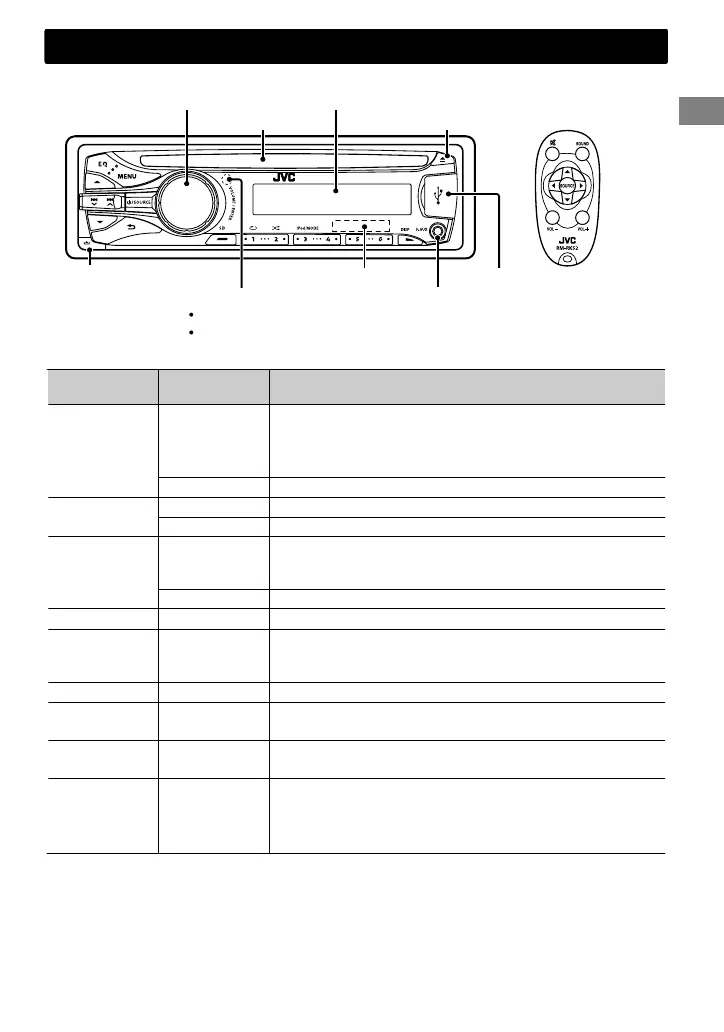
Remote controller
USB input terminal
Front AUX input jack
DO NOT expose to bright sunlight.
Remote sensor
Detaches the panel
Ejects the disc
Display window
Control dial
Loading slot
Control panel
Aim the remote controller directly at the sensor.
SD card slot
When you press or hold the following button(s)...
Control panel
Remote
controller
General function
/SOURCE
—
Turns on.
Turns off. (Hold)
Press the /SOURCE button on the control panel and turn
the control dial within 2 seconds to select the source.
SOURCE Press repeatedly to select the source.
Control dial
(turn)
VOL - / + Adjusts the volume level.
— Selects items.
Control dial
(press)
)
Mutes the sound or pauses playback.
Press the button again to cancel muting or resume
playback.
— Confirms selection.
SD —
Switches to SD source. (' page 8)
Number
buttons
(1 - 6)
—
Selects the preset stations.
Stores the current station into the selected number button.
(Hold) (' page 6)
EQ SOUND
Selects the preset sound mode. (' page 12)
—
Returns to the previous menu.
Exits from the menu. (Hold)
/ /
Selects a preset station. (' page 6)
Selects MP3/WMA folder. (' page 7)
/
/
Searches for a station automatically. (' page 6)
Searches for a station manually. (Hold)
Selects track. (' page 7, 9)
Fast-forwards or reverses track. (Hold)
Basic operations
ENGLISHޓ|
5
2011/11/23ޓ2:15:1KD-SD636_U_EN


 To Next Page