28
ENGLISH
To go to a particular folder directly
IMPORTANT:
To directly select the folders using the number
button(s), it is required that folders are
assigned 2 digit numbers at the beginning of
their folder names. (This can only be done
during the recording of CD-Rs or CD-RWs.)
Ex.: If folder name is “01 ABC”
= Press 1 to go to Folder 01 ABC.
If folder name is “1 ABC,” pressing 1
does not work.
If folder name is “12 ABC”
= Press and hold 6 (12) to go to Folder
12 ABC.
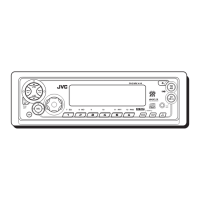
Press the number button corresponding to the
folder number to start playing the first file in the
selected folder.
• To select a folder number from 01 – 06:
Press 1 (7) – 6 (12) briefly.
• To select a folder number from 07 – 12:
Press and hold 1 (7) – 6 (12) for more than one
second.
Notes:
• If “MP3” flashes on the display after you have
selected a folder, it means that the folder does not
contain any MP3 files.
• You cannot directly select a folder with a number
greater than 12.
To select a particular file in a folder, press
¢
or 4 after selecting the folder.
To go to a particular file quickly within the
current folder (+10 and –10 buttons)
1 Press MODE to enter the functions mode
while playing an MP3 disc.
“MODE” flashes on the upper
part of the display.
2 Press +10 or –10.
* The first time you press +10 or –10 button,
the file skips to the nearest higher or lower
file with a file number of multiple ten (ex.
10th, 20th, 30th).
Then each time you press the button, you can
skip 10 files (see “How to use the +10 and
–10 buttons” below).
• After the last file, the first file will be
selected, and vice versa.
How to use the +10 and –10 buttons
• Ex. 1: To select file number 32 while playing
file number 6
• Ex. 2: To select file number 8 while playing
file number 36
To skip 10 files* forwards
to the last file
To skip 10 files* backwards
to the first file
(Three times)
(Twice)
File 6 \ 10 \ 20 \ 30 \ 31 \ 32
File 36 \ 30 \ 20 \ 10 \ 9 \ 8
(Three times) (Twice)


 To Next Page
 Loading...