EasyManua.ls Logo

JVC KD-SX950J - User Manual

JVC KD-SX950J
40 pages
Print Icon
To Next Page IconTo Next Page
Loading...
ENGLISH
FSUN3114-631
[J]
ESPAÑOL
FRANÇAIS
RECEPTOR CON CD KD-SX950
RECEPTEUR CD KD-SX950
For customer Use:
Enter below the Model No. and
Serial No. which are located on
the top or bottom of the cabinet.
Retain this information for future
reference.
Model No.
Serial No.
INSTRUCTIONS
MANUAL DE INSTRUCCIONES
MANUEL D’INSTRUCTIONS
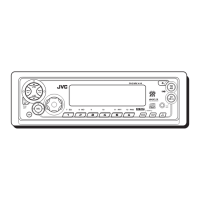
CD RECEIVER KD-SX950
For installation and connections, refer to the separate manual.
Para la instalación y las conexiones, refiérase al manual separado.
Pour l’installation et les raccordements, se référer au manuel séparé.
CD
DISP
SCM
RPT
SSM
BBE
MO
RND
789
CD CHANGER CONTROL
10 11 12
INT
CD
-CH
FM/AM
/I
ATT
/
SCAN
45
EN00.KD-SX950[J]/F 99.12.13, 1:20 PM3

Other manuals for JVC KD-SX950J

Questions and Answers

  • A
    amywrightAug 12, 2025
    Why is there no sound coming from the speakers of my JVC KD-SX950J?
    • J
      James MitchellAug 12, 2025
      If you're not hearing sound from the speakers of your JVC Car Receiver, first ensure that the volume isn't set too low. If the volume level is adequate, check the cords and connections to make sure they are correctly connected.
  • R
    Ryan ScottAug 16, 2025
    How to reset JVC KD-SX950J Car Receiver that does not work?
    • S
      Sarah SextonAug 16, 2025
      If your JVC Car Receiver is not working at all, or the CD changer is not working, the built-in microcomputer may be malfunctioning. To resolve this, press and SEL at the same time for several seconds to reset the unit. Note that the clock setting and preset stations stored in memory will be erased.
  • A
    aaronbellAug 20, 2025
    Why won't my JVC Car Receiver play CDs?
    • M
      Michael WileyAug 20, 2025
      If your JVC Car Receiver CD cannot be played back, make sure the CD is inserted correctly (right side up). Stop CD play while driving on rough roads. If the CD is scratched, try a different CD. Also, check the cords and connections to ensure they are secure.
  • D
    diane37Aug 23, 2025
    What to do if CD can't be ejected from JVC Car Receiver?
    • D
      Daniel MendezAug 23, 2025
      If your JVC Car Receiver CD can be neither played back nor ejected, the CD player may be functioning incorrectly. Press CD and SEL at the same time for several seconds until “PLEASE” and “EJECT” appear alternately on the display. Then, open the control panel by pressing 0, being careful not to drop the CD when it ejects.
  • M
    Mandy BrownAug 27, 2025
    What to do if my JVC Car Receiver says “NO DISC”?
    • G
      gmillerAug 27, 2025
      If your JVC Car Receiver displays “NO DISC”, the CD may be missing from the loading slot or inserted incorrectly. Insert a CD correctly into the loading slot.
  • S
    Susan HallAug 31, 2025
    What does “RESET 8” mean on my JVC Car Receiver?
    • M
      Mr. James Lynn MDAug 31, 2025
      If your JVC Car Receiver displays “RESET 8”, it means the unit is not correctly connected to the CD changer. Ensure that the unit and the CD changer are properly connected, and then press the reset button on the CD changer.
  • J
    Jack BrooksSep 4, 2025
    How to fix static noise on JVC KD-SX950J radio?
    • D
      Destiny BrennanSep 4, 2025
      To address static noise while listening to the radio on your JVC Car Receiver, ensure the antenna is firmly connected.
  • A
    Allison WilsonSep 7, 2025
    Why doesn't SSM automatic preset work on my JVC KD-SX950J Car Receiver?
    • C
      cwalkerSep 8, 2025
      If SSM (Strong-station Sequential Memory) automatic preset does not work on your JVC Car Receiver, it may be because the signals are too weak. In this case, store stations manually.

Summary

Customer Information and Model Details

USA FCC Information and Compliance

Laser Product Safety Precautions

Resetting the Unit

Pre-Operation Guidelines

Basic Operations

Powering On and Source Selection

Steps to turn on the unit and select audio sources like tuner or CD.

Volume Adjustment and Power Off

Guide to adjusting volume, momentary muting, and powering down the unit.

Radio Operations

Listening to the Radio and Tuning

How to select radio bands, search for stations, and tune frequencies manually.

Storing Radio Stations in Memory

Automatic Preset (SSM)

Automatically stores the strongest FM stations into memory for each band.

Manual Station Presetting

Procedure for manually storing FM and AM stations into memory.

Manual Station Presetting Details

Tuning into Preset Stations

Other Tuner Functions

Scanning Broadcast Stations

How to scan for and briefly listen to broadcast stations.

Selecting FM Reception Sound

Switching FM reception to mono for improved sound quality.

CD Operations

Playing a CD

Steps to insert a CD, start playback, and close the control panel.

Stopping and Ejecting CDs

Procedure to stop CD playback and eject the disc, including auto-eject behavior.

Navigating Tracks on a CD

Fast-Forwarding and Reversing Tracks

How to fast-forward or reverse the current track.

Skipping to Next;Previous Tracks

How to go to the beginning of the next or previous tracks.

Direct Track Selection

Method for directly selecting a track number on the CD.

CD Playback Modes

Random Play (RND)

How to play tracks in a random order on the CD.

Repeat Play (RPT)

How to play the current track or the entire disc repeatedly.

Intro Scan Playback Mode

Playing CD Text Information

Prohibiting CD Ejection

Sound Adjustments

Adjusting Bass, Treble, Fader, Balance, and Volume

Guide to adjusting various sound characteristics like bass, treble, fader, balance, and volume.

BBE Function Operation

Sound Control Memory (SCM)

Selecting and Storing Sound Modes

How to select and store preset sound modes for different sources.

Recalling Stored Sound Modes

Storing Custom Sound Adjustments

Other Main Functions

Setting the Clock

Step-by-step guide to setting the unit's clock (hour and minute).

General Settings (PSM) Configuration

Basic Procedure for PSM

Overview of the general procedure for accessing and changing settings via PSM.

Canceling Advanced SCM

Selecting Clock Display Mode

Selecting Level Display Mode

Selecting Dimmer Mode

Audio Cruise Mode Operation

Audio Cruise Troubleshooting

Adjusting Audio Cruise Volume Rate

Key-Touch Tone Control

Selecting Scroll Mode

Subwoofer Cutoff Frequency

Changing AM;FM Channel Intervals

Selecting External Component Input

Detaching and Attaching Control Panel

Remote Operations

Remote Sensor Guidelines

Proper aiming and environmental conditions for using the remote sensor.

Installing the Remote Control Battery

Procedure for replacing the battery in the remote controller.

Using the Remote Controller

CD Changer Operations

Playing CDs with the Changer

How to select the CD changer and start playback of discs.

Navigating Tracks on CD Changer

Fast-Forwarding and Reversing Tracks

How to fast-forward or reverse tracks when using the CD changer.

Skipping to Next;Previous Tracks

How to skip to the next or previous tracks on the CD changer.

Direct Disc Selection

Method for directly selecting a disc number on the CD changer.

CD Changer Playback Modes

Random Play Modes (RND1, RND2)

Different modes for random playback of tracks across discs.

Repeat Play Modes (RPT1, RPT2)

Modes for repeatedly playing tracks or entire discs.

Intro Scan Modes (INT1, INT2)

Modes for playing the beginnings of tracks for preview.

External Component Operations

Playing an External Component

Steps to connect and play an external audio component via LINE IN.

Using a Subwoofer

Connecting and configuring a subwoofer for enhanced bass.

Maintenance and CD Handling

Proper CD Handling and Cleaning

Guidelines for handling, cleaning, and storing CDs to prevent damage.

CD Player Cautions and CD-R Playback

Important cautions for CD playback, including CD-R compatibility.

Troubleshooting Common Issues

Technical Specifications

JVC KD-SX950J Specifications

General IconGeneral
Channels4
Presets18 FM, 6 AM
CD PlayerYes
MP3 PlaybackYes
WMA PlaybackYes
BluetoothNo
Display TypeLCD
Remote ControlYes
High-Pass FilterYes
Low-Pass FilterYes
Subwoofer OutputYes
DIN Size1 DIN
TunerAM/FM
Aux InputYes

Related product manuals