ENGLISH
7
Data Size: B6L (182 mm x 128 mm)
Book Size: B6L (182 mm x 128 mm)
RADIO
PTY code
[NEWS], [AFFAIRS], [INFO], [SPORT], [EDUCATE], [DRAMA], [CULTURE], [SCIENCE], [VARIED],
[POP M] (music), [ROCK M] (music), [EASY M] (music), [LIGHT M] (music), [CLASSICS],
[OTHER M] (music), [WEATHER], [FINANCE], [CHILDREN], [SOCIAL], [RELIGION], [PHONE IN],
[TRAVEL], [LEISURE], [JAZZ], [COUNTRY], [NATION M] (music), [OLDIES], [FOLK M] (music),
[DOCUMENT]
Preparation:
You can listen to music from a portable audio player via the auxiliary input
jack.
• Select
[ON]
for
[BUILT-IN AUX]
in
[SOURCESELECT]
. (Page4)
Start listening
1
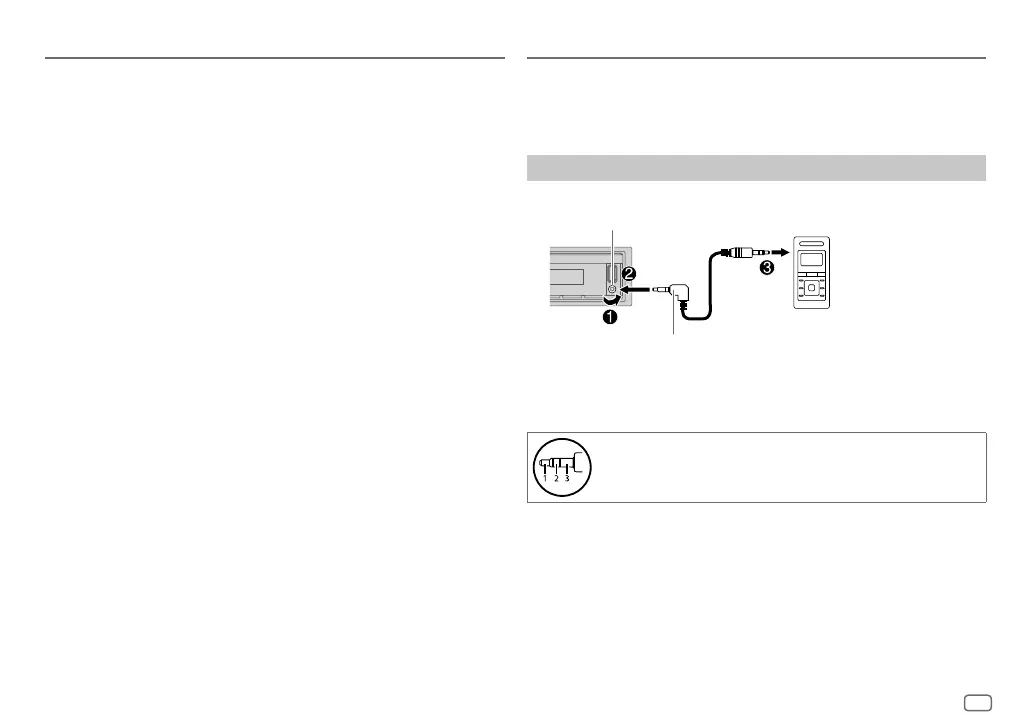
Connect a portable audio player (commercially available).
2 Press SRC-B repeatedly to select AUX.
3 Turn on the portable audio player and start playback.
Use a 3-core plug head stereo mini plug for optimum audio
output.
AUX
3.5 mm stereo mini plug with “L” shaped connector
(commercially available)
Portable audio player
Auxiliary input jack
JS_JVC_KD_X161_M_EN_1.indd 7JS_JVC_KD_X161_M_EN_1.indd 7 19/6/2018 8:19:11 AM19/6/2018 8:19:11 AM


 To Next Page