EasyManua.ls Logo

JVC KD-X2 - Page 8

JVC KD-X2
20 pages
Print Icon
To Next Page IconTo Next Page
To Previous Page IconTo Previous Page
Loading...
KD-X2
A/B/C/E/G/E/J/
fag
Standard
fag
value
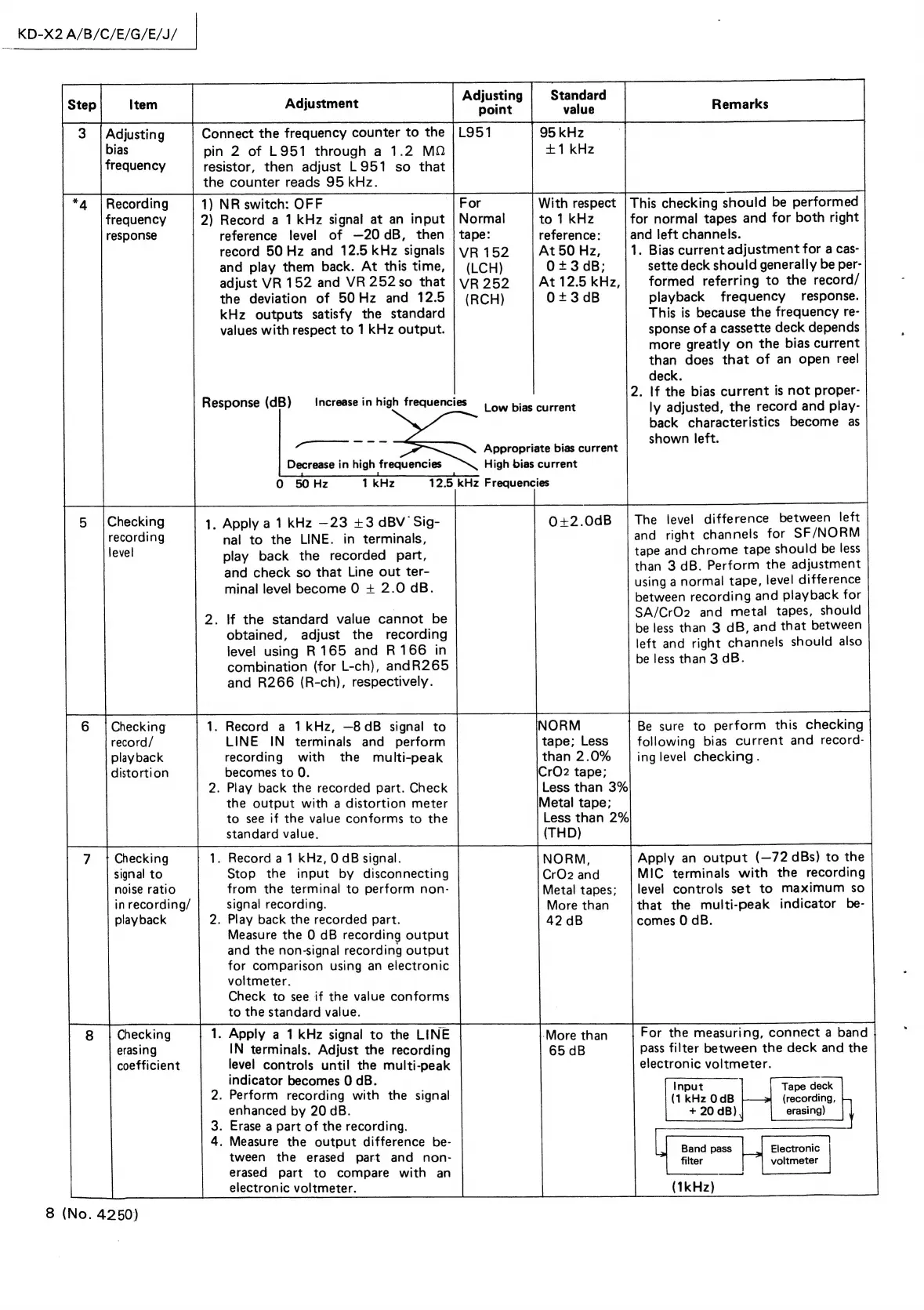
Connect
the
frequency
counter
to
the
|
L951
95
kHz
+1
kHz
Recording
|
frequency
response
pin
2
of
L951
through
a
1.2
MQ
resistor,
then
adjust
L951
so
that
the
counter
reads
95
kHz.
Checking
record/
play
back
distortion
7
7
Checking
signal
to
noise
ratio
in
recording/
playback
Checking
erasing
coefficient
8
(No.
4250)
1)
NR
switch:
OFF
For
With
respect
|
This
checking
should
be
performed
2)
Record
a
1
kHz
signal
at
an
input
|
Normal
to
1
kHz
for
normal
tapes
and
for
both
right
reference
level
of
—20dB,
then
|
tape:
reference:
and
left
channels.
record
50
Hz
and
12.5
kHz
signals
|
vR
152
At
50
Hz,
1.
Bias
current
adjustment
for
a
cas-
and
play
them
back.
At
this
time,
|
(LCH)
O0+3
dB;
sette
deck
should
generally
be
per-
adjust
VR
152
and
VR252so
that
|vyR252
|At12.5kHz,|
formed
referring
to
the
record/
the
deviation
of
50Hz
and
12.5
|
(RCH)
0+3dB
playback
frequency
response.
kHz
outputs
satisfy
the
standard
values
with
respect
to
1
KHz
output.
This
is
because
the
frequency
re-
sponse
of
a
cassette
deck
depends
more
greatly
on
the
bias
current
than
does
that
of
an
open
reel
deck.
2.
If
the
bias
current
is
not
proper-
ly
adjusted,
the
record
and
play-
back
characteristics
become
as
shown
left.
Response
(dB)
Increase
in
high
frequencies
|
4.
bias
current
.
oa
Appropriate
bias
current
Decrease
in
high
frequencies
High
bias
current
O
50
Hz
1
kHz
12.5
kHz
Frequencies
The
level
difference
between
left
and
right
channels
for
SF/NORM
tape
and
chrome
tape
should
be
less
than
3
dB.
Perform
the
adjustment
using
a
normal
tape,
level
difference
between
recording
and
playback
for
SA/CrO2
and
metal
tapes,
should
be
less
than
3
dB,
and
that
between
left
and
right
channels
should
also
be
less
than
3
dB.
.
Apply
a
1
kHz
—23
+3
dBV
Sig-
nal
to
the
LINE.
in
terminals,
play
back
the
recorded
part,
and
check
so
that
Line
out
ter-
minal
level
become
O
+
2.0
dB.
0+2.0dB
.
If
the
standard
value
cannot
be
obtained,
adjust
the
recording
level
using
R165
and
R166
in
combination
(for
L-ch),
andR265
and
R266
(R-ch),
respectively.
.
Record
a
1kHz,
—8dB
signal
to
LINE
IN
terminals
and
perform
recording
with
the
multi-peak
becomes
to
0.
2.
Play
back
the
recorded
part.
Check
the
output
with
a
distortion
meter
to
see
if
the
value
conforms
to
the
standard
value.
.
Record
a
1
kHz,
0
dB
signal.
Stop
the
input
by
disconnecting
from
the
terminal
to
perform
non-
signal
recording.
2.
Play
back
the
recorded
part.
Measure
the
0
dB
recording
output
and
the
non-signal
recording
output
for
Comparison
using
an
electronic
voltmeter.
Check
to
see
if
the
value
conforms
to
the
standard
value.
.
Apply
a
1
kHz
signal
to
the
LINE
-More
than
For
the
measuring,
connect
a
band
IN
terminals.
Adjust
the
recording
65
dB
pass
filter
between
the
deck
and
the
level
controls
until
the
multi-peak
electronic
voltmeter.
indicator
becomes
0
dB.
.
Input
Tape
deck
2.
Perform
recording
with
the
signal
(1
kHz
OdB
(recording,
enhanced
by
20
dB.
+
20
dB)
erasing)
3.
Erase
a
part
of
the
recording.
4.
Measure
the
output
difference
be-
;
Band
pass
Electronic
tween
the
erased
part
and
non-
filter
voltmeter
erased
part
to
compare
with
an
———~
electronic
voltmeter.
(1kHz)
NORM
tape;
Less
than
2.0%
CrO2
tape;
Less
than
3%
Metal
tape;
Less
than
2%
(THD)
NORM,
CrO2
and
Metal
tapes;
More
than
42
dB
Be
sure
to
perform
this
checking
following
bias
current
and
record-
ing
level
checking.
Apply
an
output
(—72
dBs)
to
the
MIC
terminals
with
the
recording
level
controls
set
to
maximum
so
that
the
multi-peak
indicator
be-
comes
O
dB.

Related product manuals