22
ENGLISH
Data Size: B6L (182 mm x 128 mm)
Book Size: B6L (182 mm x 128 mm)
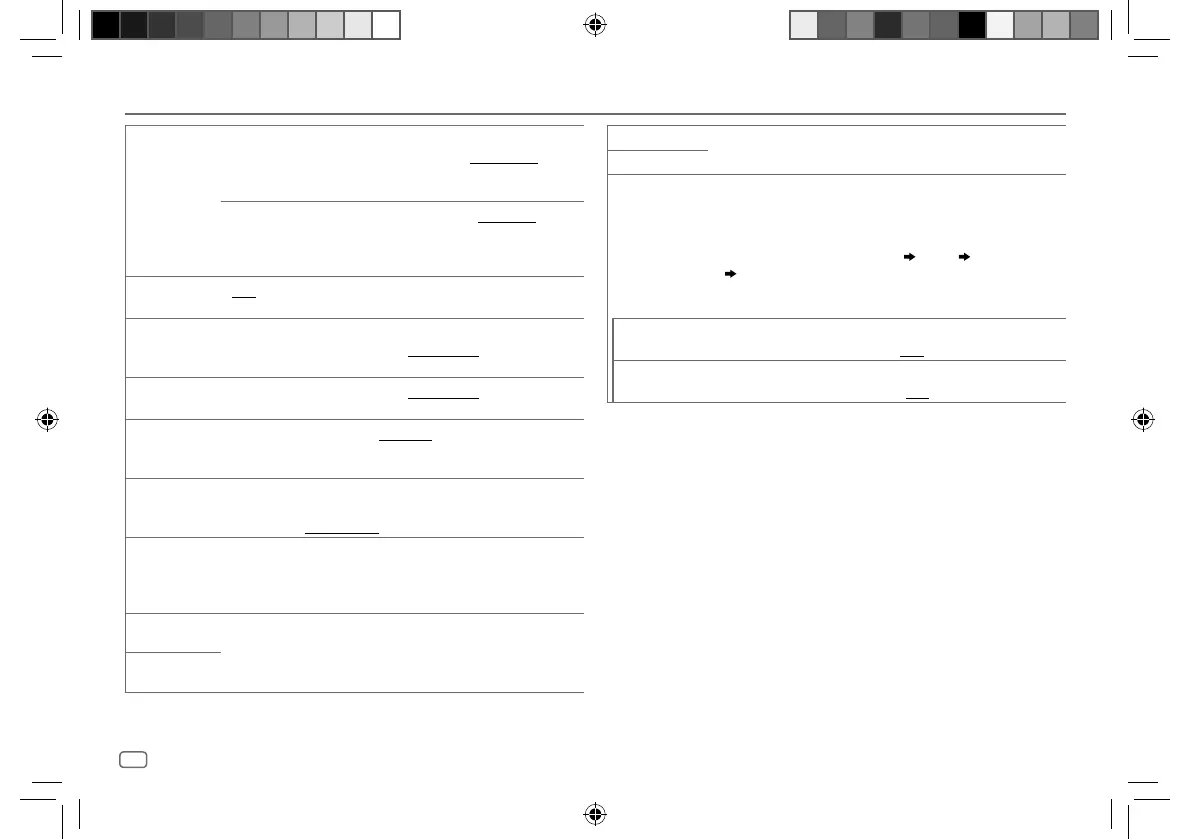
Audio Settings
[SUB.W LEVEL]*1 [SPK-OUT]*2 (Not applicable when 3-way crossover is selected.)
[SUB.W00] to [SUB.W+06] ([SUB.W+03]): Adjusts
the output level of the subwoofer connected via speaker
lead. (Page 33)
[PRE-OUT]*3
[SUB.W–50] to [SUB.W+10] ([SUB.W00]): Adjusts
the output level of the subwoofer connected to the
lineout terminals (REAR/SW) through an external
amplifier. (Page 33)
[SUBWOOFER
SET]*3
[ON]: Turns on the subwoofer output. ; [OFF]: Cancels.
[FADER]
(Not applicable when 3-way crossover is selected.)
[POSITIONR15] to [POSITIONF15] ([POSITION00]): Adjusts the front
and rear speaker output balance.
[BALANCE]*4
[POSITIONL15] to [POSITIONR15] ([POSITION00]): Adjusts the left and
right speaker output balance.
[VOLUME
ADJUST]
[LEVEL–15] to [LEVEL+06] ([LEVEL00]): Presets the initial volume level
of each source by comparing to the FM volume levels.
(Before adjustment, select the source you want to adjust.)
[AMPGAIN]
[LOWPOWER]: Limits the maximum volume level to 25. (Select if the
maximum power of each speaker is less than 50 W to prevent damaging
the speakers.) ; [HIGHPOWER]: The maximum volume level is 35.
[SPK/PREOUT] (Not applicable when 3-way crossover is selected.)
Depending on the speaker connection method, select the appropriate
setting for the desired output. (See “Speaker output settings” on
page 23.)
[SPEAKER SIZE] Depending on the crossover type you have selected (see the following
[X'OVER TYPE]), 2-way crossover or 3-way crossover setting items will be
shown. (See “Crossover settings” on page 24.)
By default, 2-way crossover type is selected.
[X ' OVER]
[DTA SETTINGS]
For settings, see “Digital Time Alignment settings” on page 26.
[CAR SETTINGS]
[X ‘ OVER TYPE] Caution: Adjusts the volume before changing the [X ‘ OVER TYPE] to avoid
the sudden increase or decrease of the output level.
• Once you have changed the crossover type, the next time when you turn
on the power, the display shows:
“2-WAY X’OVER” or “3-WAY X’OVER”
“PRESS” “VOLUME KNOB”
“TO CONFIRM”
Press the volume knob to acknowledge in order to proceed to the next
desired operation.
[2-WAY]
(Displayed only when [3-WAY] is selected.)
[YES]: Selects two way crossover type. ; [NO]: Cancels.
[3-WAY]
(Displayed only when [2-WAY] is selected.)
[YES]: Selects three way crossover type. ; [NO]: Cancels.
*1 Displayed only when [SUBWOOFER SET] is set to [ON].
*2 For 2-way crossover: Displayed only when [SPK/PREOUT] is set to [SUB.W/SUB.W].
(Page 23)
*3 For 2-way crossover: Displayed only when [SPK/PREOUT] is set to [REAR/SUB.W] or
[SUB.W/SUB.W]. (Page 23)
*4 This adjustment will not affect the subwoofer output.
KD-X282DBT_E_B5A-3845-00_EN_1st Draft.indd 22KD-X282DBT_E_B5A-3845-00_EN_1st Draft.indd 22 7/9/2021 4:26:59 PM7/9/2021 4:26:59 PM


 To Next Page