ENGLISH
5
Data Size: B6L (182 mm x 128 mm)
Book Size: B6L (182 mm x 128 mm)
BASICS
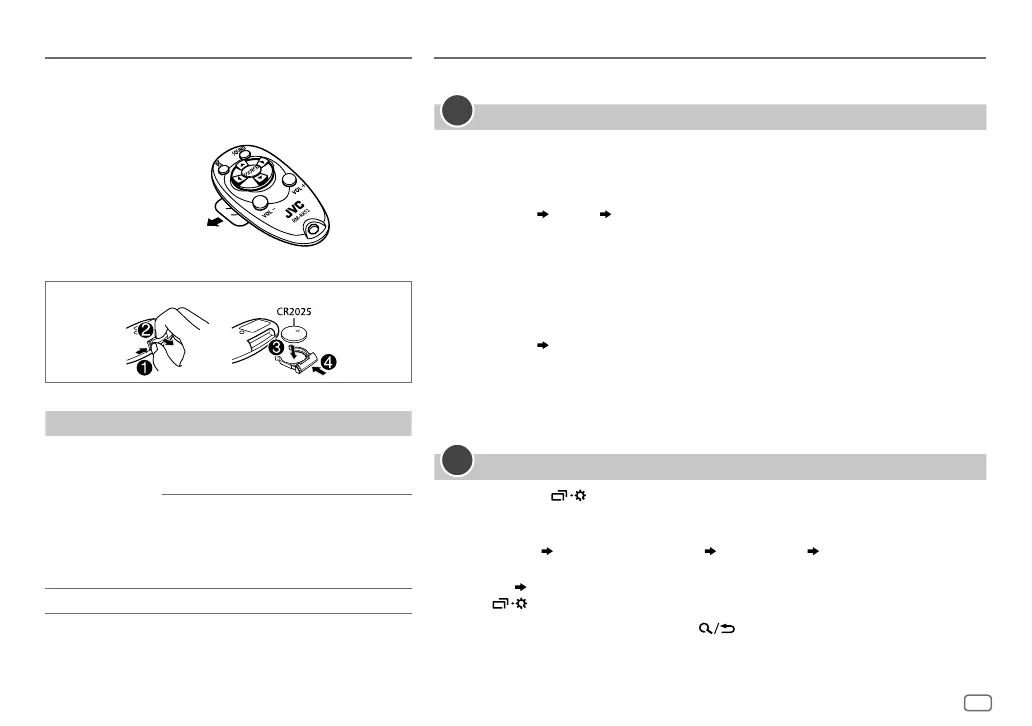
Remote control (RM-RK52)
Aim the remotely control directly at the remote sensor on
the unit. (Page 3 or 4)
To On the remote control
Adjust the volume Press VOL + or VOL – .
• Press and hold VOL + to continuously
increase the volume to 15.
Press d to mute the sound or pause
playback.
• Press again to cancel. The volume
level returns to the previous level
before muting or pause.
Select a source Press SOURCE repeatedly.
Pull out the insulation
sheet when using for
the first time.
How to replace the battery
GETTING STARTED
For key layout on the faceplate, see page 3 or page 4.
Cancel the demonstration
When you turn on the power for the first time (or
[FACTORY RESET]
is set to
[YES]
, see
page 6), the display shows:
KD-X462BT:
“CANCEL DEMO”
“PRESS” “VOLUME KNOB”
1 Press the volume knob.
[YES]
is selected for the initial setup.
2 Press the volume knob again.
“DEMO OFF” appears.
KD-X368BT:
“CANCEL DEMO” “PRESS ENTER”
1 Press * ENTER.
[YES]
is selected for the initial setup.
2 Press * ENTER again.
“DEMO OFF” appears.
Set the clock and date
1
Press and hold .
2 Perform ‘Select an item (page3 or 4)’ operation to select
[CLOCK]
.
3 Perform ‘Select an item (page3 or 4)’ operation to adjust the clock.
[CLOCKADJUST]
set the hour and minute
[CLOCKFORMAT] [12H]
or
[24H]
4 Perform ‘Select an item (page3 or 4)’ operation to set the date.
[DATESET]
set the day, month and year
5 Press to exit.
To return to the previous setting item, press
.
1
2
JS_JVC_KD_X462BT_M_EN_1.indd 5JS_JVC_KD_X462BT_M_EN_1.indd 5 6/5/2018 11:06:01 AM6/5/2018 11:06:01 AM


 To Next Page
 Loading...