e.~~9~!3!9~~!l4W
""'
V~9
~
>
You can stream Pandora from iPod touch/iPhone
via a wired connection or from Android devices
through
Bluetooth.
• Install
the
latest
version
of
the Pandora
application
on your iPod
touch/iPhone/
Android.
•
Android devices
can
only
be used
with
KW-V40BT Region 1 /KW-V20BT Region 1 /KW-
V200BT.
Preparation
Connect the device, then start Pandora application.
For Android
1
Pair
the
Android
device
through
Bluetooth.
(Page 30)
2
3
18
Select
"Pandora"
as
the
source.
(Page
8)
Connect
the
Android
device
for
using
Pandora
on
the
<Biuetooth Setup>
s~reen.
(Page
31)
"''""··
R!1t->h•
tt--
-,\-'
11
,
A.
.,>
"••
1
"nnt "',;n
\
,"nn~.-t-;nyct
P;-,ryra
Dr;,,,:;e
No
Parn.:
:.e
-----
"Connected"
appears.
Press
[OK]
to
confirm
the
operation.
When the connection
is
established,
the
Pandora
application
is
started and "Pandora"
source
control screen
is
displayed.
For iPod touch/iPhone
1
Connect
the
iPod
touch/iPhone
to
the
USB
terminal
using KS-U59
(optional
accessory)
or
USB
2.0 cable (accessory
of
the
iPod/
iPhone). (Page
52)
2
Start
the
Pandora
application
on
the
connected
iPod
touch/iPhone.
The "Pandora"
source
control screen
is
displayed.
•
You can
also display
the
"Pandora"
source
control
screen by connecting the iPod touch/iPhone using
KS-U59
after starting the Pandora
application.
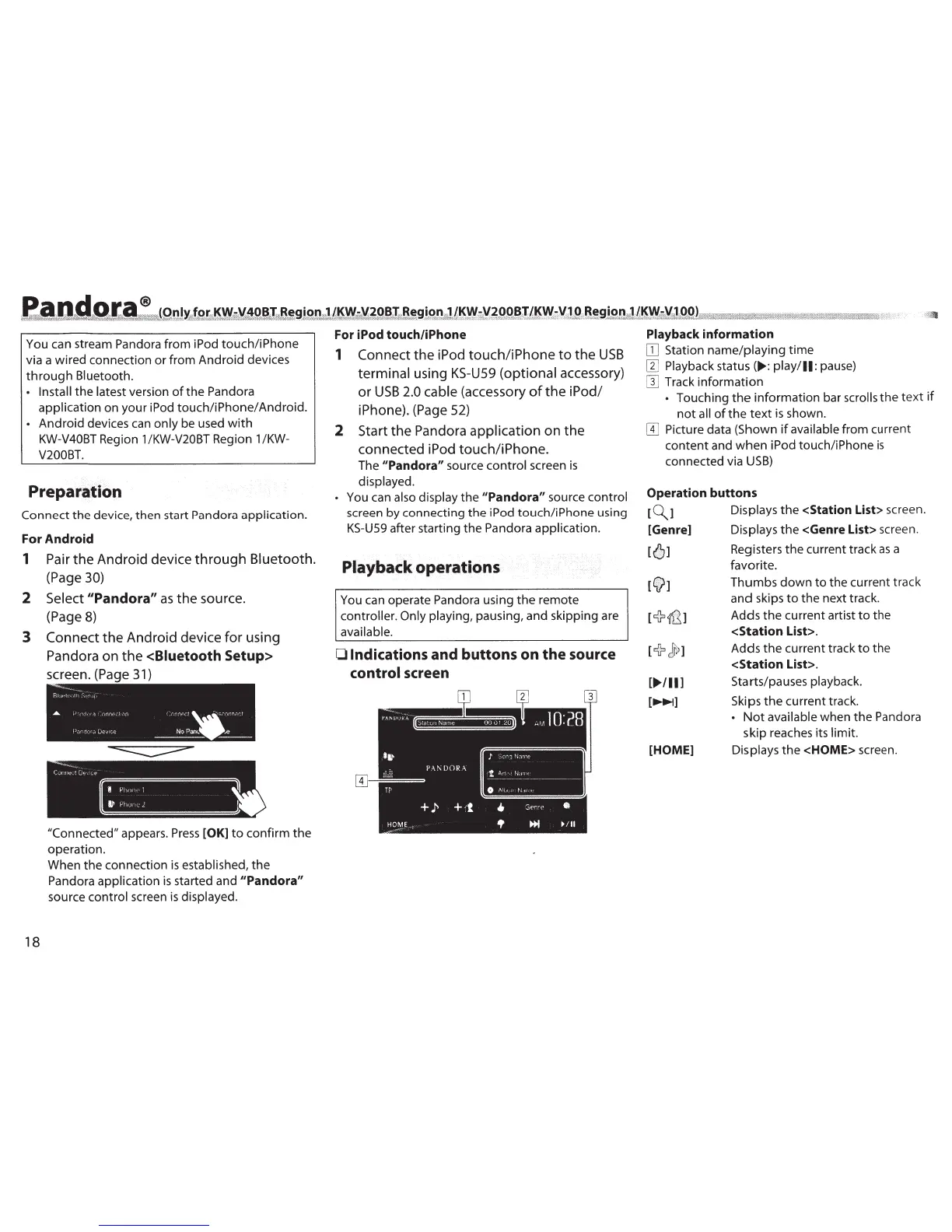
Playback operations
You can operate Pandora using
the
remote
controller. Only playing,
pausing, and skipping are
available.
0
Indications and buttons on
the
source
control
screen
J
:Oonq
~bmt
l
An·
I~.J!ll£
-------
-~
-
---
-~
0
/\ltJtP
t-,if't•
Playback information
[JJ
Station name/playing
time
[1]
Playback status
(.,.: play/11:
pause)
[}]
Track information
•
Touching
the
information bar
scrolls
the
text
if
not
all
of
the
text
is
shown.
W
Picture data (Shown
if
available
from current
content and
when
iPod touch/iPhone
is
connected via
USB)
Operation buttons
[~]
[Genre]
[']
[f]
r+
Jr;
1
[
...
,
..
]
[~]
[HOME]
Displays
the
<Station List> screen.
Displays
the
<Genre List> screen.
Registers
the
current track
as
a
favorite.
Thumbs
down
to
the current track
and skips
to
the next track.
Adds
the
current artist
to
the
<Station List>.
Adds
the
current track
to
the
<Station List>.
Starts/pauses playback.
Skips
the
current track.
•
Not
available
when
the
Pandora
skip reaches its
limit.
Displays the <HOME> screen.



 To Next Page
 Loading...





