Presetting stations
0
Storing stations in the memory
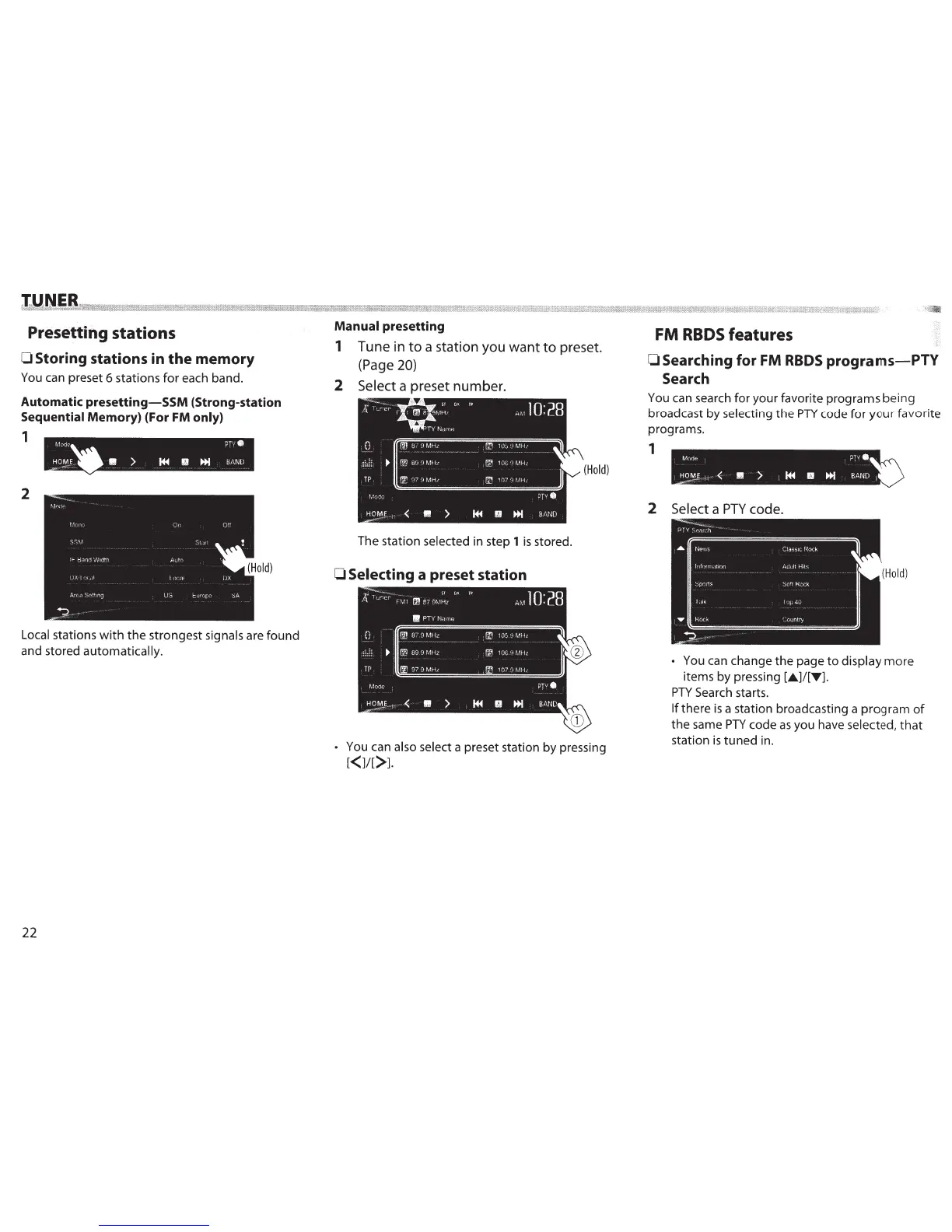
You can preset 6 stations
for
each band.
Automatic
presetting-SSM
(Strong-station
Sequential Memory) (For FM only)
1
2
Local stations
with
the
strongest
signals
are
found
and stored automatically.
22
Manual
presetting
1 Tune in
to
a station you
want
to
preset.
(Page 20)
2
Select a preset number.
(Hold)
The station
selected
in step
1
is
stored.
0 Selecting
a preset station
• You can
also select a preset station by pressing
[<11[>1.
FM
RBDS
features
OSearching for FM
RBDS
programs-PlY
Search
You can search for your favorite programs
being
broadcast by
selecting
the
PTY
code
for
your
favorite
programs.
1
2
Select
a
PTY
code.
(Hold)
• You can change
the
page
to
display
more
items by pressing
[.A.]/[T1.
PTY
Search starts.
If
there
is
a station broadcasting a
program
of
the
same
PTY
code
as
you have
selected,
that
station
is
tuned
in.



 To Next Page
 Loading...





