EasyManua.ls Logo

JVC KW-V40BT - Common operations

JVC KW-V40BT
66 pages
Print Icon
To Next Page IconTo Next Page
To Previous Page IconTo Previous Page
Loading...
Common.
operation~
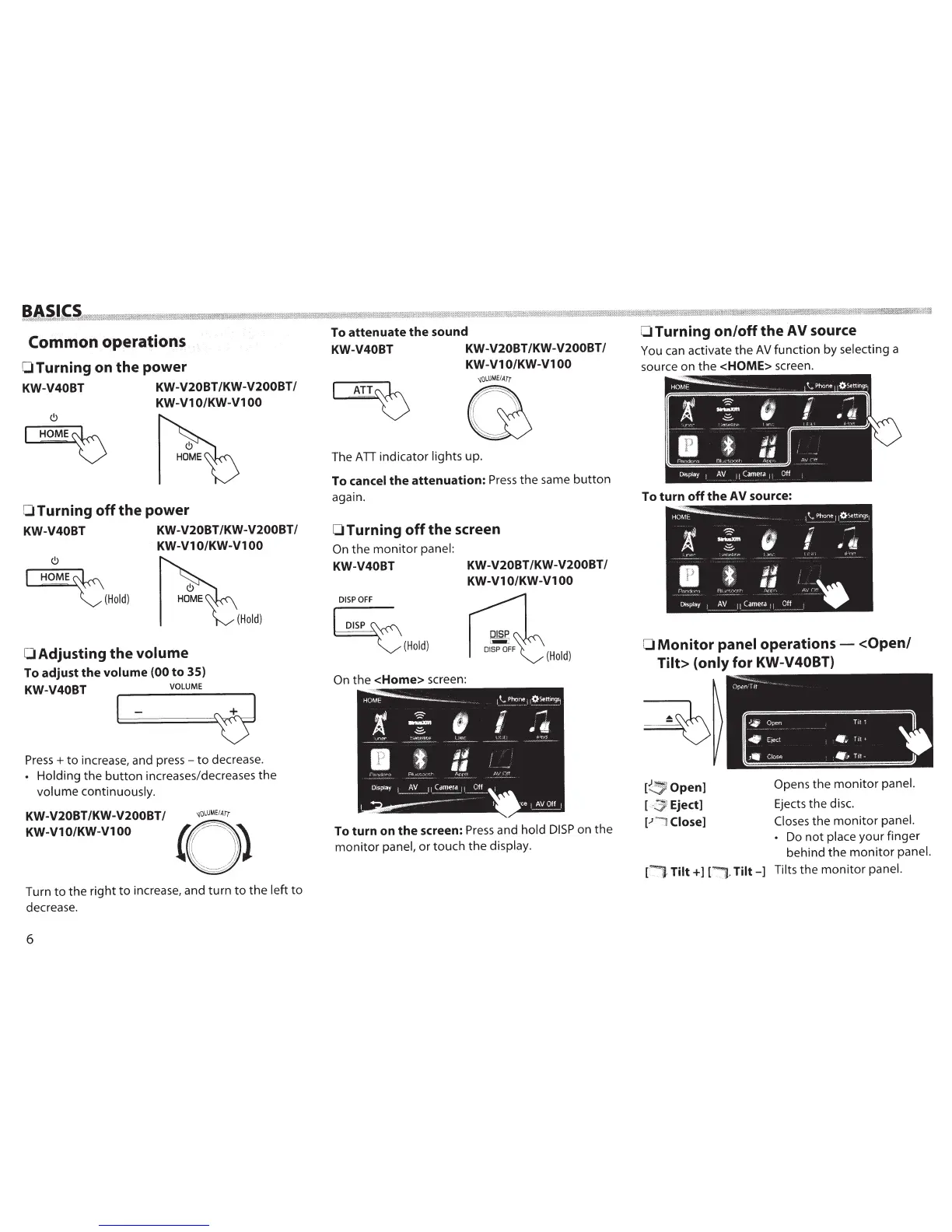
OTurning on the power
KW-V40BT KW-V20BT/KW-V200BT/
KW-V1
0/KW-Vl
00
OTurning
off
the power
KW-V40BT KW-V20BT/KW-V200BT/
KW-V1
0/KW-Vl
00
(!)
~
~·(Hold)
0
Adjusting the
volume
To adjust the volume
(00 to 35)
KW-V40BT
VOLUME
(Hold)
1-
~
Press+
to
increase, and
press-
to
decrease.
Holding the
button
increases/decreases the
volume continuously.
KW-V20BT /KW-V200BT
I
~oLUME
I
ATr
KW-V10/KW-V100
(Q)
Turn
to
the right
to
increase, and turn
to
the
left
to
decrease.
6
To attenuate the sound
KW-V40BT KW-V20BT/KW-V200BT/
KW-V1
0/KW-Vl
00
The
ATI
indicator lights up.
To cancel
the
attenuation:
Press
the
same
button
again.
0 Turning
off
the screen
On
the
monitor
panel:
KW-V40BT KW-V20BT/KW-V200BT/
KW-V1
0/KW-Vl
00
DISP
OFF
~
~(Hold)
(Hold)
On
the
<Home>
screen:
To turn on
the
screen:
Press
and hold
DISP
on the
monitor
panel,
or
touch the display.
0
Turning
on/off
the
AV
source
You
can
activate
the
AV
function by selecting a
source on
the
<HOME>
screen.
To turn
off
the
AV
source:
0
Monitor
panel
operations-
<Open/
Tilt> (only
for
KW-V40BT)
[
~
Open]
Eject]
[.J
~
Close]
[!"
':'1-
Tilt+]
[
J.
·
Tilt-]
Opens
the
monitor
panel.
Ejects the disc.
Closes
the
monitor
panel.
Do not place your finger
behind the
monitor
panel.
Tilts the
monitor
panel.

Table of Contents

Related product manuals