EasyManua.ls Logo

JVC L-E22 - Page 7

JVC L-E22
20 pages
Print Icon
To Next Page IconTo Next Page
To Previous Page IconTo Previous Page
Loading...
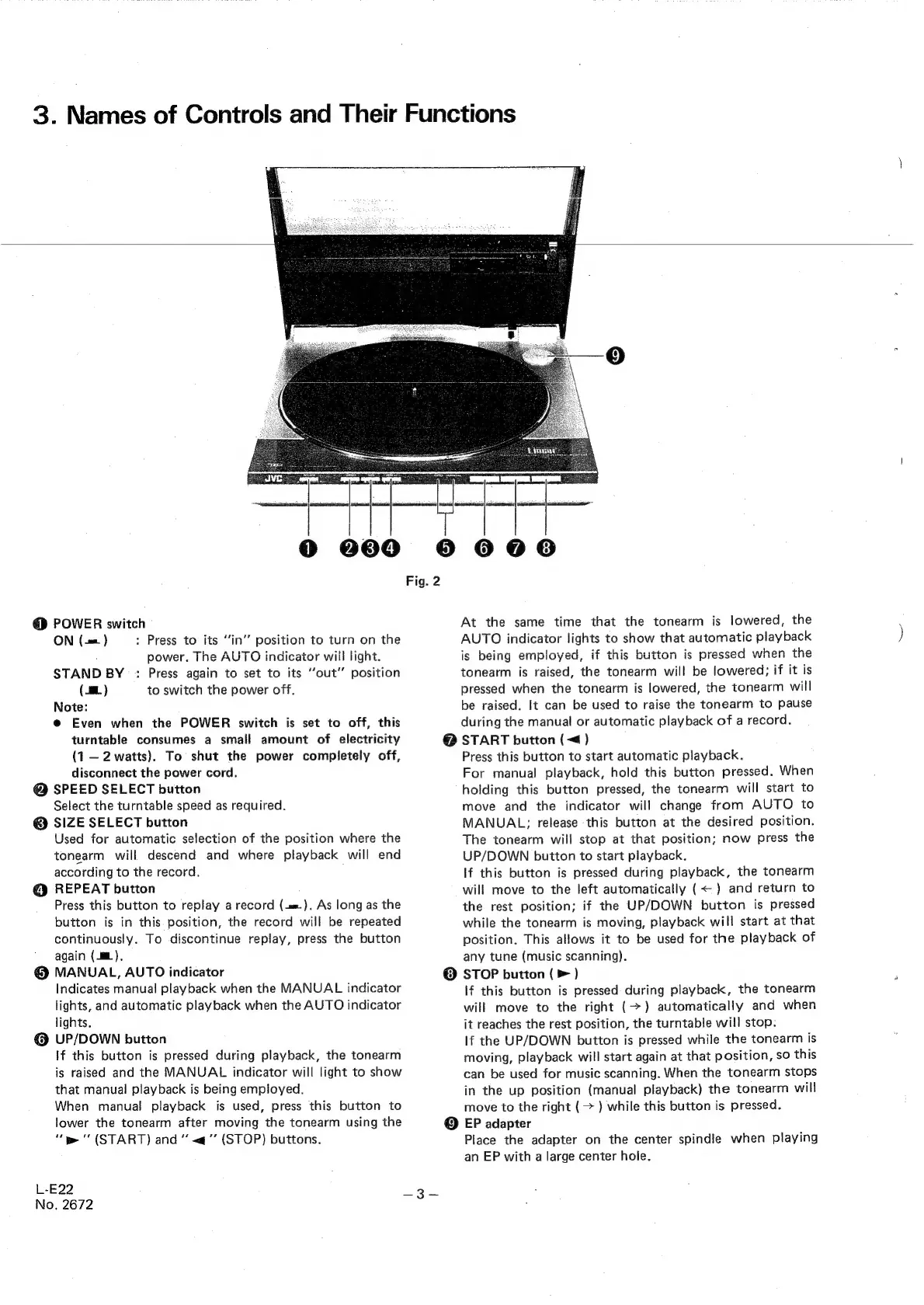
3.
Names
of
Controls
and
Their
Functions
@
POWER
switch
ON
(-==.)
:
Press
to
its
“‘in’’
position
to
turn
on
the
power.
The
AUTO
indicator
will
light.
STAND
BY
:
Press
again
to
set
to
its
‘‘out’’
position
(8.
)
to
switch
the
power
off.
Note:
@
Even
when
the
POWER
switch
is
set
to
off,
this
turntable
consumes
a
small
amount
of
electricity
(1
—2
watts).
To
shut
the
power
completely
off,
disconnect
the
power
cord.
@
SPEED
SELECT
button
Select
the
turntable
speed
as
required.
@
SIZE
SELECT
button
Used
for
automatic
selection
of
the
position
where
the
tonearm
will
descend
and
where
playback
will
end
according
to
the
record,
@
REPEAT
button
Press
this
button
to
replay
a
record
(=).
As
long
as
the
button
is
in
this
position,
the
record
will
be
repeated
continuously.
To
discontinue
replay,
press
the
button
again
(mL).
@
MANUAL,
AUTO
indicator
Indicates
manual
playback
when
the
MANUAL
indicator
lights,
and
automatic
playback
when
the
AUTO
indicator
lights.
@
UP/DOWN
button
If
this
button
is
pressed
during
playback,
the
tonearm
is
raised
and
the
MANUAL
indicator
will
light
to
show
that
manual
playback
is
being
employed.
When
manual!
playback
is
used,
press
this
button
to
lower
the
tonearm
after
moving
the
tonearm
using
the
“we
'
(START)
and
«<q
(STOP)
buttons.
L-E22
No,
2672
@
000
°
606
Fig.
2
At
the
same
time
that
the
tonearm
is
lowered,
the
AUTO
indicator
lights
to
show
that
automatic
playback
is
being
employed,
if
this
button
is
pressed
when
the
tonearm
is
raised,
the
tonearm
will
be
lowered;
if
it
is
pressed
when
the
tonearm
is
lowered,
the
tonearm
will
be
raised.
It
can
be
used
to
raise
the
tonearm
to
pause
during
the
manual
or
automatic
playback
of
a
record.
@
START
button
(<¢)
Press
this
button
to
start
automatic
playback.
For
manual
playback,
hold
this
button
pressed.
When
holding
this
button
pressed,
the
tonearm
will
start
to
move
and
the
indicator
will
change
from
AUTO
to
MANUAL;
release
this
button
at
the
desired
position.
The
tonearm
will
stop
at
that
position;
now
press
the
UP/DOWN
button
to
start
playback.
If
this
button
is
pressed
during
playback,
the
tonearm
will
move
to
the
left
automatically
(<
)
and
return
to
the
rest
position;
if
the
UP/DOWN
button
is
pressed
while
the
tonearm
is
moving,
playback
will
start
at
that
position.
This
allows
it
to
be
used
for
the
playback
of
any
tune
(music
scanning).
®
STOP
button
(>
)
If
this
button
is
pressed
during
playback,
the
tonearm
will
move
to
the
right
(>)
automatically
and
when
it
reaches
the
rest
position,
the
turntable
will
stop.
If
the
UP/DOWN
button
is
pressed
while
the
tonearm
is
moving,
playback
will
start
again
at
that
position,
so
this
can
be
used
for
music
scanning.
When
the
tonearm
stops
in
the
up
position
(manual
playback)
the
tonearm
will
move
to
the
right
(>
)
while
this
button
is
pressed.
®
EP
adapter
Place
the
adapter
on
the
center
spindle
when
playing
an
EP
with
a
large
center
hole.

Related product manuals