EasyManua.ls Logo

JVC L-E22 - Main Parts Location; Removal Procedures

JVC L-E22
20 pages
Print Icon
To Next Page IconTo Next Page
To Previous Page IconTo Previous Page
Loading...
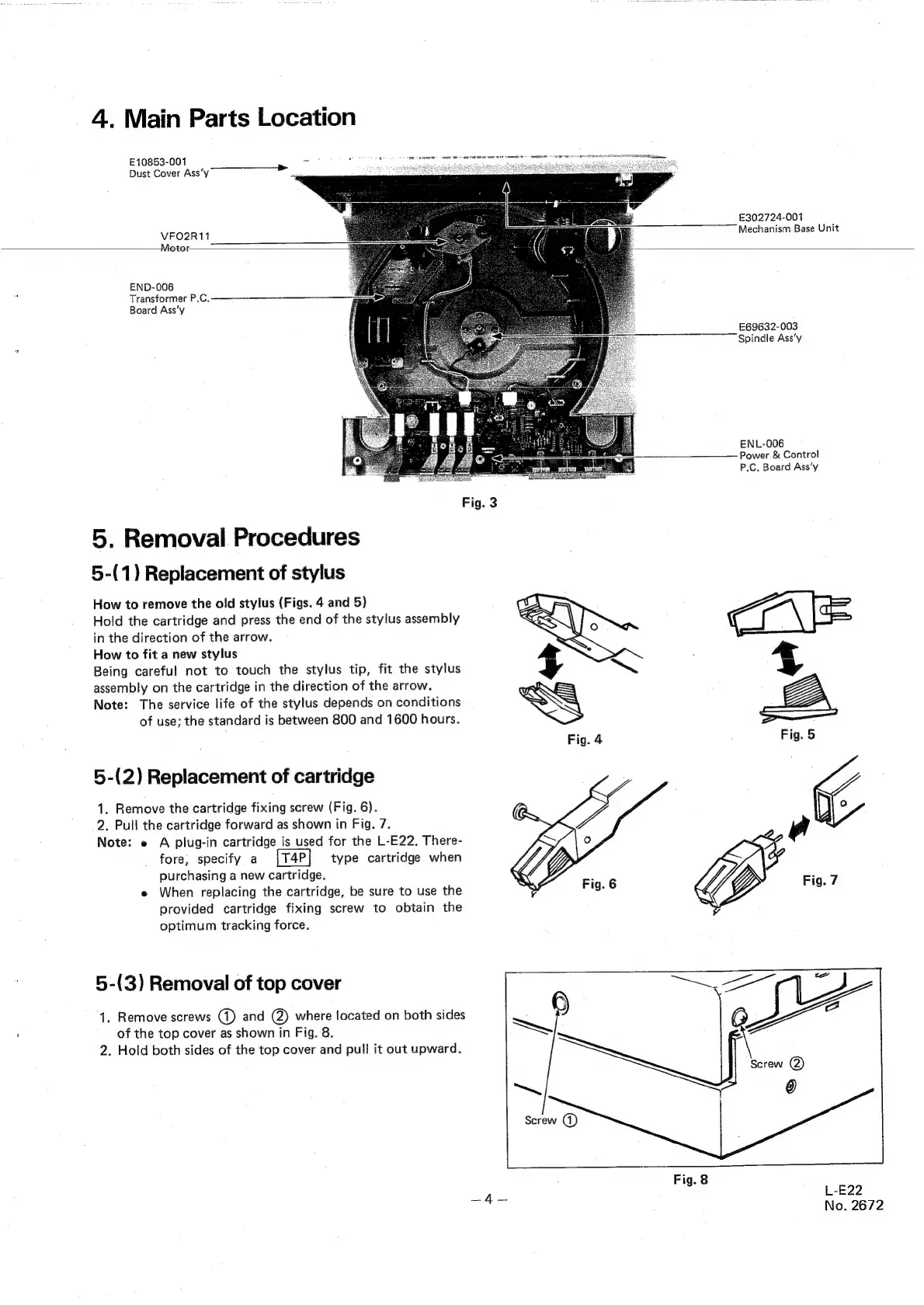
4.
Main
Parts
Location
E10853-001
oO
Dust
Cover
Ass‘y
>
:
VFO2R11
Motor
END-006
Transformer
P.C.
Board
Ass’y
5.
Removal
Procedures
5-(1)
Replacement
of
stylus
How
to
remove
the
old
stylus
(Figs.
4
and
5)
Hold
the
cartridge
and
press
the
end
of
the
stylus
assembly
in
the
direction
of
the
arrow.
How
to
fit
a
new
stylus
Being
careful
not
to
touch
the
stylus
tip,
fit
the
stylus
assembly
on
the
cartridge
in
the
direction
of
the
arrow.
Note:
The
service
life
of
the
stylus
depends
on
conditions
of
use;
the
standard
is
between
800
and
1600
hours.
5-(2)
Replacement
of
cartridge
1.
Remove
the
cartridge
fixing
screw
(Fig.
6).
2.
Pull
the
cartridge
forward
as
shown
in
Fig.
7.
Note:
e
A
plug-in
cartridge
is
used
for
the
L-E22.
There-
fore,
specify
a
type
cartridge
when
purchasing
a
new
cartridge.
e
When
replacing
the
cartridge,
be
sure
to
use
the
provided
cartridge
fixing
screw
to
obtain
the
optimum
tracking
force.
5-(3)
Removal
of
top
cover
1.
Remove
screws
(1)
and
(@)
where
located
on
both
sides
of
the
top
cover
as
shown
in
Fig.
8.
2.
Hold
both
sides
of
the
top
cover
and
pull
it
out
upward.
£302724-001
Mechanism
Base
Unit
£69632-003
Spindle
Ass’y
ENL-006
Power
&
Control
P.C,
Board
Ass‘y
Fig.
6
Fig.
7
|
~—s
Screw
@
Fig.
8
L-E22
No.
2672

Related product manuals