24
Analogue Teletext function
Basic operation
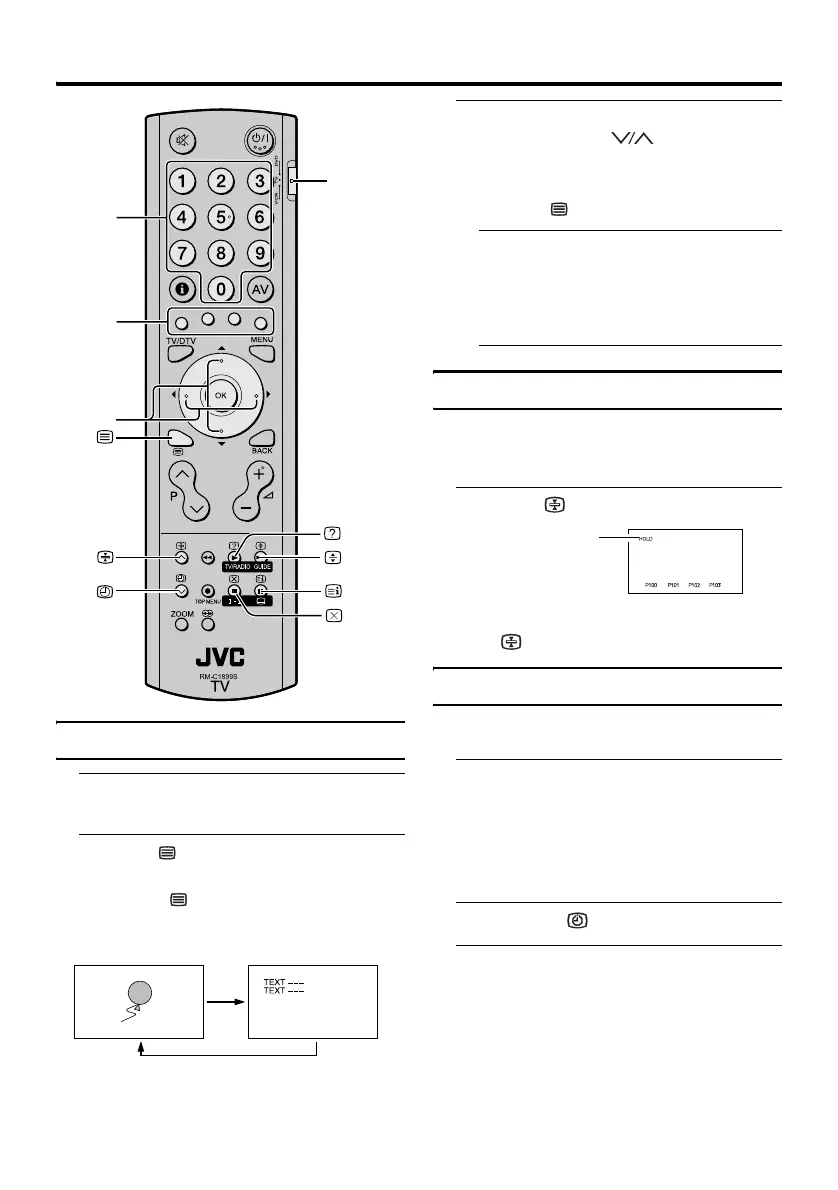
1 Choose a TV channel with a
Teletext broadcast
2 Press (Text) button to display
the Teletext
Pressing (Text) button changes the
mode as follows:
3 Choose a Teletext page by
pressing the P buttons,
Number buttons or Colour buttons
To return to the TV mode:
Press the (Text) button.
• If you have trouble receiving Teletext
broadcasts, consult your local dealer or
the Teletext station.
• You cannot operate menus when
viewing a Teletext programme.
Hold
You can hold a Teletext page on the screen
for as long as you want, even while several
other Teletext pages are being received.
Press the (Hold) button
To cancel the Hold function:
Press (Hold) button again.
Sub-page
Some Teletext pages include sub-pages that
are automatically displayed.
1 Choose a Teletext page that
includes sub-pages
A Teletext page that includes sub-pages is
indicated by an “S” following the Teletext
page number on the top left corner of the
screen.
2 Press the (Subpage) button
3 Press the number buttons to enter
sub-page number
VCR/TV/
DVD switch
Number
buttons
Colour
buttons
7
buttons
TV mode
Text mode
Hold indication



 To Next Page