Need help?
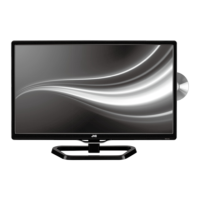
Do you have a question about the JVC LT-24C340 and is the answer not in the manual?
Covers damage, location, temperature, flames, moisture, ventilation, mains cable, interference, and viewing.
Details on LCD screen, screen burn, and earphones safety guidelines.
Information on standby power, battery handling, supervision, and disposal.
Guidelines for service, maintenance, and electrical safety warnings.
Lists included items and instructions for unpacking the TV.
Step-by-step guide for attaching the TV stand.
Instructions for wall mounting, including spacer usage.
Identifies and describes front and rear panel controls and connections.
Inserting batteries, operation range, and general handling precautions.
Detailed explanation of each button on the remote control.
Overview of AV device connection types and best performance options.
Steps for connecting devices via HDMI for high-definition signals.
Connecting computers via VGA and devices via component cables.
Steps for connecting devices using SCART and composite cables.
Connecting coaxial audio receiver and headphones.
Steps for powering on the TV for the first time and initial setup.
Choosing OSD language and TV operating mode (Home/Shop).
Setting the country and performing automatic channel tuning.
How to choose the active input source for the TV.
Managing TV channels, including auto and manual tuning.
Adjusting picture quality options like mode, contrast, and brightness.
Configuring audio modes, balance, and SRS TruSurround HD.
Setting power on/off times, sleep timer, and auto standby.
Accessing various TV settings like OSD language and country.
Configuring preferences for the Personal Video Recorder file system.
Controlling HDMI devices and setting up Audio Return Channel.
Managing channel locks, passwords, and content blocking.
Navigating the Electronic Programme Guide for TV listings.
Accessing digital teletext services and information.
Steps for connecting and using USB storage devices.
Viewing photos, music, movies, and text files from USB.
Pausing and recording live TV broadcasts.
Instructions for recording digital TV programs onto USB.
Scheduling recordings using the EPG or manually.
How to play back recorded TV programs.
Inserting discs and basic player operation.
Detailed guide to DVD playback controls and modes.
Playing MP3, WMA, and JPEG files from discs.
Configuring language, video, rating, and misc settings for DVD playback.
Guidelines for cleaning the TV and handling discs.
Solutions for common TV issues and performance tips.
Information on resolution and aspect ratios for different input modes.
Technical details and input/output ports of the TV.
 General
| Screen Size | 24 inches |
|---|---|
| Resolution | 1366 x 768 |
| Display Type | LCD |
| HDMI Ports | 2 |
| USB Ports | 1 |
| Audio Output | 10 W |
| HD Technology | HD Ready |
| Aspect Ratio | 16:9 |
| Refresh Rate | 60 Hz |
| Built-in Tuner | Yes |

 To Next Page