Set Up
Auto Program
Component Auto Select
PC Position
Attenuator
Off
Off
HDMI Setting
Edit/Manual
Decoder(EXT-2)
EXT Setting
Off
> EXT Setting
EXT-1
Dubbing
EXT-2
EXT-4
EXT-3
TV
DTV
> EXT Setting
EXT-1
Dubbing
EXT-2
EXT-4
EXT-3
TV
DTV
> EXT Setting
EXT-1
Dubbing
EXT-2
EXT-4
EXT-3
TV
DTV
ID List
VHS
S-VHS
DVC
CAM
SAT
STB
GAME
DVD
DVR
> EXT Setting
EXT-1
Dubbing
EXT-2
EXT-4
EXT-3
TV
DTV
ID List
VHS
S-VHS
DVC
CAM
SAT
STB
GAME
DVD
DVR
> EXT Setting
EXT-1
Dubbing
EXT-2
EXT-4
EXT-3
TV
DTV
> EXT Setting
EXT-1
DVD
Dubbing
EXT-2
EXT-4
EXT-3
TV
DTV
> EXT Setting
EXT-1
Dubbing
EXT-2
EXT-4
EXT-3
TV
DTV
> EXT Setting
EXT-1
Dubbing
EXT-2
EXT-4
EXT-3
TV
DTV
1
2
3
4
5
6
7
EXT-1
EXT-2
EXT-3
EXT-4
HDMI
PC
DTV
EXT Mode
0
AV
Set Up
Auto Program
Component Auto Select
Attenuator
Off
Off
HDMI Setting
Edit/Manual
Decoder(EXT-2)
EXT Setting
Off
PC Position
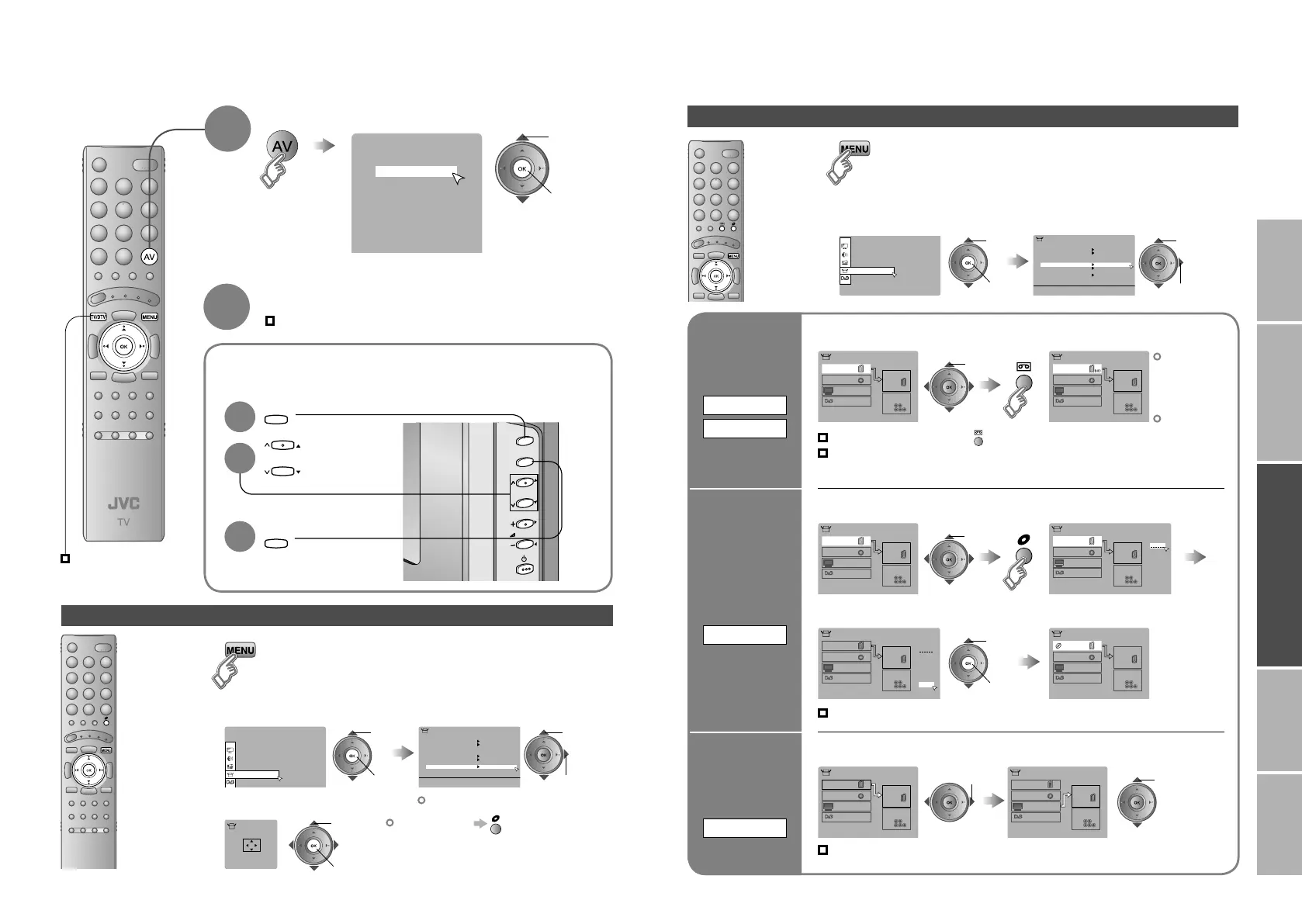
IMPORTANT! PREPARE USE
SETTINGS
TROUBLE?
Watching videos / DVDs
Display the
menu bar
Select “Set Up”
Select “EXT Setting”
1 select
2 next
Advanced functions
1
2
select
The device
selection
display will
change from
E1 to S1.
S-OUT is
not available
when EXT-2
receives an
RGB input.
Cancel this mode
Clear the name
Select the blank space in 3
Set up
dubbing on
EXT-2
DUBBING
Edit names
of connected
devices
ID LIST
1 Select the EXT connected to S-VIDEO
3 Select a name from the list
1 Select the arrow 2 Select the dubbing source
2 Set S-VIDEO input
Press “ ” in 2 again
Switch
to S-VIDEO
input / output
S-IN
(DTV)
S-OUT
select
1 Select an EXT to assign a name to 2 Show the name list
1 select
2 set
select
Set the S-OUT
Cancel S-IN at “EXT-2”, then select “DTV” and
press yellow button. (available only for DTV)
Record DTV with S-VIDEO
Set S-OUT at “DTV”.
select
Select the video source
E.g. For EXT-1
1
To TV
1 select
2 next
2 watch
1 select
Select the video source using
the side buttons
1
Select the
video source
2
3
Operate the connected device and play a video
2
Operate JVC recorders and other devices (P. 32)
PC position adjustment
Display the menu bar
1
Select “Set Up”
Select “PC Position”
2
1 select
2 next
1 select
2 next
Shown only when “PC” is selected.
3
2 set
1 adjust
Reset position
26-27 4/5/2006 4:40:26 PM



 To Next Page
 Loading...