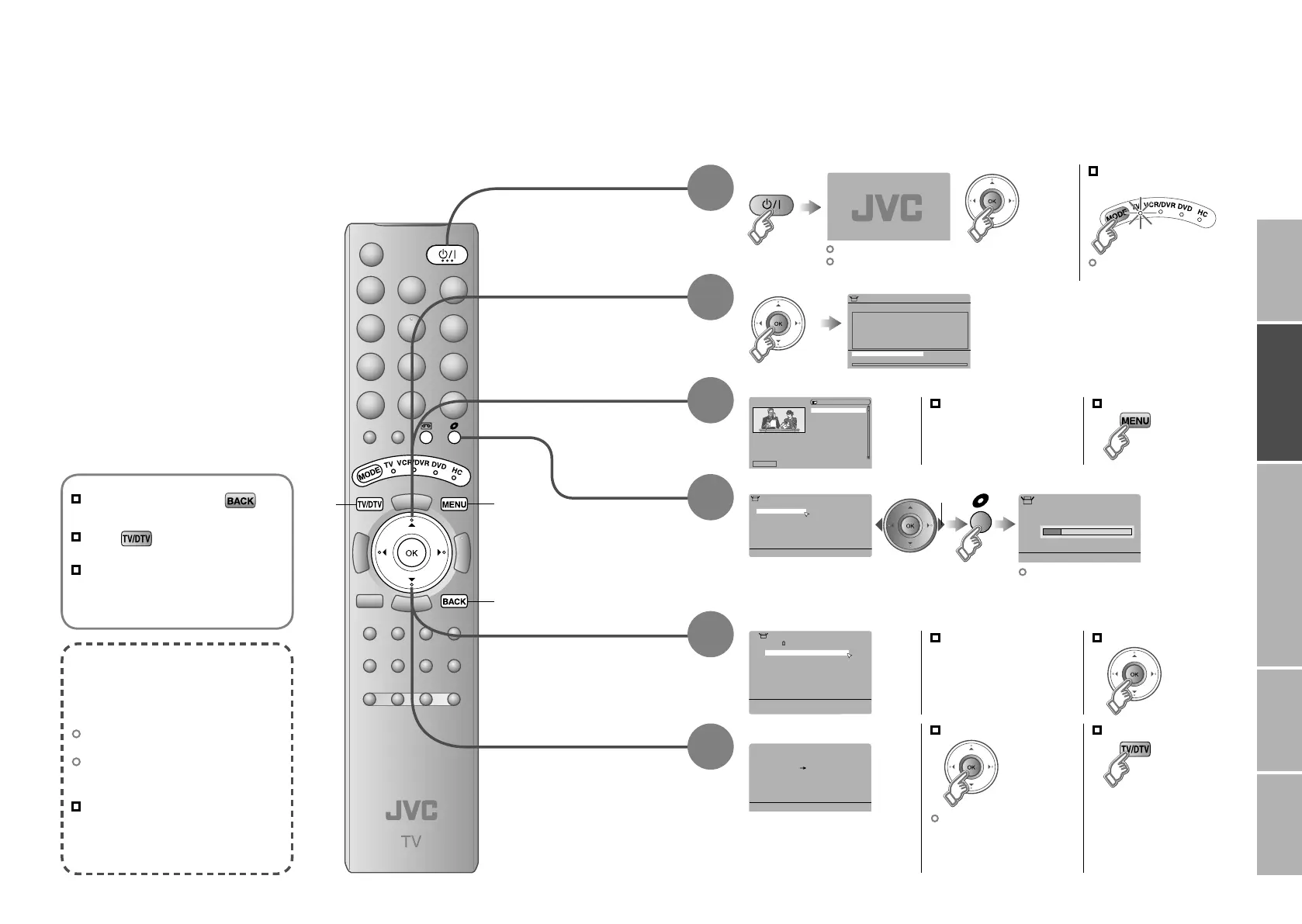
Installation > Automatic Search
Channels:
100%
BBC ONE
BBC TWO
BBC THREE
BBC NEWS 24
BBCi
CBBC Channel
UHF CH:68
1 BBC ONE
Select Delete Edit Name Lock Favourites
EDIT PR LIST
1. BBC ONE
2. BBC TWO
7. BBC THREE
30. CBBC Channel
40. BBC NEWS 24
51. BBCi
> Auto Program
United Kingdom
Country
Ireland
01
AV
PR
02
03
04
05
06
07
08
09
ID CH/CC
BBC1 CH
21
CH
22
CH
23
CH
24
CH
25
CC
02
CC
CC
04
CC
05
03
>Edit
Download TV Recording Device
T-V LINK
IMPORTANT! PREPARE USE
SETTINGS
TROUBLE?
Initial settings
Register DTV / ATV channels on TV. These channels can be edited later.
(In this manual, digital broadcasting is indicated as DTV, and analogue broadcasting as ATV.)
Begin
Automatically register DTV channels
Check what was registered
Automatically register ATV channels
Check what was registered
select
Edit ATV channels
@ in “Editing ATV
channels” (P. 16)
When not using T-V LINK
When using T-V LINK
If “Feature Not
Available” appears :
Is a T-V LINK compatible
device connected to EXT-2?
Is the device turned on?
If “ACI Start” appears, select and start settings.
(This will set up cable television channels.)
“What is ACI (Automatic Channel
Installation)?” (P. 48)
Finish
4
Confirm
Edit DTV channels
@ in “Editing DTV
channels” (P. 14)
Confirm
To the previous screen
Exit
MENU
BACK
What is “T-V LINK”?
Connecting the TV to a “T-V LINK”
compatible device allows :
ATV channels on the TV to be
instantly registered on the device.
The “DIRECT REC” function to be
used.
“Technical information”
(P. 48)
“T-V LINK” variations
“T-V LINK” (JVC) “Q-LINK” (Panasonic)
“Megalogic” (Grundig) “Data Logic” (Metz)
“SMARTLINK” (Sony) “Easy Link” (Philips)
TV/DTV
If the “JVC” logo does not appear or
if you wish to make changes later
DTV : “Automatic Search” (P. 40)
ATV : “Auto Program” (P. 35)
The remote control
doesn’t work
Confirm the mode is set to
“TV”.
Shown only when powering on for the first time.
The power on the unit can also be used.
3
2
1
5
6
12-13 4/5/2006 4:29:15 PM


 To Next Page