8
Setting up your TV
Install your TV
Power requirements
Connect the power cord only to a 220 - 240 V, 50 Hz AC outlet.
When attaching the TV to the wall, use the optional JVC wall mounting unit
Consult a qualied technician.
See the included manual on mounting procedures.
JVC assumes no responsibility for damage due to improper mounting.
Mounting holes for wall mounting unit:
M5 x 4, 200 mm x 200 mm
Depth of screw hole is 7 mm from the surface of the TV.
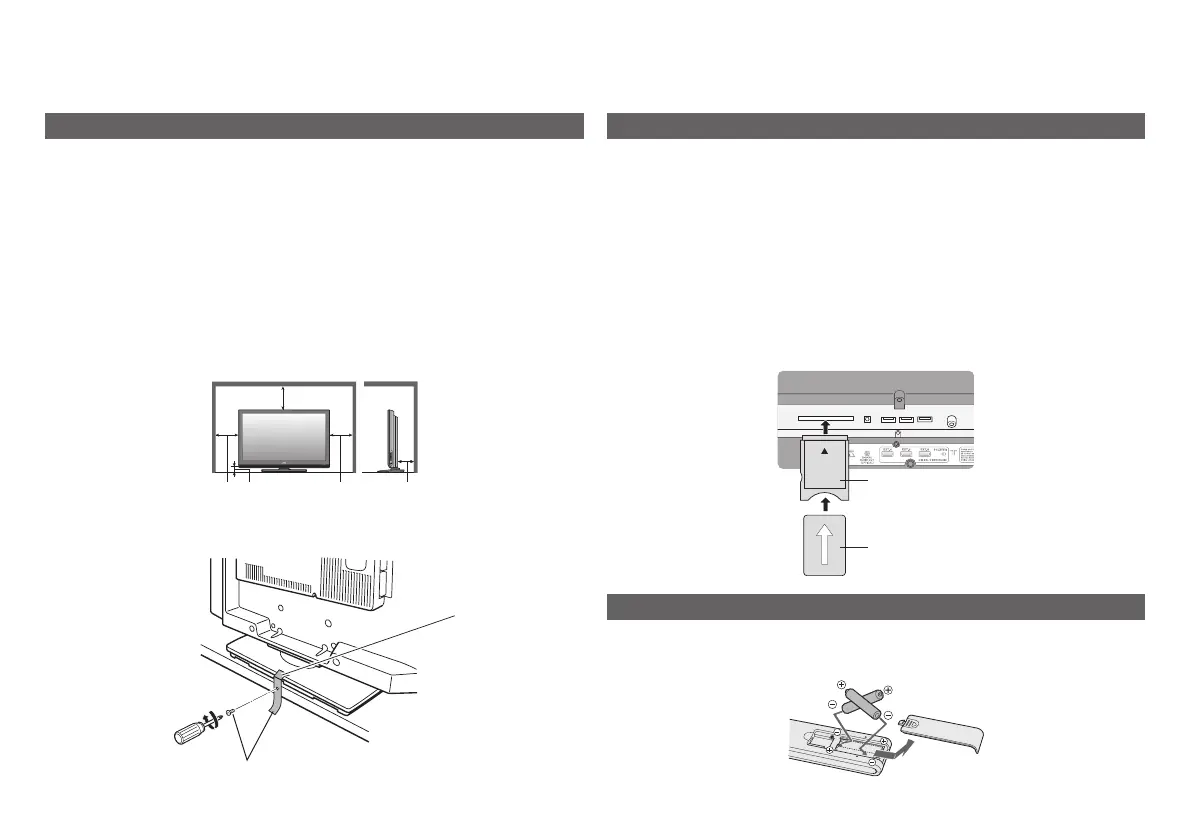
Installation requirements
Place the TV on the at and stable location.
To avoid overheating, ensure the unit has ample room.
200 mm
50 mm150 mm 150 mm 50 mm
Insert the batteries
Use two “AAA/R03” dry cell batteries. Insert the batteries from the - end,
making sure the + and - polarities are correct.
Subscribe to a broadcasting company beforehand. A Smart Card (B) will
be sent by the broadcasting company after subscribing to it. It may be
necessary for you to purchase a Conditional Access Module (A) in addition
to the Smart Card.
Consult your broadcasting company or retailer.
1 Unplug the power cord
2 Insert “B” into “A”.
3 Insert “A”.
4 Plug the power cord, and turn the power on.
5 Perform necessary settings using “Common Interface”. (P. 30)
Pay-TV analogue channels cannot be watched.
Watch pay-TV digital channels
A
B
To prevent the TV from falling, thread the belt through the hole on the
back of the stand and secure it to the TV rack, etc.
Hole
Belt and screw (not provided)



 To Next Page