11
IMPORTANT! PREPARE USE
SETTINGS
TROUBLE?
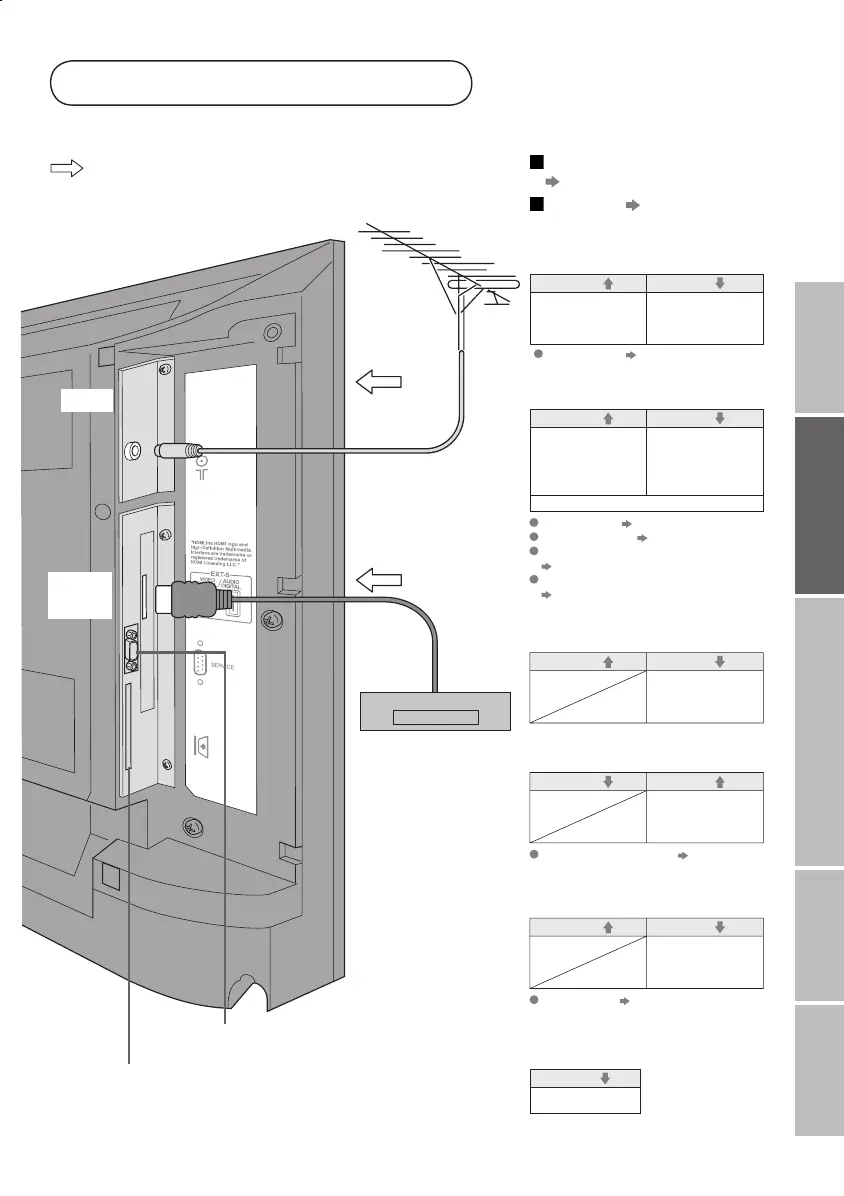
AERIAL
DVD player
(HDMI compatible)
EXT-5
(HDMI)
: signal direction
· Sound L / R
Output
AUDIO OUT
Listening to the TV on external speakers
Connect DVI devices
T-V LINK
(P. 12)
(P. 46)
·
Component signal
(P. 47)
· Sound L / R
Input
Output
EXT-4
Watching DVDs
Component auto select (P. 33)
EXT-5
· HDMI signal
(P. 47)
Output
Input
Connecting
HDMI devices
HDMI setting (P. 33)
· Composite
signal / S-VIDEO
· Sound L / R
Output
Input
EXT-3
Watching videos
EXT-1
·
Composite signal /
RGB / S-VIDEO
· Sound L / R
Output
Input
· Composite
signal
· Sound L / R
Watching videos
Use S-VIDEO "S-IN" (P. 27)
·
Composite signal /
RGB / S-VIDEO
· Sound L / R
Output
Input
· T-V LINK
EXT-2
Dubbing videos
Using T-V LINK
Use S-VIDEO "S-IN" (P. 27)
Use DTV S-OUT "S-OUT" (P. 27)
Select dubbing sources
"DUBBING" (P. 27)
Connect a decoder
"DECODER (EXT-2)" (P. 33)
VCR / DVD / other devices
· Composite signal
· S-VIDEO (only for
DTV)
· Sound L / R
Not available.
(For service adjustments)
CAM slot
(“Watch pay-per-view” P.8)
LT-32&26DS6BJSJ.indd 11LT-32&26DS6BJSJ.indd 11 4/12/2005 3:26:45 PM4/12/2005 3:26:45 PM


 To Next Page
 Loading...