EasyManua.ls Logo

JVC LT-37DS6BJ - Editing DTV Channels; DTV Channel Management Process

JVC LT-37DS6BJ
48 pages
Print Icon
To Next Page IconTo Next Page
To Previous Page IconTo Previous Page
Loading...
14
Timers
Configuration
Installation
Common Interface
DTV
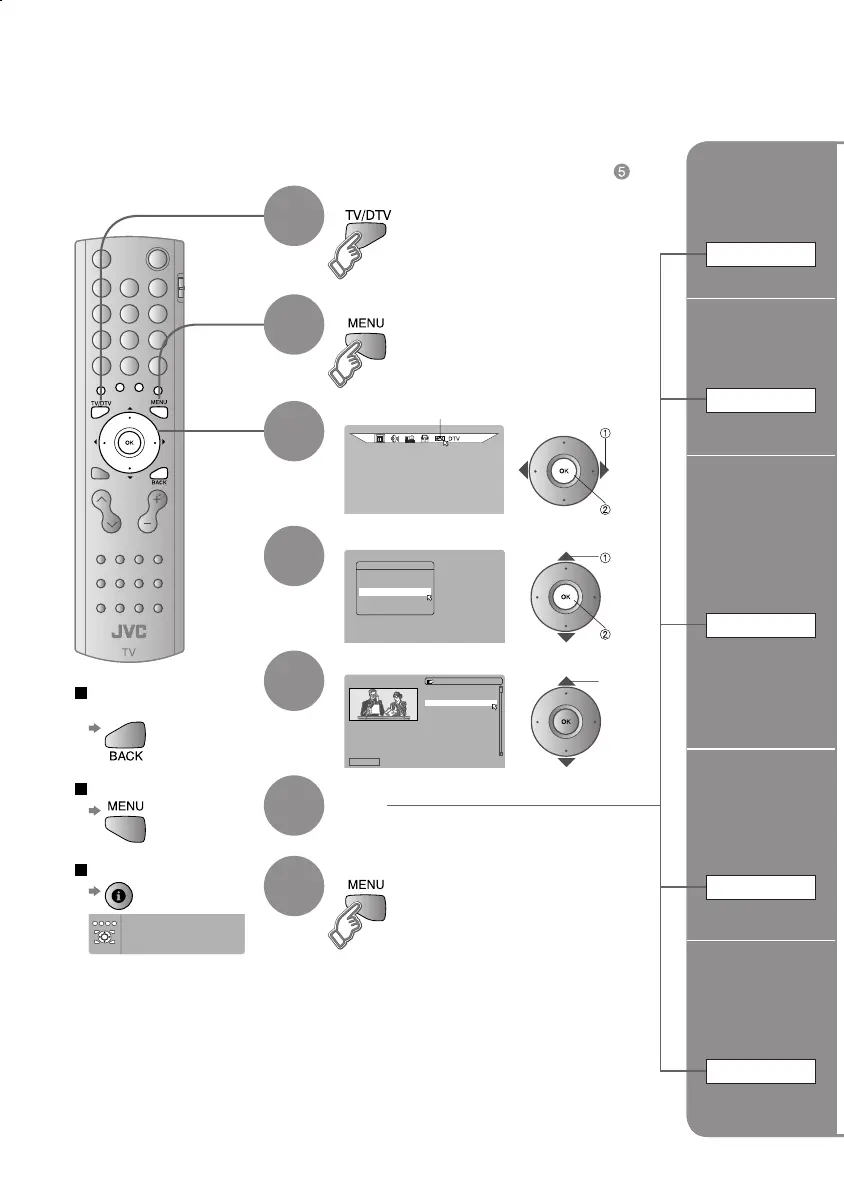
Edit PR List
1 BBC ONE
Select Delete Edit Name Lock Favourites
EDIT PR LIST
1. BBC ONE
2. BBC TWO
7. BBC THREE
30. CBBC Channel
40. BBC NEWS 24
51. BBCi
Red: Page up
Green: Pagedown
TV/DTV: Go to DTV
Guide: Go to guide
Back: Go to previous
i: Exit help
MENU
OK
Display the menu bar
Select "DTV"
Select "Edit PR List"
When coming from "Initial settings" (P. 12), skip to .
Select a channel
Confi rm
the channel
picture
Select
Editing DTV channels
Edit the channels registered with "Automatic search" in "Initial settings" (P. 12).
To the previous
screen
Exit
4
5
Edit a
channel name
Edit Name
select
next
select
Select DTV
Tips for operation
1
2
3
Finish
7
Edit
6
Delete
a channel
Delete
Stop Children
from watching
specifi c
channels
Lock
Register your
favourite
channel
Favourites
select
next
LT-32&26DS6BJSJ.indd 14LT-32&26DS6BJSJ.indd 14 4/12/2005 3:27:06 PM4/12/2005 3:27:06 PM

Other manuals for JVC LT-37DS6BJ

Related product manuals