10
Connecting external devices
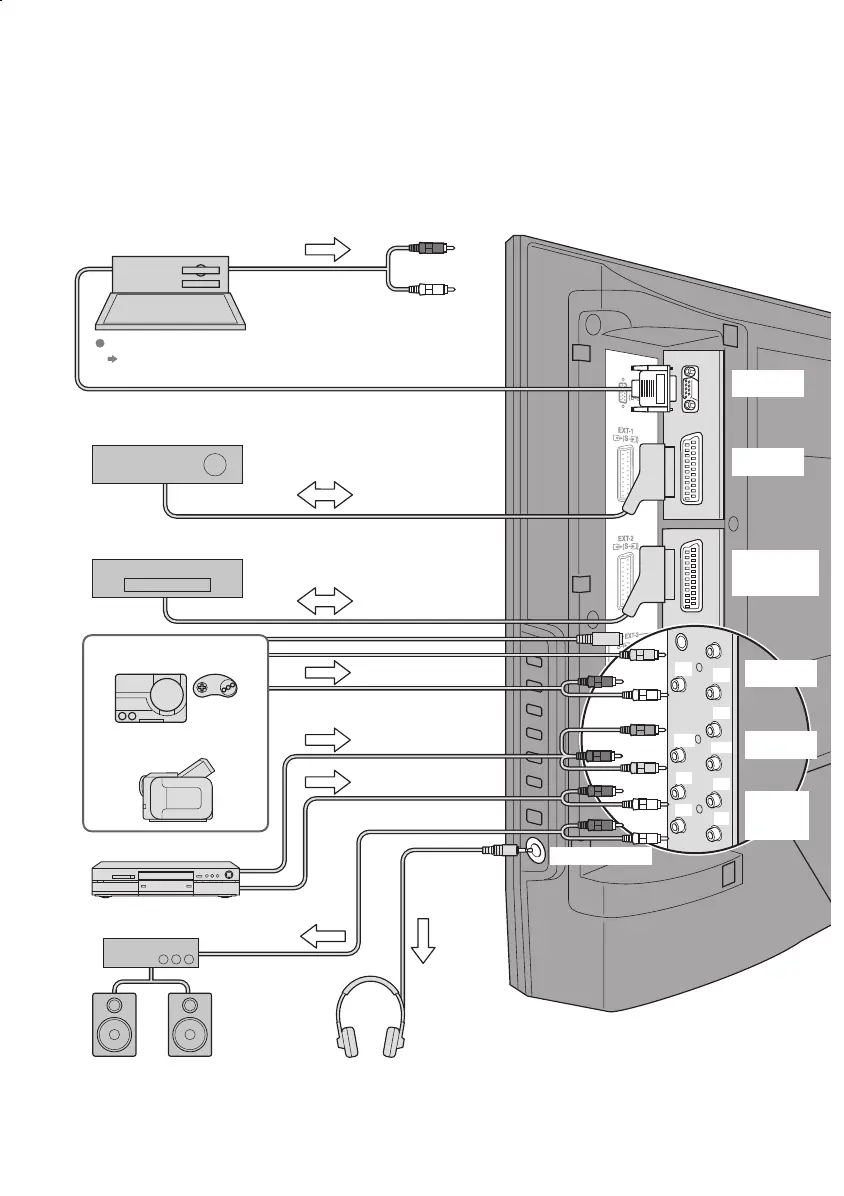
You can connect many different devices to the rear panel of the TV.
Please read the user manuals of each device before setting up.
(Connecting cables are not supplied with this TV.)
Amplifi er
(L) (R)
VCR / DVD recorder
(T-V LINK compatible)
AUDIO
OUT
Satellite broadcast tuner
Game consoles
Check for PC compatibility
"Technical information" (P. 46)
DVD player
PC IN
PC
Video camera
EXT-1
EXT-2
(T-V LINK)
EXT-3
EXT-4
(Y)
(Pb)
(L)
(L)
(L)
To EXT-3 R/L (PC IN)
Headphones
(Pr)
(R)
(R)
(R)
Headphones
LT-32&26DS6BJSJ.indd 10LT-32&26DS6BJSJ.indd 10 4/12/2005 3:26:45 PM4/12/2005 3:26:45 PM


 To Next Page
 Loading...