33
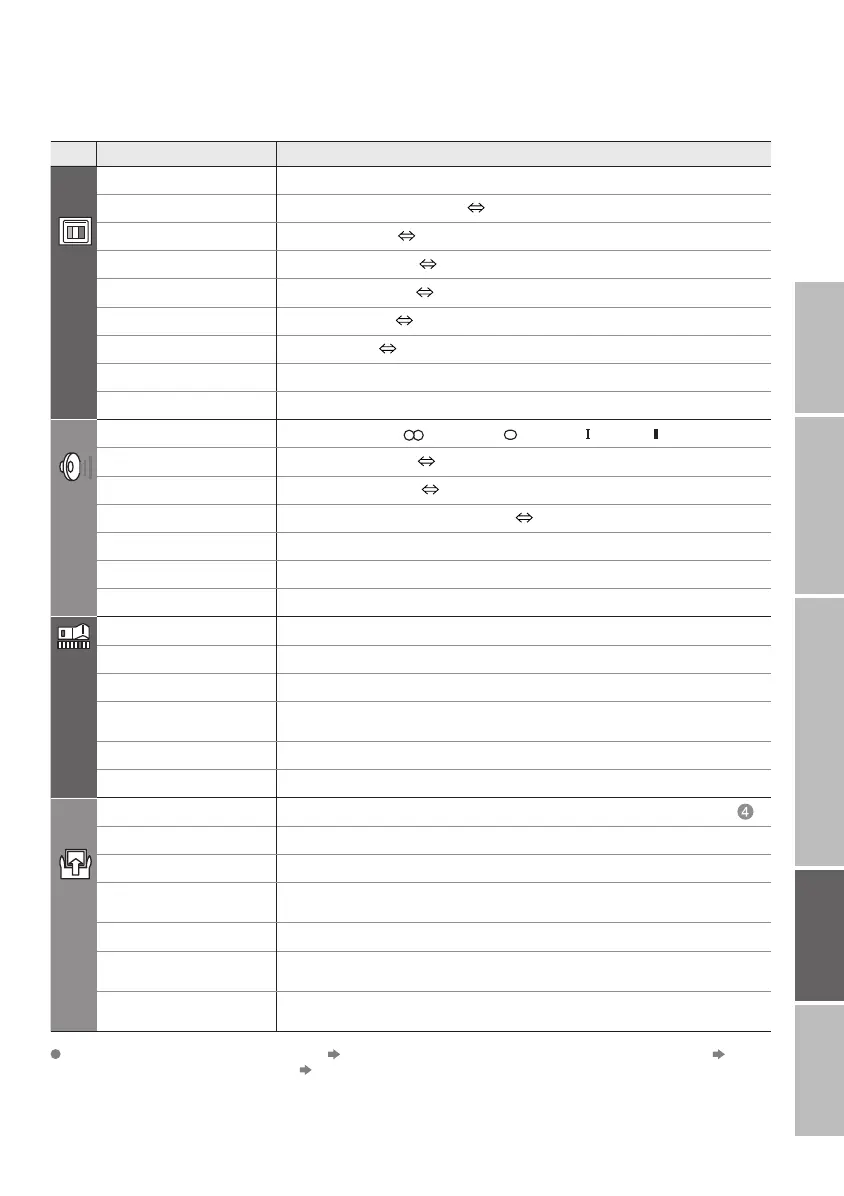
Menu
Item Adjustments / Confi gurations
PICTURE
PICTURE MODE
Picture mode (BRIGHT / STANDARD / SOFT)
BRIGHT-1
Backlight brightness (Darker Brighter)
CONTRAST
Contrast (LOWER HIGHER)
BRIGHT-2
Brightness (DARKER BRIGHTER)
SHARP
Sharpness (SOFTER SHARPER)
COLOUR
Colour (LIGHTER DEEPER)
HUE
Tint (REDDISH GREENISH)
COLOUR TEMP.
Colour temperature (WARM / NORMAL / COOL)
FEATURES
Finer picture adjustments (P. 40)
SOUND
STEREO / I · II
Mode / Language ( : STEREO / : MONO / : SUB1 / : SUB2)
BASS
Low tones (WEAKER STRONGER)
TREBLE
High tones (WEAKER STRONGER)
BALANCE
Speaker balance (LEFT STRONGER RIGHT STRONGER)
3D SOUND
Ambience level (HIGH / LOW / MONO / OFF)
A.H.B.
Emphasize the bass sound (ON / OFF)
BBE
* Sound enhancement technology (ON / OFF)
FEATURES
SLEEP TIMER
Timer for turning off the TV (P. 30)
CHILD LOCK
Stop children from watching specifi c channels (P. 31)
APPEARANCE
Format for displaying the channel number (TYPE A / TYPE B / TYPE C / TYPE D)
BLUE BACK
Display a blue screen and mute the sound
when the signal is weak or absent (ON / OFF)
FAVOURITE SETTING
Clear favourite channel settings (P. 29)
ILLUMINATION
Lights illumination lamp (P.6) while the power is turned on (BRIGHT / SOFT / OFF)
SET UP
AUTO PROGRAM
Select the country of installation, automatically register channels (P. 12, )
EDIT / MANUAL
Change registered channels or add new ones (P. 16)
DECODER(EXT-2)
For when connected to VCR with T-V LINK (ON / OFF)
COMPONENT
AUTO SELECT
Changes the TV input to EXT-4 when the component signals
are input to EXT-4. (ON/OFF) (Not available when viewing DTV or PC)
EXT SETTING
For use with video players and other devices (P. 27)
HDMI SETTING
SIZE (AUTO / 1 / 2)
AUDIO (AUTO / ANALOGUE / DIGITAL)
ATTENUATOR
For when the picture is not displayed because of too strong radio waves
(ON/OFF)
IMPORTANT! PREPARE USE
SETTINGS
TROUBLE?
· Change the aspect ratio "ZOOM" (P. 20)
· Turn on 3D SOUND "3D SOUND" (P. 20)
Other settings * BBE licence (P. 46)
LT-32&26DS6BJSJ.indd 33LT-32&26DS6BJSJ.indd 33 6/1/2005 3:26:03 PM6/1/2005 3:26:03 PM


 To Next Page
 Loading...