36
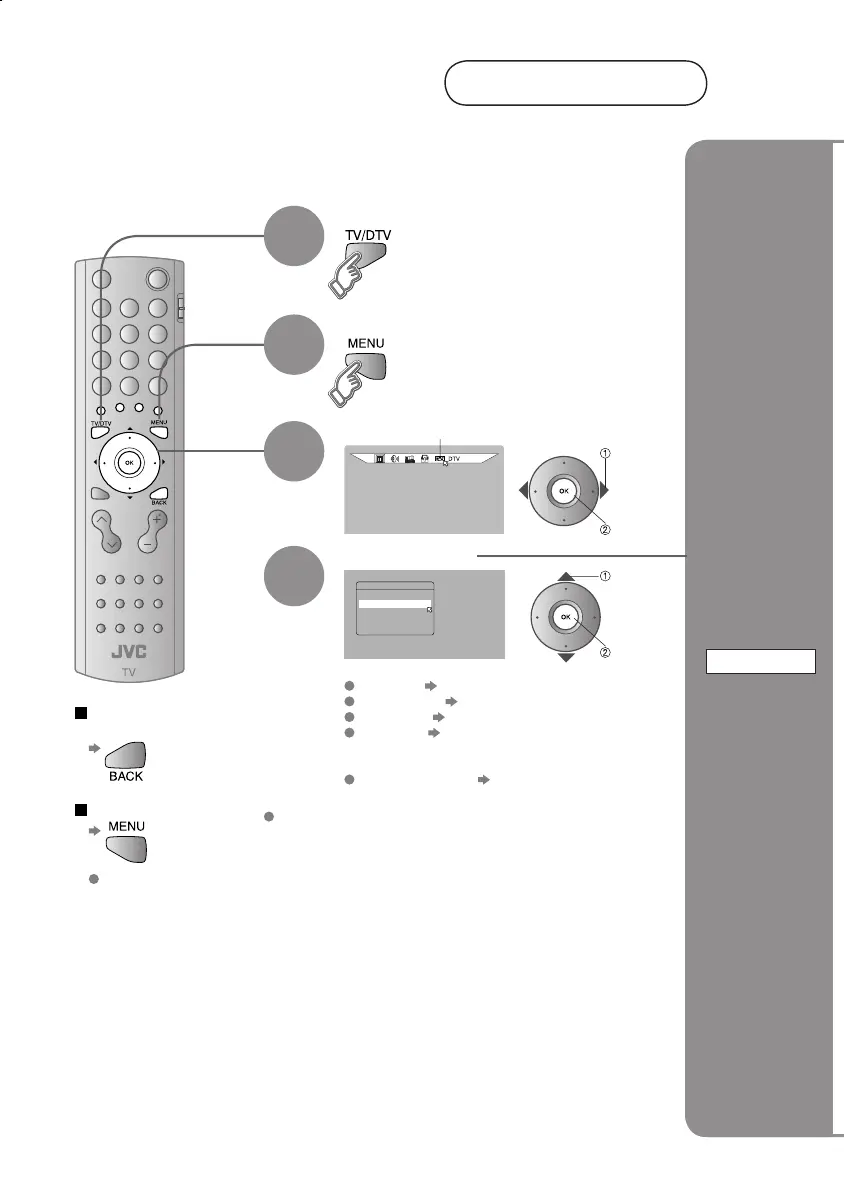
Rec Timer
Installation
Common Interface
DTV
Edit PR List
Configuration
Display the menu bar
Select "DTV"
Change
AV settings
Confi guration
4
Select DTV
1
2
3
Select an item
To the previous
screen
Exit
The menu disappears
after one minute of
inactivity.
select
next
AV setting
Using DTV
Available for changing subtitle languages for DTV, favourite channel selection,
changing PIN code, and upgrading the tuner software.
Also, you can upgrade the tuner software as newer versions become available.
Rec Timer "
Recording using timer setting
" (P. 34)
Confi guration "Change AV settings" (P. 36)
Edit PR List "Editing DTV channels" (P. 14)
Installation "Reset channel/Register a new
channel/Initialise the DTV settings"
(P. 38)
Common Interface "Set pay-per-view" (P. 38)
select
next
DTV menu cannot be operated with the
front panel buttons.
LT-32&26DS6BJSJ.indd 36LT-32&26DS6BJSJ.indd 36 4/12/2005 3:34:07 PM4/12/2005 3:34:07 PM


 To Next Page