EasyManua.ls Logo

JVC LT-37DS6BJ - Page 41

JVC LT-37DS6BJ
48 pages
Print Icon
To Next Page IconTo Next Page
To Previous Page IconTo Previous Page
Loading...
41
AUTO
AUTO
ON
ON
AUTO
(
LOW
)
AUTO
ON
ON
AUTO
(
LOW
)
AUTO
ON
ON
AUTO
(
LOW
)
AUTO
AUTO
AUTO
(
LOW
)
AUTO
AUTO
ON
ON
AUTO
(
LOW
)
AUTO
AUTO
ON
ON
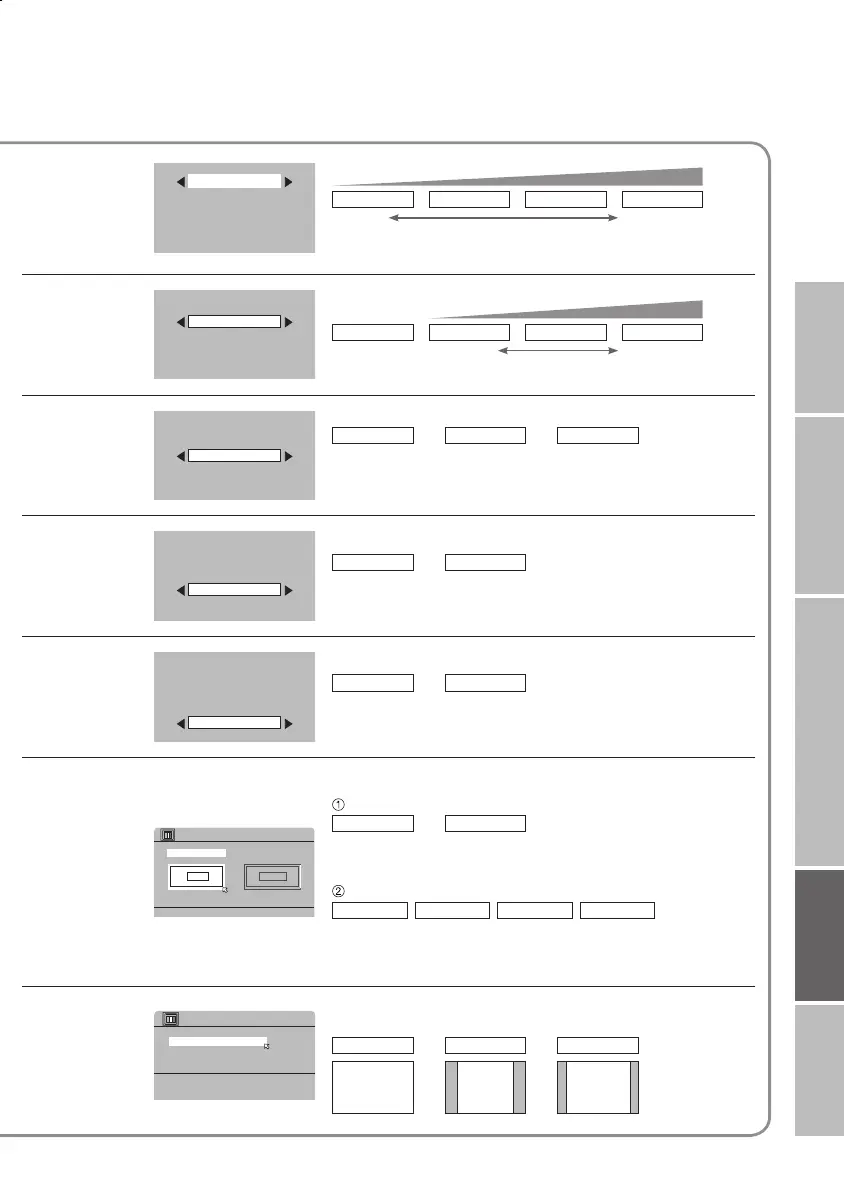
>> COLOUR SYSTEM
SUB
AUTOPAL
MAIN
>> 4:3 AUTO ASPECT
REGULAR
14:9 ZOOM
PANORAMIC
IMPORTANT! PREPARE USE
SETTINGS
TROUBLE?
To reduce
noise
MIN
: When
the picture
loses sharpness
AUTO(LOW) AUTO(HIGH) MAX
level
: When noise
appears
For
natural-looking
outlines
OFF
: Function is
turned off
MIN AUTO MAX
level
: When the picture
loses sharpness
For smooth
cinema fi lm
OFF
: Function is
turned off
: When
noise appears
For
natural-looking
pictures
OFF
: Function is
turned off
ON
: Maintain a natural
colour balance
Fix
bright/dark
pictures
OFF
: Function is
turned off
ON
: Make it easier to view
bright / dark pictures
When
there is no
colour
MAIN
: Main picture
SUB
: Sub-picture in
MULTI-PICTURE mode (P. 28)
Select the screen to change settings on
PAL
: Western
Europe
NTSC 3.58
: USA
3.58 MHz
NTSC 4.43
: USA
4.43 MHz
AUTO
: When watching
videos, etc.
Set a default
aspect ratio
PANORAMIC
Select a default aspect ratio for "AUTO" in "ZOOM"
(P.20)
REGULAR 14:9 ZOOM
16 : 9 4 : 3 14 : 9
Select the colour system
ON
AUTO
: Automatically
adjusts
: Function is
always on
LT-32&26DS6BJSJ.indd 41LT-32&26DS6BJSJ.indd 41 4/12/2005 3:37:03 PM4/12/2005 3:37:03 PM