16
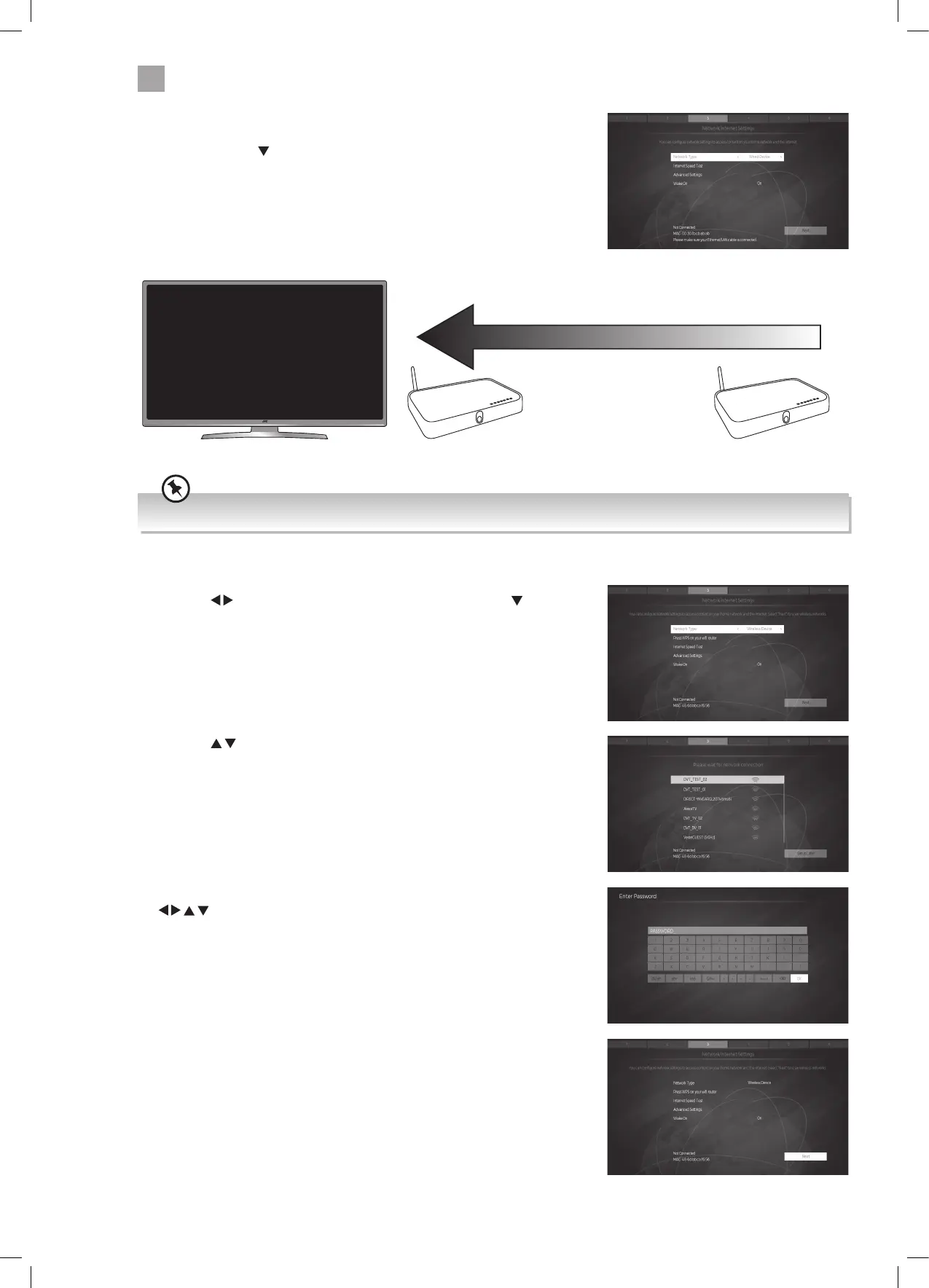
WIRED Connection
• If you have connected your ethernet cable to the LAN socket on the back of
your TV, press the
button to highlight NEXT then press OK.
WIRELESS Connection
You can connect using a wireless connection via your router.
16. Press the
buttons to select WIRELESS DEVICE then press the button to
highlight NEXT then press OK.
17. Press the
buttons to select your wireless network then press OK.
Make sure your TV is as close to your router as possible, within 5m and ideally in the same room as the TV
18. You now need to enter your password, a keyboard will appear. Press the
buttons to select a letter/number/symbol and press OK to enter
each one. Once you have typed your password highlight OK and press OK.
19. The network will now show Connected and NEXT will be highlighted press the
OK button to continue.
Best connection
speed
Maximum distance
5m
Wireless Router Wireless Router
JVC 40' LED Smart 4K HDR TV LT-40C890 Manual.indd 16 07/12/2018 08:30


 To Next Page