PREPERATION
When attaching the TV to the wall, use the optional JVC wall
mounting unit (only for LT-42DA9BJ and LT-32DA9BJ)
• Consult a qualified technician.
• See the included manual on mounting procedures.
• JVC assumes no responsibility for damage due to improper mounting.
• Mountingholesforwallmountingunit:M5x4,200mmx200mm
Depthofscrewholes:
[LT-42DA9BJ] 17.6mm(2 screws of upper part) and 14.7mm(2 screws of lower part) from the surface of the TV
[LT-32DA9BJ] 13.7mm from the surface of the TV
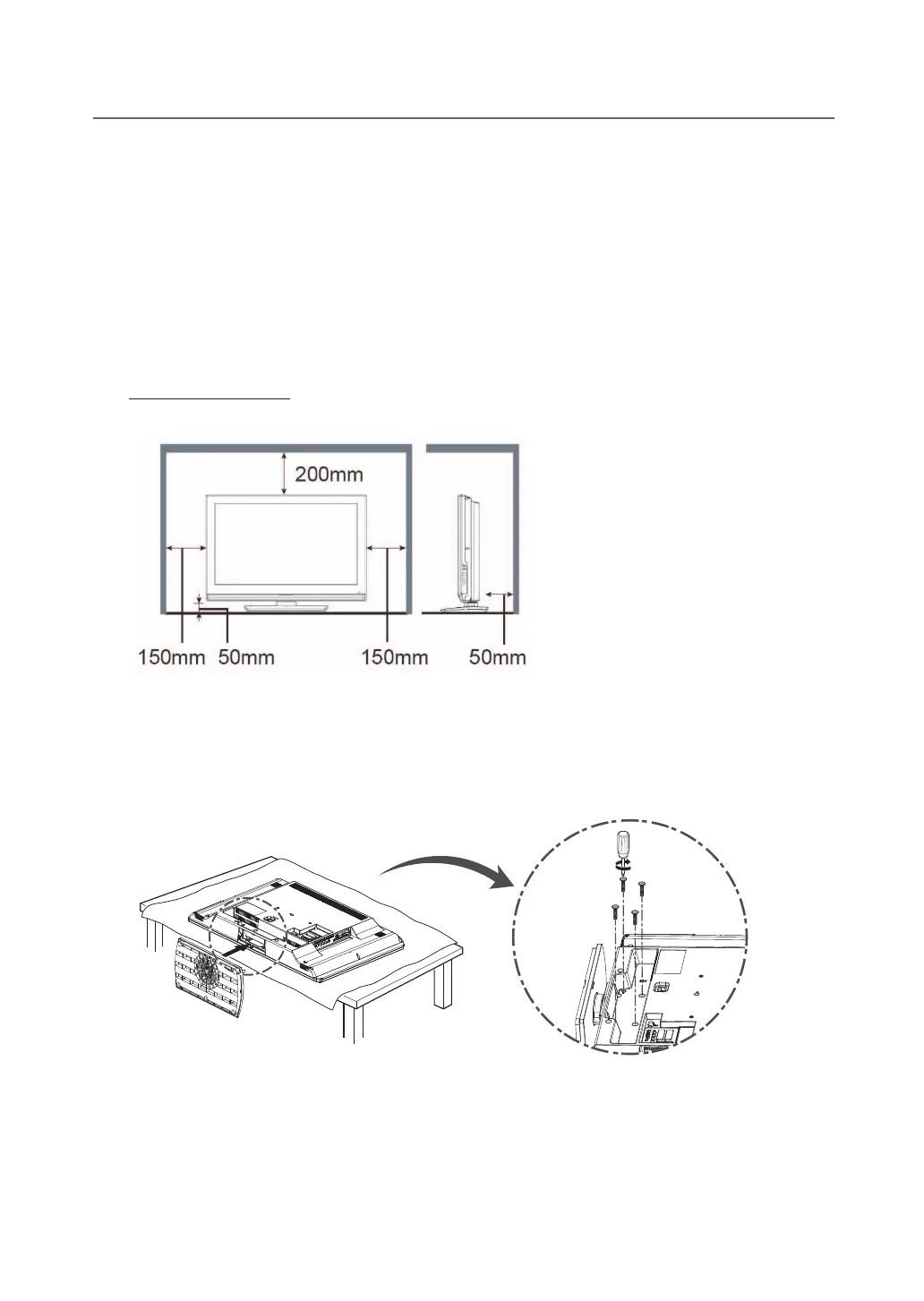
Installation requirements
To avoid overheating, ensure the unit has ample room.
Stand Installation (only for LT-32DA9BJ)
Assemble the TV as shown.
Fix the 4 screws securely using the holes in the back of the TV.
Note: To prevent scratches on the panel, lay a piece of soft cloth on an even platform and place the TV onto it.


 To Next Page