EasyManua.ls Logo

JVC PC-V55 B - Page 7

JVC PC-V55 B
29 pages
Print Icon
To Next Page IconTo Next Page
To Previous Page IconTo Previous Page
Loading...
@
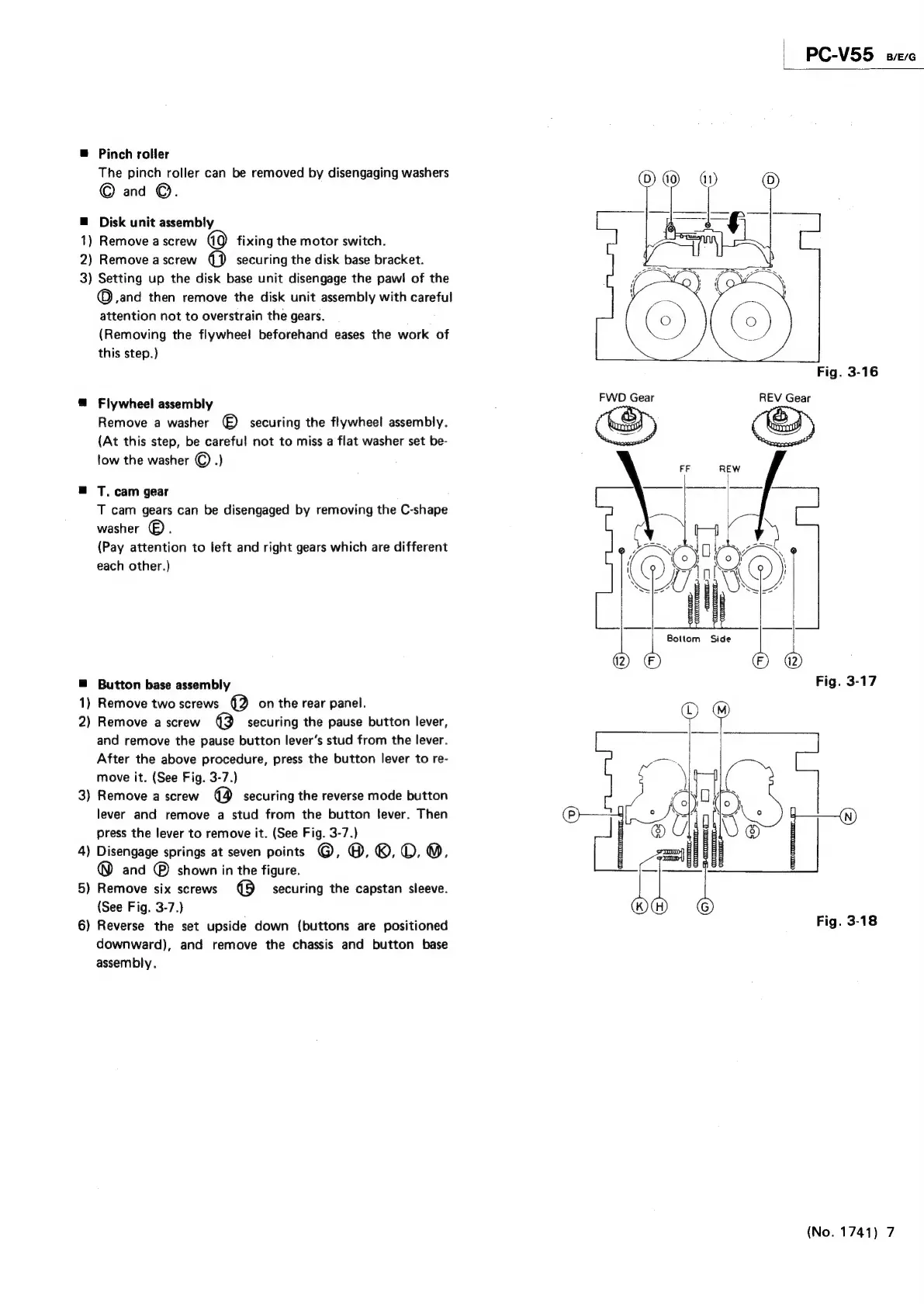
Pinch
roller
The
pinch
roller
can
be
removed
by
disengaging
washers
©
and
©.
Disk
unit
assembly
1)
Remove
a
screw
oO)
fixing
the
motor
switch.
2)
Remove
a
screw
cB)
securing
the
disk
base
bracket.
3)
Setting
up
the
disk
base
unit
disengage
the
pawl
of
the
©
,and
then
remove
the
disk
unit
assembly
with
careful
attention
not
to
overstrain
the
gears.
(Removing
the
flywheel
beforehand
eases
the
work
of
this
step.)
@
Flywheel
assembly
Remove
a
washer
()
securing
the
flywheel
assembly.
{At
this
step,
be
careful
not
to
miss
a
flat
washer
set
be-
tow
the
washer
©
.}
@
T.
cam
gear
T
cam
gears
can
be
disengaged
by
removing
the
C-shape
washer
®.
(Pay
attention
to
left
and
right
gears
which
are
different
each
other.)
@
Button
base
assembly
1)
Remove
two
screws
(2
on
the
rear
panel.
2)
Remove
a
screw
\k)
securing
the
pause
button
lever,
and
remove
the
pause
button
lever’s
stud
from
the
lever.
After
the
above
procedure,
press
the
button
lever
to
re-
move
it.
(See
Fig.
3-7.)
3)
Remove
a
screw
@
securing
the
reverse
mode
button
lever
and
remove
a
stud
from
the
button
lever.
Then
press
the
lever
to
remove
it.
(See
Fig.
3-7.)
4)
Disengage
springs
at
seven
points
@,
0.6,0.
9M,
®
and
®
shown
in
the
figure.
5)
Remove
six
screws
@
securing
the
capstan
sleeve.
(See
Fig.
3-7.)
6)
Reverse
the
set
upside
down
(buttons
are
positioned
downward),
and
remove
the
chassis
and
button
base
assembly,
PC-V55
sc
Fig.
3-16
FWD
Gear
REV
Gear
Bottom
Side
Fig.
3-17
(No.
1741)
7

Related product manuals