EasyManua.ls Logo

JVC PC-V55 B - Page 6

JVC PC-V55 B
29 pages
Print Icon
To Next Page IconTo Next Page
To Previous Page IconTo Previous Page
Loading...
PC-V55.
pec
@
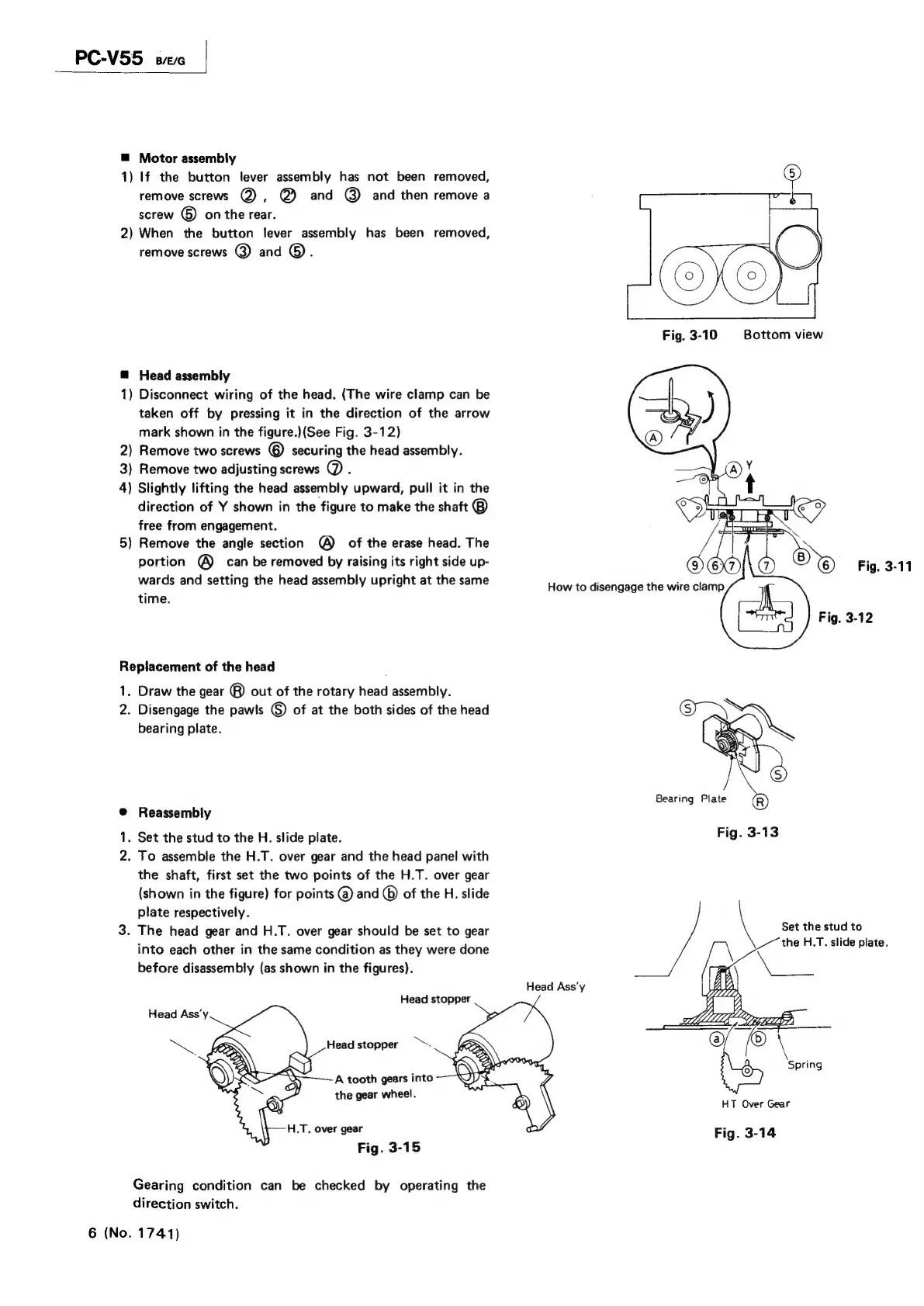
Motor
assembly
1)
If
the
button
lever
assembly
has
not
been
removed,
remove
screws
@),
@)
and
@)
and
then
remove
a
screw
&)
on
the
rear.
2)
When
the
button
lever
assembly
has
been
removed,
remove
screws
@
and
®.
Fig.
3-10
Bottom
view
@
Head
assembly
1)
Disconnect
wiring
of
the
head.
(The
wire
clamp
can
be
taken
off
by
pressing
it
in
the
direction
of
the
arrow
mark
shown
in
the
figure.)(See
Fig.
3-12)
2)
Remove
two
screws
©
securing
the
head
assembly.
3)
Remove
two
adjusting
screws
@.
4)
Slightly
lifting
the
head
assembly
upward,
pull
it
in
the
direction
of
Y
shown
in
the
figure
to
make
the
shaft
®
free
from
engagement.
5)
Remove
the
angle
section
©
of
the
erase
head.
The
portion
®
can
be
removed
by
raising
its
right
side
up-
wards
and
setting
the
head
assembly
upright
at
the
same
How
to
disengage
the
wire
clamp
time.
Ih
ort"
J
Fig.
3-12
Replacement
of
the
head
1.
Draw
the
gear
®)
out
of
the
rotary
head
assembly.
2.
Disengage
the
pawls
©)
of
at
the
both
sides
of
the
head
bearing
plate.
@
Reassembly
1.
Set
the
stud
to
the
H.
slide
plate.
2.
To
assemble
the
H.T.
over
gear
and
the
head
panel
with
the
shaft,
first
set
the
two
points
of
the
H.T.
over
gear
(shown
in
the
figure)
for
points
(@)
and
©
of
the
H.
slide
plate
respectively.
'
3.
The
head
gear
and
H.T.
over
gear
should
be
set
to
gear
Set
the
etud36
into
each
other
in
the
same
condition
as
they
were
done
OE
ae
Bete
before
disassembly
(as
shown
in
the
figures).
7
Head
Ass‘y
Head
stopper
Head
stopper
~~.
Spring
A
tooth
gears
into
hi
ar
wheel.
mee
HT
Over
Gear
H,.T,
over
gear
Fig.
3-15
Fig.
3-14
Gearing
condition
can
be
checked
by
operating
the
direction
switch.
6
(No.
1741)

Related product manuals