25
12
3
4
7
10
8
+10
9
6
5
POWER
STEREO
AUTO/MONO
RANDOMCONTINUE REPEAT
/ CLEAR
PROGRAM
TUNER
CD
UP
DOWN TUNING
SOUND
ACTIVE HYPER
-BASS PRO SEARCH
(AC)
SLEEP
/
/BAND
1 2
3
3-DISC CONTROL
3, 5
123
4
5
6
7
7
1
4,
2,
5
6
PROGRAM
DISC
TRACK
PROGRAM
DISC
TRACK
PROGRAM
CD
/
/ CLEAR PROGRAM
1
3
3
+10
2
6
PROGRAM
DISC
TRACK
CD number
Número de disco
Numéro de disque
Track number
Número de pista
Numéro de piste
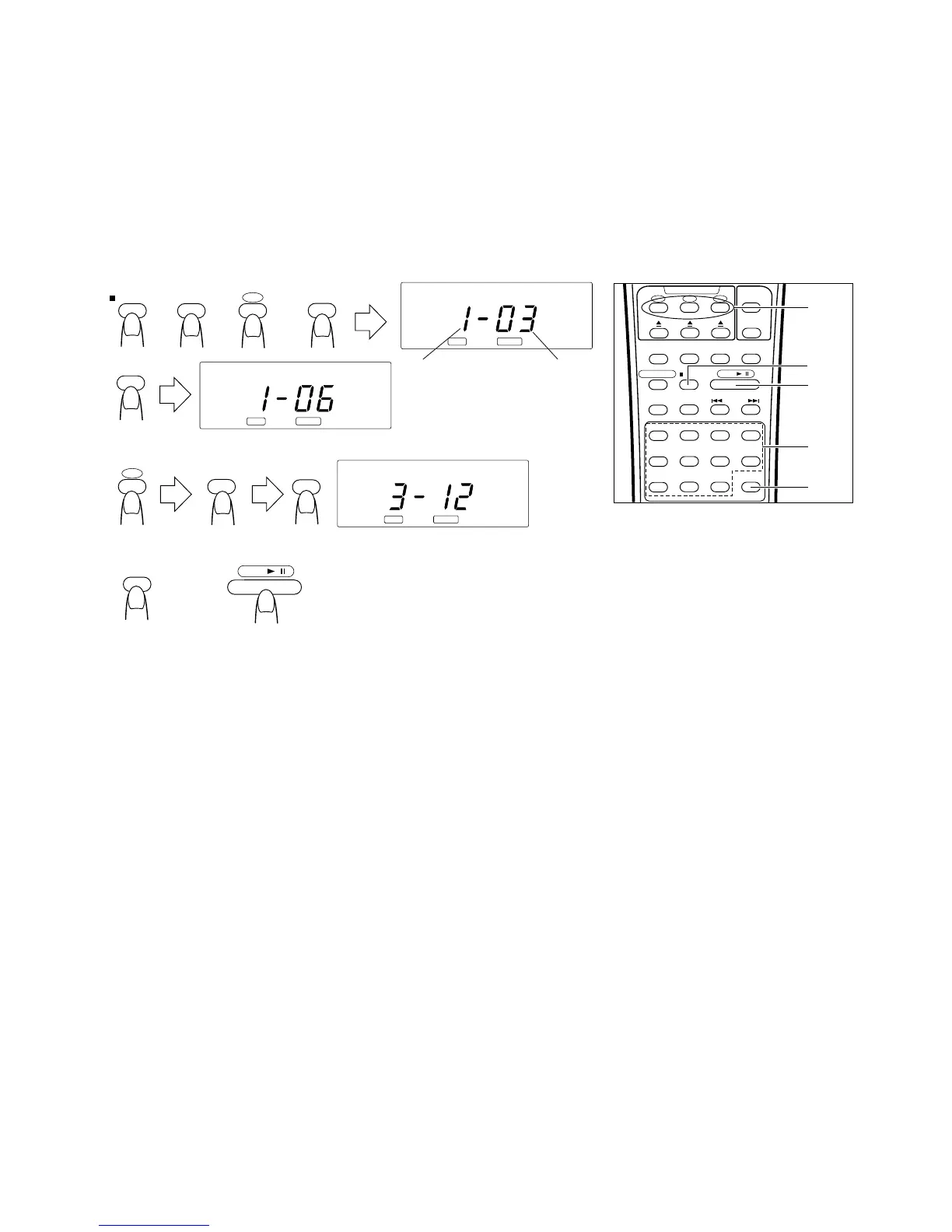
÷ Example 2: Programming tracks from 2 or
more CDs in the order of disc 1 (track 3), disc
1 (track 6), and disc 3 (track 12).
÷ Ejemplo 2: Programación de pistas de 2 o
más CD en el siguiente orden: disco 1 (pista
3), disco 1 (pista 6), y disco 3 (pista 12).
÷
Exemple 2: Pour programmer des pistes à partir
de 2 disques ou plus dans l’ordre disque 1 (piste
3), disque 1 (piste 6) et disque 3 (piste 12).
1 Press the 7/CLEAR button.
2 Press the PROGRAM button to set to the
programming mode.
3 Designate the required CD using the CD
CONTROL buttons (No. 1 to No. 3).
4 Designate the required track using the track
number buttons (No. 1 to No. 10, and +10).
5 Repeat steps 3 and 4 to designate the other
tracks.
6 Press the PROGRAM button to confirm
program details.
÷ Repeat from step 1 to readjust the
program.
÷ Repeat from step 3 to add to the program.
7 Press the CD 3/8 button when programming
is completed. Programmed play starts.
To confirm the details of a program...
Press the PROGRAM button in stop mode: the
tracks making up the program will be displayed
in programmed order.
To clear the programmed tracks ...
Press the 7/CLEAR button before playing a CD.
During programmed play, press this button twice.
Notes:
÷ Programming is possible even when a CD tray
is open. (The tracks on the CD can be
confirmed as the labels are visible.)
÷ Programmed tracks are not cleared even if
the CD tray is open.
÷ During programmed play from more than 2
CDs, if a CD tray is open, programmed play
will not function.
1 Presione el botón 7/CLEAR.
2 Para activar el modo de programación,
presione el botón PROGRAM.
3 Seleccione el CD deseado utilizando los
botones (No. 1 a No. 3) de CD CONTROL.
4 Seleccione la pista deseada utilizando los
botones (No. 1 a No. 10, +10), de número
de pista.
5 Repita los pasos 3 y 4 para seleccionar otras
pistas.
6 Presione el botón PROGRAM para confirmar
los detalles del programa.
÷ Repita desde el paso 1 para reajustar el
programa.
÷ Repita desde el paso 3 para agregar al
programa.
7 Cuando termine la programación presione
el botón CD 3/8. Se inicia la reproducción
programada.
Para confirmar los detalles de un programa
...
Presione el botón PROGRAM en el modo de
parada: las pistas que componen el programa
aparecerán indicadas en el orden programado.
Para borrar las pistas programadas...
Presione el botón 7/CLEAR antes de reproducir
el CD. Durante la reproducción programada
presione este botón dos veces.
Notas:
÷ La programación es posible aunque haya un
portadisco de CD abierto. (Las pistas del CD
pueden ser confirmadas en las etiquetas
visibles.)
÷ Las pistas programadas no se borran si se
abre el portadisco de CD.
÷ Durante la reproducción programada de más
de 2 CD, si hay un portadisco de CD abierto,
la reproducción programada no funcionará.
1
Appuyer sur la touche
7
/CLEAR.
2
Appuyer sur la touche PROGRAM pour
passer en mode de programmation.
3
Désigner le disque voulu en utilisant les
touches CD CONTROL (No. 1 à No. 3).
4
Désigner la piste voulue en utilisant les
touches de numéro de piste (No. 1 à No. 10,
et +10).
5
Reprendre les étapes
3
et
4
pour désigner
d’autres pistes.
6
Appuyer sur la touche PROGRAM pour
vérifier les détails du programme.
÷
Reprendre à partir de l’étape
1
pour
modifier le programme.
÷
Reprendre à partir de l’étape
3
pour ajouter
des éléments au programme.
7
Appuyer la touche CD
3
/
8
lorsque la
programmation est terminée. La lecture
programmée commence.
Pour vérifier les détails d’un programme...
Appuyer sur la touche PROGRAM en mode
d’arrêt: les pistes composant le programme
seront affichés dans l’ordre programmé.
Pour annuler les pistes programmées...
Appuyer sur la touche
7
/CLEAR avant de lire
un disque. Pendant la lecture programmée,
appuyer deux fois sur cette touche.
Remarques:
÷
La programmation est possible même si un
tiroir CD est ouvert. (Les pistes sur le CD
peuvent être confirmées comme les étiquettes
sont visibles.)
÷
Les pistes programmées ne sont pas effacées
même si le tiroir CD est ouvert.
÷
Pendant la lecture programmée à partir de
plus de 2 CD, si un tiroir CD est ouvert, la
lecture programmée ne fonctionnera pas.


 To Next Page