14
Basic Operation
Switching ON/OFF
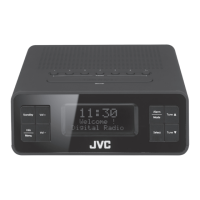
Press Standby button on the unit to switch the unit between the On and
Standby mode.
Remove the mains plug from the mains socket if you want to switch the
unit o completely.
Selecting Modes
Press and hold Alarm/Mode button to switch between DAB and FM mode.
The unit will automatically go to Standby mode after 15 minutes if there
is no DAB signal. Press Standby button to resume.
Adjusting the Volume
Press Vol+/Vol– button on the unit to increase/decrease the volume.
Automatically Setting the Clock
The clock will be updated automatically if you can receive DAB/FM signal in
your location.
In order to synchronise to the current local time, you must leave it on the
DAB/FM station for a period of time. It may take about 1-2 minutes to
receive the time signal.
If there is no DAB broadcast in your area, switch the unit into FM mode
to receive the time signal, or you may set the clock manually (Refer to
“Setting the Time and Date” section below).
RA-D38x_IB_Final180424.indd 14 24/4/18 11:11 am


 To Next Page
 Loading...