EasyManua.ls Logo

JVC RC-QC7 - Page 22

JVC RC-QC7
73 pages
Print Icon
To Next Page IconTo Next Page
To Previous Page IconTo Previous Page
Loading...
RC-QC7
B/E/EN/G
m
Removing
the
Main
Amp.
P.C.
Board
and
LCD
&
NO
a
o
o
N
.
Remove
the
front
cabinet
assembly
sensor
board
.
By
removing
the
one
screw
@
retaining
the
remote
.
Disconnect
the
card
wires
outgoing
from
the
connectors
System
CPU
P.C.
board
Remote
contro!
LCD
&
system
CPU
Remove
the
cassette
mechanism
unit
and
CD
traverse
mechanism
unit
from
the
body.
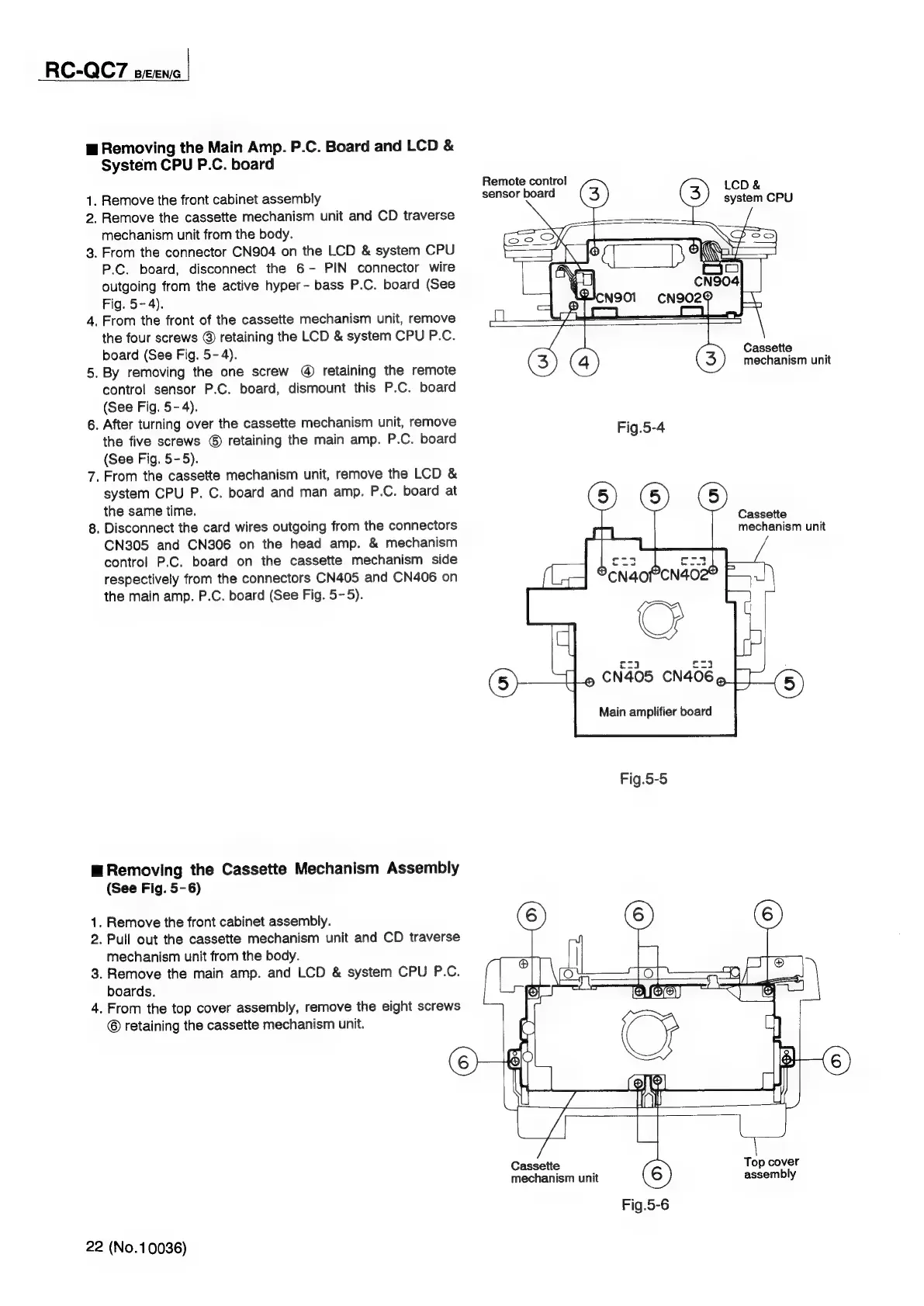
From
the
connector
CN904
on
the
LCD
&
system
CPU
P.C.
board,
disconnect
the
6-
PIN
connector
wire
outgoing
from
the
active
hyper-
bass
P.C.
board
(See
Fig.
5-4).
From
the
front
of
the
cassette
mechanism
unit,
remove
the
four
screws
©
retaining
the
LCD
&
system
CPU
P.C.
board
(See
Fig.
5-4).
Cassette
mechanism
unit
control
sensor
P.C.
board,
dismount
this
P.C.
board
(See
Fig.
5-4).
After
turning
over
the
cassette
mechanism
unit,
remove
Fig.5-4
the
five
screws
©
retaining
the
main
amp.
P.C.
board
(See
Fig.
5-5).
From
the
cassette
mechanism
unit,
remove
the
LCD
&
system
CPU
P.
C.
board
and
man
amp.
P.C.
board
at
the
same
time.
Cassette
mechanism
unit
CN305
and
CN306
on
the
head
amp.
&
mechanism
control
P.C.
board
on
the
cassette
mechanism
side
respectively
from
the
connectors
CN405
and
CN406
on
the
main
amp.
P.C.
board
(See
Fig.
5-5).
Main
amplifier
board
Fig.5-5
m
Removing
the
Cassette
Mechanism
Assembly
ny
4.
.
Remove
the
front
cabinet
assembly.
.
Pull
out
the
cassette
mechanism
unit
and
CD
traverse
.
Remove
the
main
amp.
and
LCD
&
system
CPU
P.C.
(See
Fig.
5-6)
mechanism
unit
from
the
body.
boards.
From
the
top
cover
assembly,
remove
the
eight
screws
©
retaining
the
cassette
mechanism
unit.
Cassette
Top
cover
mechanism
unit
assembly
Fig.5-6
22
(No.10036)

Related product manuals