ENGLISH
15
SETTINGS
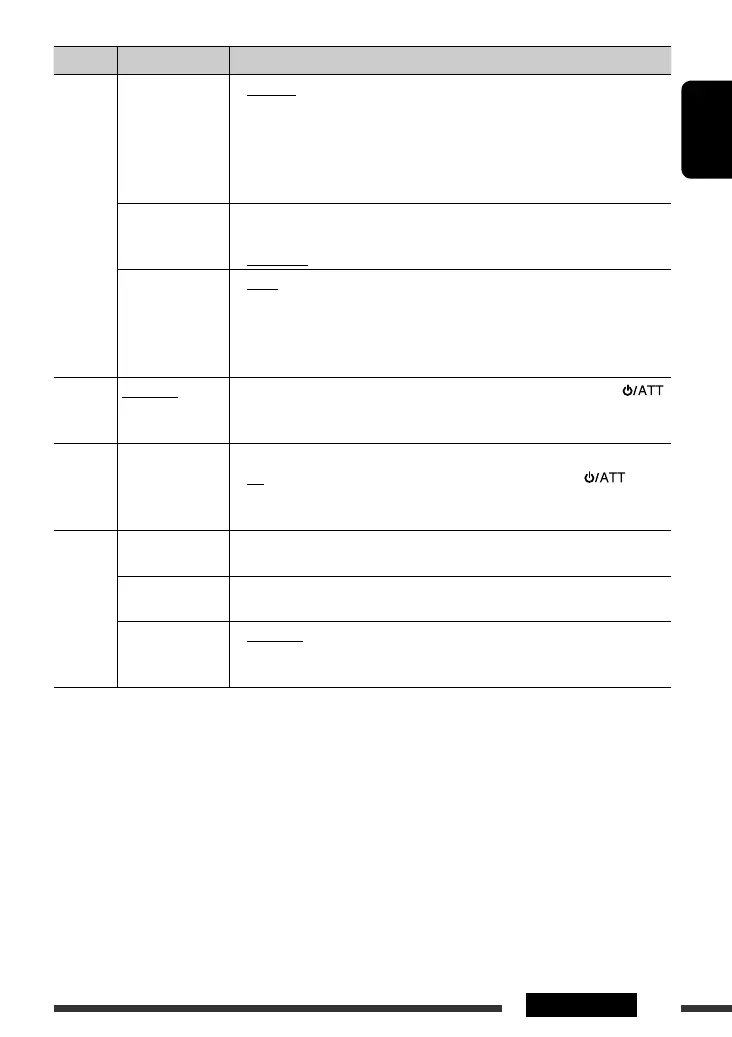
Category Menu items Selectable settings, [reference page]
TUNER
AREA
Tuner channel
interval
• AREA US
• AREA EU
• AREA SA
: When using in North/Central/South America. AM/FM
intervals are set to 10 kHz/200 kHz.
: When using in any other areas. AM/FM intervals are set to
9 kHz/50 kHz (100 kHz during auto search).
: When using in South American countries where FM interval
is 100 kHz. AM interval is set to 10 kHz.
MONO *
3
Monaural mode
• MONO ON
• MONO OFF
: Activate monaural mode to improve FM reception, but
stereo effect will be lost, [8].
: Restore the stereo effect.
IF BAND
Intermediate
frequency band
• AUTO
• WIDE
: Increases the tuner selectivity to reduce interference noises
between adjacent stations. (Stereo effect may be lost.)
: Subject to interference noises from adjacent stations, but
sound quality will not be degraded and the stereo effect
will remain.
COLOR
COLOR 01
– COLOR 29,
USER
: Select one of the preset or user color for display and button (except EQ/
/0) illumination.
(For customize color settings, “USER,” see page 17.)
MENU
COLOR
MENU COLOR
Menu color
• OFF
• ON
: Cancels.
: Changes the display and button (except EQ/ /0)
illumination during menu, list search and playback mode
operations.
AUDIO
FADER*
4,
*
5
Fader
R06 – F06 : Adjust the front and rear speaker output balance.
(Initial: 00)
BALANCE *
5
Balance
L06 – R06 : Adjust the left and right speaker output balance.
(Initial: 00)
LOUD
Loudness
• LOUD OFF
• LOUD ON
: Cancels.
: Boost low and high frequencies to produce a well-balanced
sound at a low volume level.
*
3
Displayed only when the source is “FM.”
*
4
If you are using a two-speaker system, set the fader level to “00.”
*
5
This adjustment will not affect the subwoofer output.
Continued on the next page
EN10-15_KD-R400[J]_f.indd 15EN10-15_KD-R400[J]_f.indd 15 9/10/08 3:24:02 PM9/10/08 3:24:02 PM


 To Next Page