ENGLISH
9OPERATIONS
Continued on the next page
3
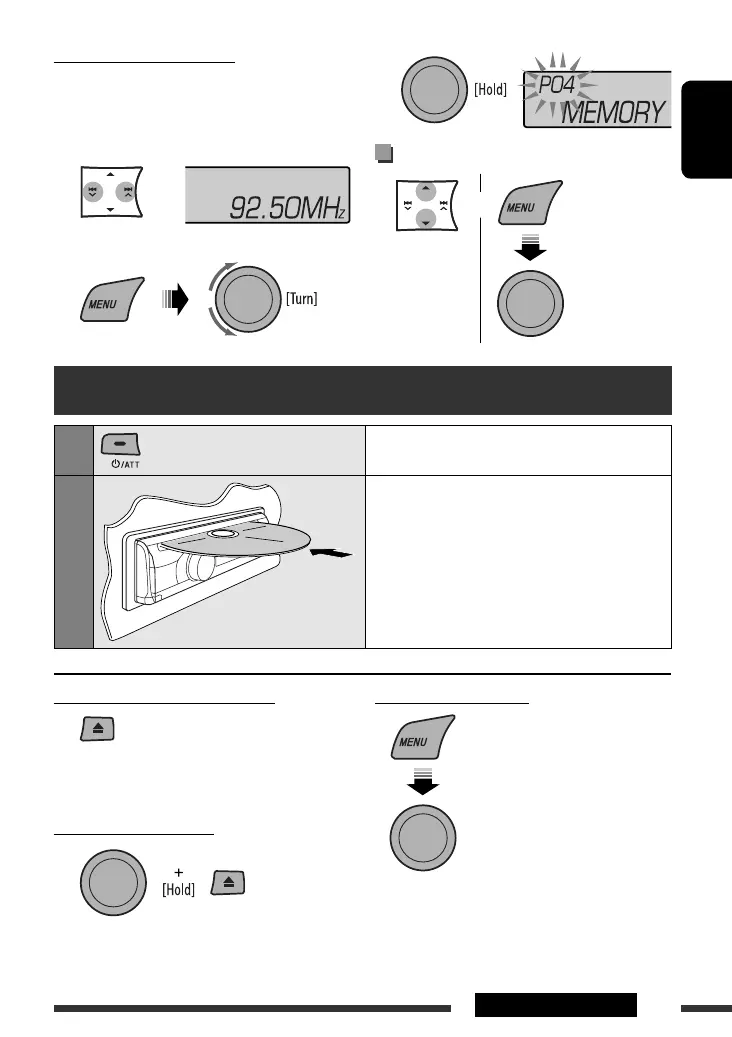
Selecting preset station
or
[Turn] = [Press]
Manual presetting (FM/AM)
You can preset up to 18 stations for FM and 6 stations
for AM.
Ex.: Storing FM station of 92.50 MHz into preset
number “04.”
1
2 Select preset number “04.”
Disc operations
1
Turn on the power.
2
Insert a disc.
All tracks will be played repeatedly until you change
the source or eject the disc.
Stop playing and ejecting the disc
• “NO DISC” appears. Press SRC to listen to another
playback source.
Prohibiting disc ejection
To cancel the prohibition, repeat the same
procedure.
Selecting a track/folder
• For MP3/WMA discs, select the desired folder,
then the desired track by repeating the control dial
procedures.
• To return to the previous menu, press BACK.
[Turn] = [Press]
EN02-09_KD-R400[J]_f.indd 9EN02-09_KD-R400[J]_f.indd 9 9/10/08 3:33:31 PM9/10/08 3:33:31 PM


 To Next Page