6
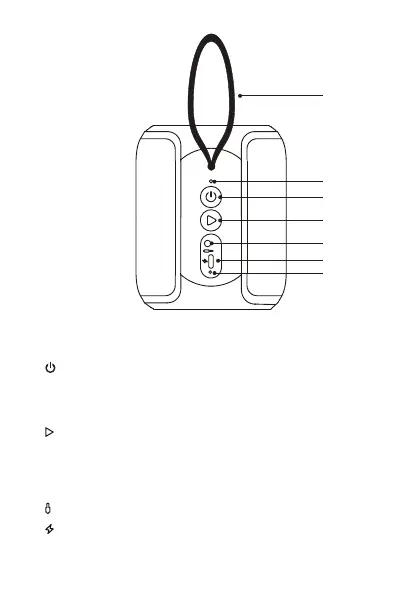
Rear View
1
2
3
4
5
6
7
LED
1. Strap String
2. LED Indicator
3.
ON/OFF Button
• Press to switch between Bluetooth® and AUX IN mode (if the unit
is connected with a stereo audio cable [not included]).
• Press and hold to switch the unit on/o.
4.
Play/Pause Button
• Press to play / pause / resume playback in Bluetooth® mode.
• Press to answer/end a phone call.
• Press and hold to reject an incoming call.
• Press twice to redial.
5.
AUX IN Socket
6.
Type-C Charging Socket
7. LED charging Indicator
SP-AD105-B_IB_Final200716V1.indd 6 17/7/2020 1:58 PM



 To Next Page