9
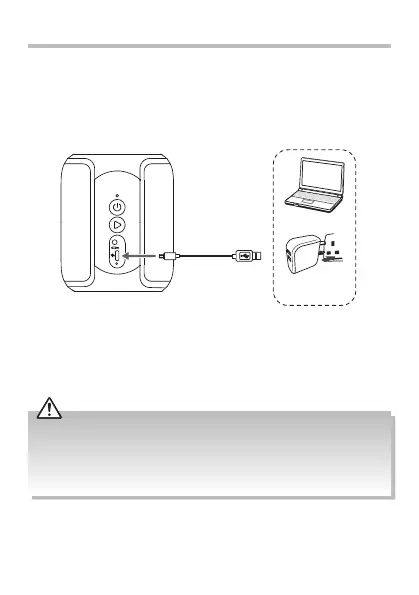
Led
Type-C Charging
Cable (included)
Computer
USB charging
device
Charging the Speaker
The unit has a built-in rechargeable battery, which should be charged
before using the speaker for the rst time.
The battery is charged automatically whenever the unit is connected to
a computer or a USB charging device.
1. Connect the supplied Type-C charging cable to the speaker, and then
connect the other end to a charging device.
2. The LED charging indicator will light up RED during charging. It will
go o automatically after fully charge.
• Type-C charging socket is for charging the unit only.
• Do not overcharge the battery as it may shorten its life. Disconnect the USB cable
after the unit is fully charged.
• Please use a 5V/1A USB charger for charging to avoid the risk of damaging the
unit.
SP-AD105-B_IB_Final200716V1.indd 9 17/7/2020 1:58 PM


 To Next Page