15
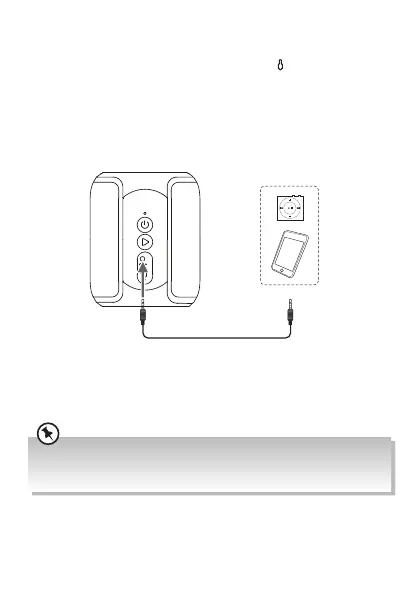
AUX IN Mode
Use a 3.5 mm to 3.5 mm stereo audio cable (not included) to connect
the headphone socket of an audio device and the
AUX IN Socket of
the unit.
• To increase or decrease the volume, press volume +/– .
• Operate your audio device directly for playback features.
Led
3.5 mm to 3.5 mm stereo
audio cable (not included)
External Audio Device
(not included)
Do not connect the unit to the device with output power more than 1V (e.g. DVD
player) to avoid sound distortion. You may refer to the instruction manual of the
external audio device for its output power.
SP-AD105-B_IB_Final200716V1.indd 15 17/7/2020 1:58 PM


 To Next Page