7
77
7
Connections
ConnectionsConnections
Connections
EnglishEnglishEnglishEnglishEnglishEnglishEnglish
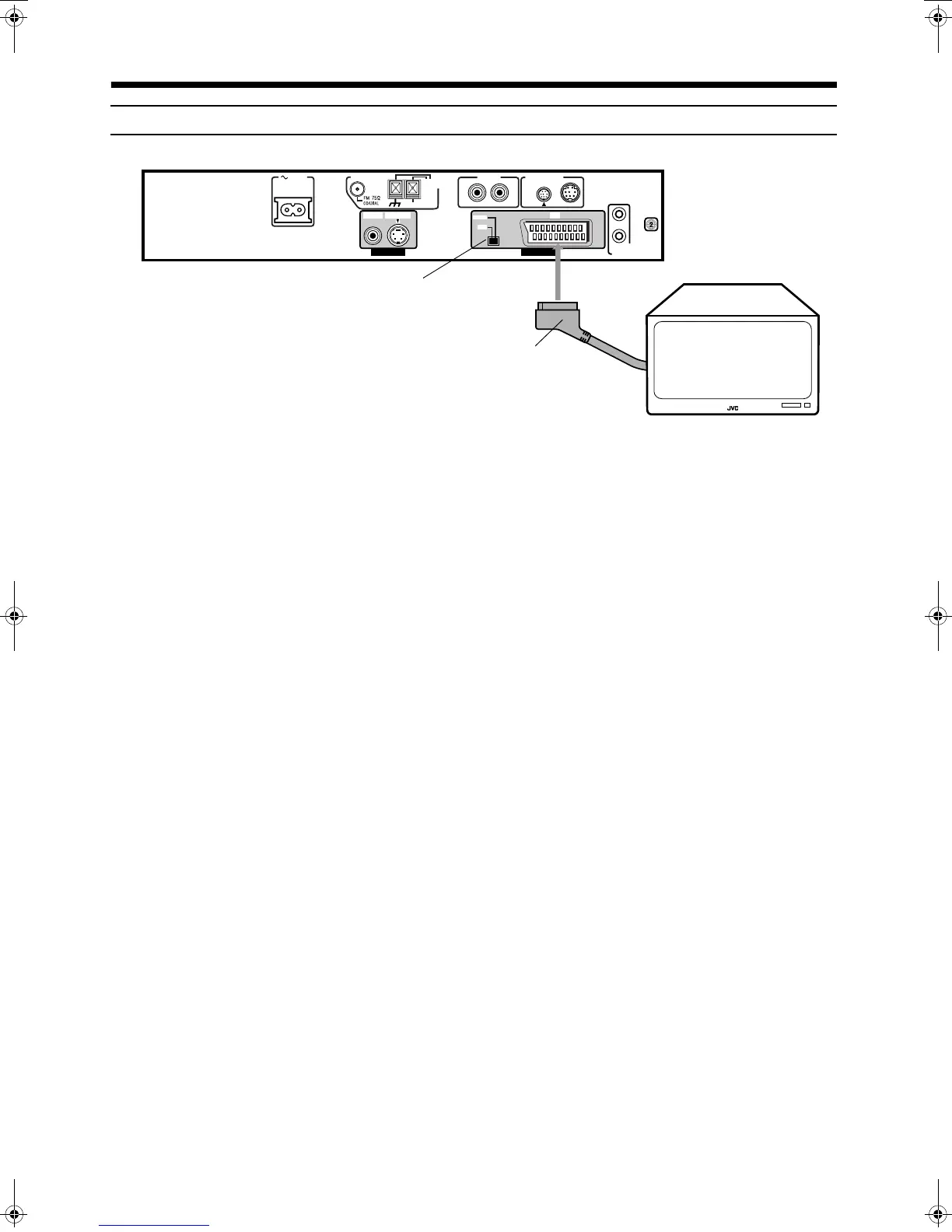
Connecting the TV with the SCART connector
Connect the unit’s AV OUT connector with your TV’s SCART connector using an optional SCART cable.
• Set the COMP.-Y/C switch correctly according to your TV. If the TV only accommodates the regular (composite) video signal, set the
switch to “COMP”. If the TV accommodates the Y/C signal, set the switch to Y/C so that you can enjoy better-quality pictures.
Note:
On the rear panel SCART cable is indicated as “AV OUT”. However, this terminal is designed as video output. So,
no sound comes out.
AV
COMPU LINK
AUX IN
ANTENNA
AC IN
AM
LOOP
AM EXT
S-VIDEO AV
COMP.
Y/C
VIDEO
VIDEO OUT AV OUT
RL
CONNECTOR
TO SP-PWA9
SCART Cable
(Not supplied)
COMP.-Y/C switch
TH-A9(B).book Page 7 Saturday, February 3, 2001 12:53 PM



 To Next Page