Mounting the Camera (Continued)
m
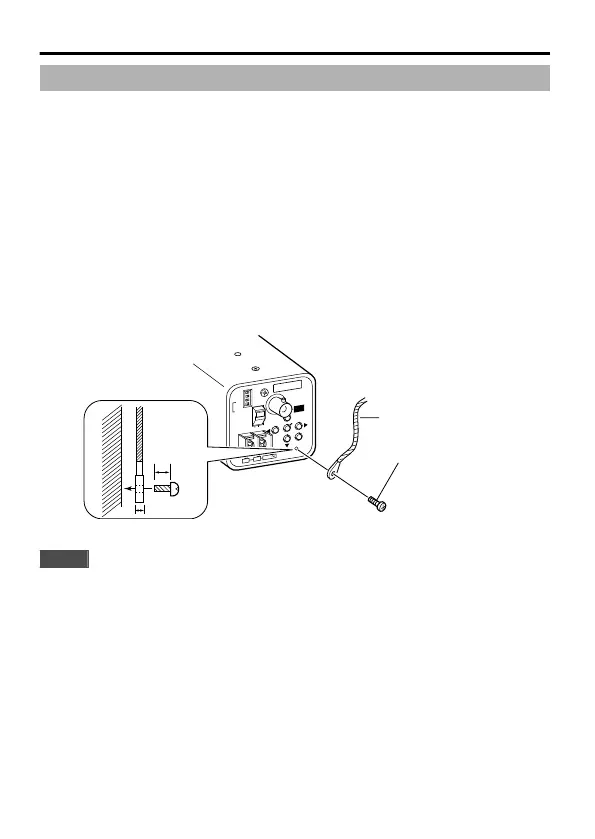
Fall Prevention
v
Special attention is required when installing the camera to the wall or ceiling.
You should not engage in the installation work yourself. Ask a professional to do
the job, because injuries and accidents may occur if the camera falls.
v
When installing the camera on a fixer, pan/tilt unit and the like, make sure to
install it firmly using a rotation-preventive hole to prevent fall.
v
To prevent fall, connect the camera to a section with sufficient strength (ceiling
slab or channel) using a fall prevention wire.
v
Pay attention to the length, strength, routing and material (insulation properties)
of the fall prevention wire used.
v
Use the screw (M3 x 6 mm) on the back of the camera for the installation of the
fall prevention wire. Do not use a screw that is longer than 6 mm as it may
damage the internal parts.
.
.
Fall Prevention Wire
DC12V
SET
MANUAL
SEE INSTRUCTION
GNDAUX
ONLY
(
E TYPE
)
ISOLATED POWER
(
U TYPE
)
CLASS 2 ONLY
MENU
OUT
VIDEO
ON
CRT
ON
OFF
AES OFF
LCD
BLC OFF
D/N AUTO
MONITOR TYPE
AC24V
1 2
ADJUST
FOCUS
M3 x 6 mm
6mm
2 mm
6 mm
Note
When mounting the camera to the ceiling, ensure to wear safety glasses
to protect the eye from any falling objects.
Connection/Installation
10



 To Next Page