Mounting the Lens
1
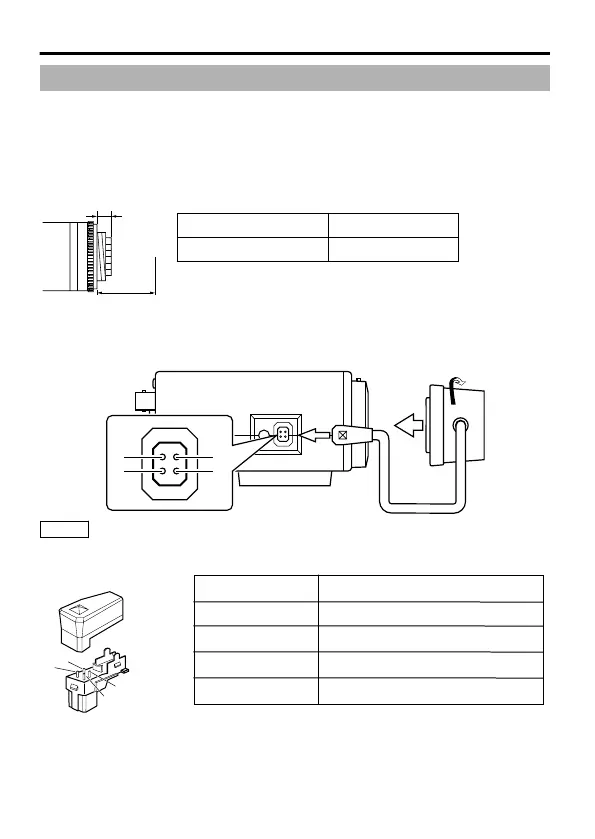
Check the mounting method of the lens before mounting.
This camera is compatible with CS-mount lens.
To use a C-mount lens, a C-mount adapter is necessary. For details about the C-
mount adapter, consult your JVC dealer.
Never use a lens that exceeds the dimension (a) in the below figure as it will
damage the inner part of the camera and will not allow normal installation. This
will result in a malfunction.
.
(a)
(b)
12.5 mm
Flange back (b)
Dimension (a)
5.5 mm or less
2
Turn the lens clockwise and mount it securely on the camera.
3
In the case of a DC IRIS lens, check the pin arrangement and
connect the lens cable to the socket.
.
Memo
v
Video IRIS lens cannot be used.
v
If the plug of the lens cable is different, connect with a 4 pin plug. For
details about the 4 pin plug, consult your JVC dealer.
.
1
2
3
4
4 pin plug
Pin number DC IRIS lens
Brake (-)
Brake (+)
Drive (+)
Drive (-)
1
2
3
4
Connection/Installation
6



 To Next Page