EasyManua.ls Logo

JVC UX-1 - Page 6

JVC UX-1
72 pages
Print Icon
To Next Page IconTo Next Page
To Previous Page IconTo Previous Page
Loading...
UX-teee
|
[5]
Instructions
(Extract)
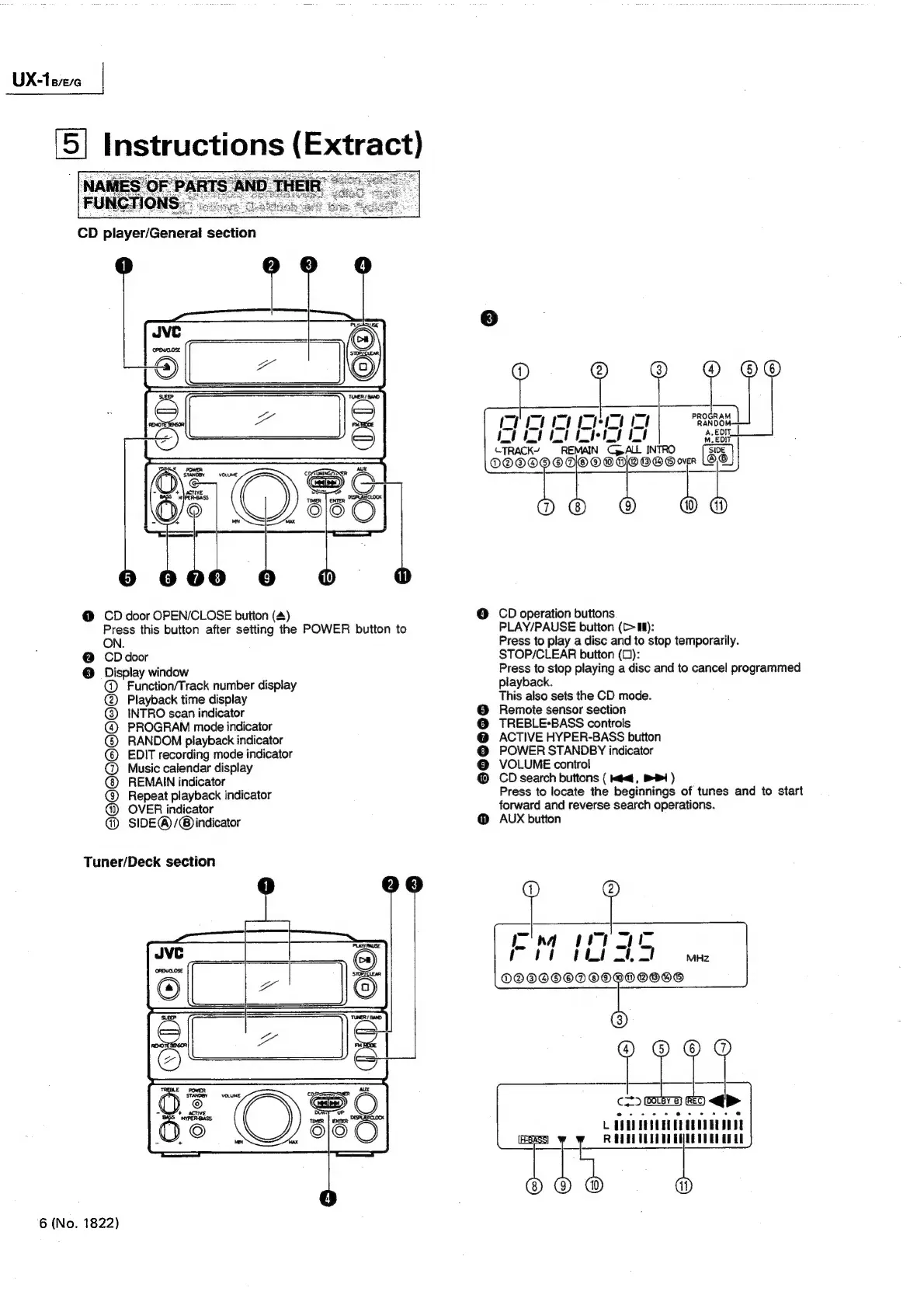
CD
player/General
section
5
ae
rm
cI
Pa0
sat
t
red
git
i
REMAIN
INTRO
SIDE
DOO
O/@
©
OO
over
|
(10)
@
CD
door
OPEN/CLOSE
button
(4)
@
CD
operation
buttons
Press
this
button
after
setting
the
POWER
button
to
PLAY/PAUSE
button
(>
Il):
ON.
Press
to
play
a
disc
and
to
stop
temporarily.
@
CDdoor
STOP/CLEAR
button
(0):
@
Display
window
Press
to
stop
playing
a
disc
and
to
cancel
programmed
@
Function/Track
number
display
playback.
(@
Playback
time
display
This
also
sets
the
CD
mode.
Q)
INTRO
scan
indicator
@
Remote
sensor
section
@
PROGRAM
mode
indicator
@
TREBLE-BASS
controls
G)
RANDOM
playback
indicator
@
ACTIVE
HYPER-BASS
button
©
EDIT
recording
mode
indicator
@
POWER
STANDBY
indicator
@
Music
calendar
display
@
VOLUME
control
REMAIN
indicator
@
CD
search
buttons
(
<4,
BP)
()
Repeat
playback
indicator
Press
to
locate
the
beginnings
of
tunes
and
to
start
OVER
indicator
forward
and
reverse
search
operations.
@)
SIDE@/@®
indicator
@
AUX
button
Tuner/Deck
section
[Tha
wy
Poet
tho
LS
MHz
OG
OOOOQD
OOOD
OOD
ait
c=)
ee
arr
are
COUPRDEESU
REDD
GGQTEESUDE
‘6
(No.
1822)

Related product manuals