EasyManua.ls Logo

JVC UX-1 - Page 7

JVC UX-1
72 pages
Print Icon
To Next Page IconTo Next Page
To Previous Page IconTo Previous Page
Loading...
@
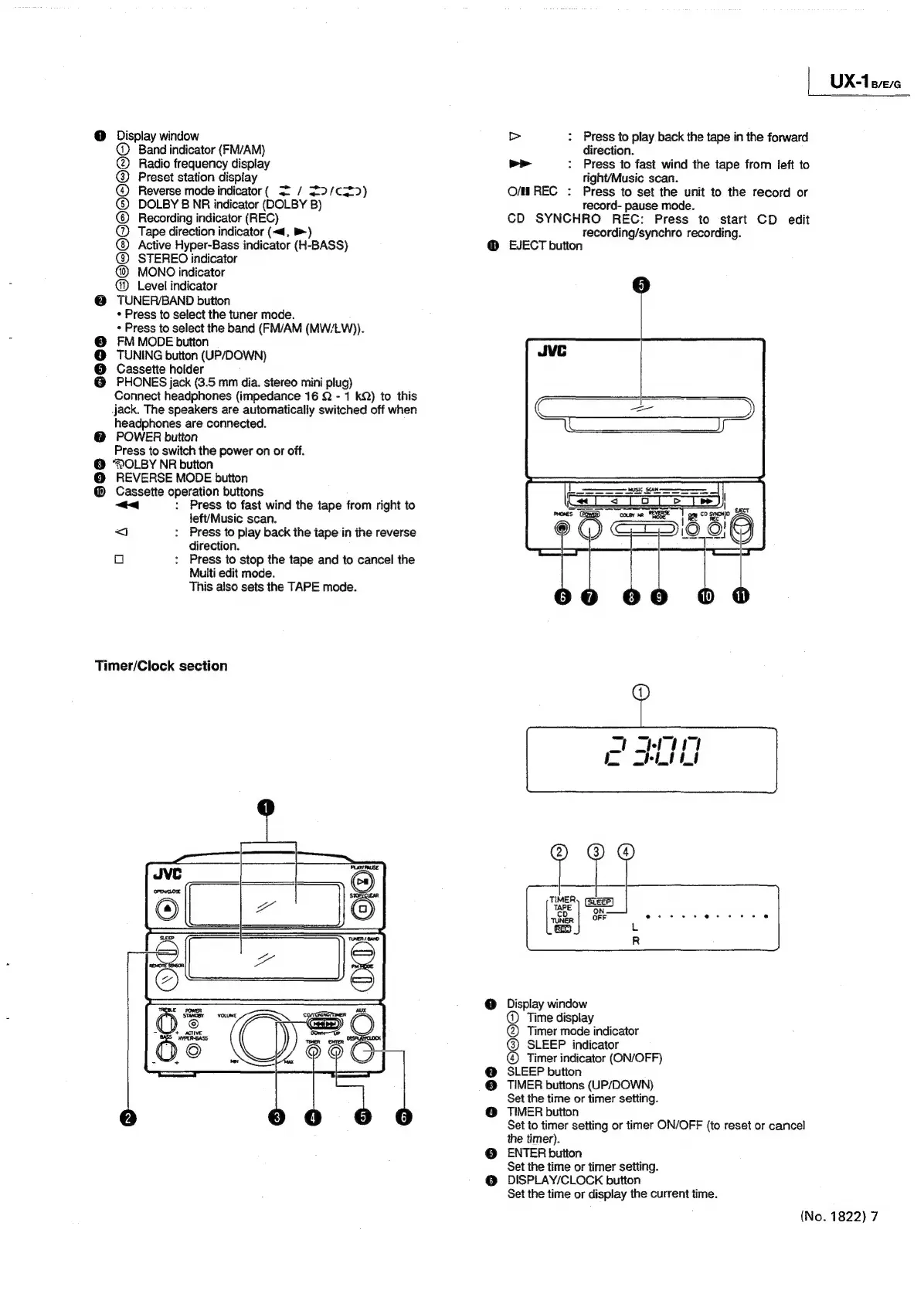
Display
window
@
Band
indicator
(FM/AM)
@
Radio
frequency
display
@
Preset
station
dispiay
@
Reverse
mode
indicator
(
2
/
32/c==>)
©
DOLBY
B
NR
indicator
(DOLBY
B)
©)
Recording
indicator
(REC)
@
Tape
direction
indicator
(<4,
>)
@)
Active
Hyper-Bass
indicator
(H-BASS)
@
STEREO
indicator
MONO
indicator
Level
indicator
@
TUNER/BAND
button
+
Press
to
select
the
tuner
mode.
«
Press
to
select
the
band
(FM/AM
(MW/LW)).
FM
MODE
button
TUNING
button
(UP/DOWN)
Cassette
holder
PHONES
jack
(3.5
mm
dia.
stereo
mini
plug)
Connect
headphones
(impedance
16
Q
-
1
kQ)
to
this
.jack.
The
speakers
are
automatically
switched
off
when
headphones
are
connected.
@
POWER
button
Press
to
switch
the
power
on
or
off.
@
DOLBY
NR
button
@
REVERSE
MODE
button
@
Cassette
operation
buttons
<<
:
Press
to
fast
wind
the
tape
from
right
to
left/Music
scan.
<j
:
Press
to
piay
back
the
tape
in
the
reverse
direction.
o
:
Press
to
stop
the
tape
and
to
cancel
the
Multi
edit
mode.
This
also
sets
the
TAPE
mode.
©
@
3]
0
e
6
Timer/Clock
section
;
UX-1
B/E/G
>
:
Press
to
play
back
the
tape
in
the
forward
direction.
>>
:
Press
to
fast
wind
the
tape
from
feft
to
right/Music
scan.
Press
to
set
the
unit
to
the
record
or
record-
pause
mode.
CD
SYNCHRO
REC:
Press
to
start
CD
edit
recording/synchro
recording.
O/MREC
:
EJECT
button
1)
Display
window
@
Time
display
@
Timer
mode
indicator
SLEEP
indicator
®
Timer
indicator
(ON/OFF)
SLEEP
button
TIMER
buttons
(UP/DOWN)
Set the
time
or
timer
setting.
TIMER
button
Set
to
timer
setting
or
timer
ON/OFF
(to
reset
or
cancel
the
timer).
ENTER
button
Set
the
time
or
timer
setting.
DISPLAY/CLOCK
button
Set
the
time
or
display
the
current
time.
(No.
1822)
7

Related product manuals