(No.MB262)1-7
SECTION 3
DISASSEMBLY
3.1 Main body section
3.1.1 Removing the side panels L/R
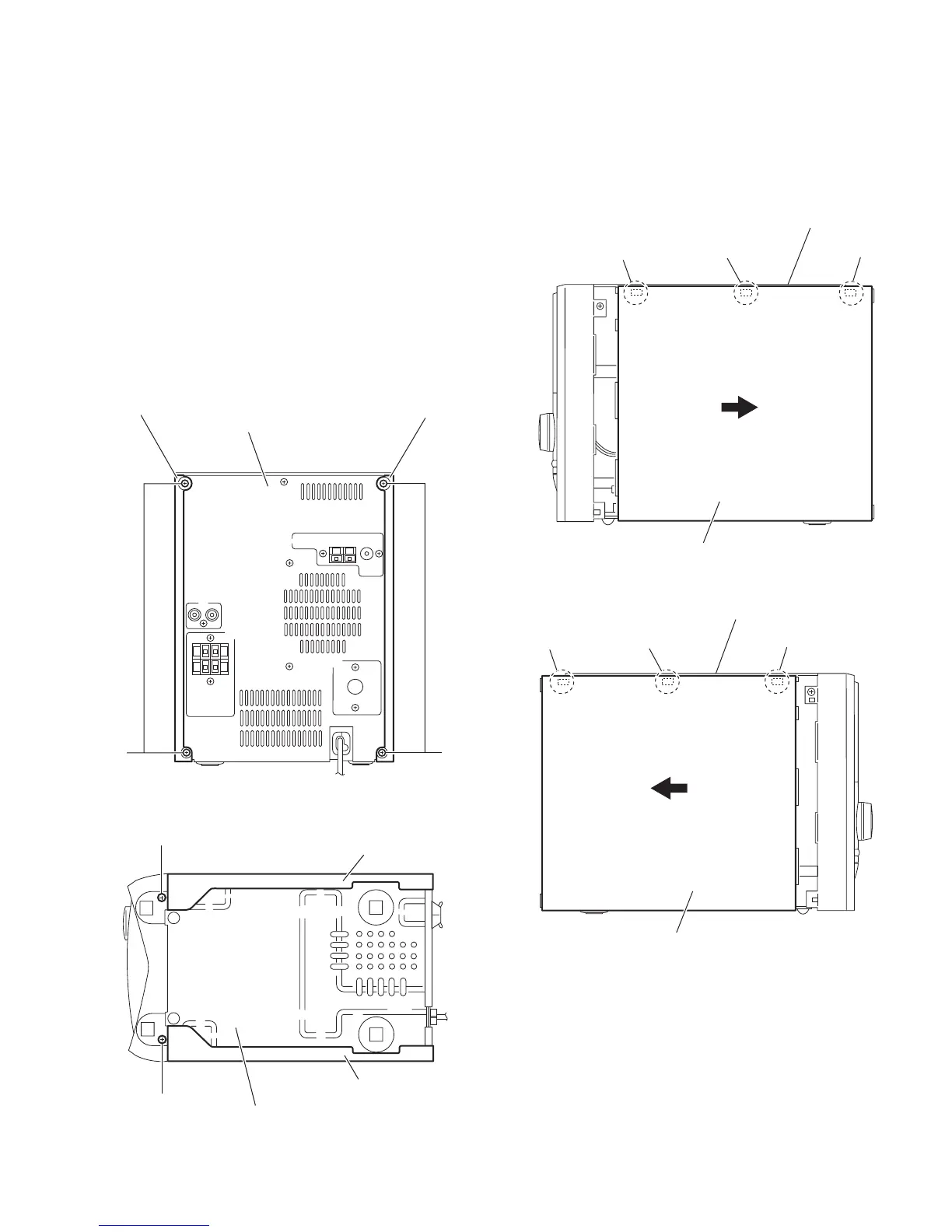
(See Figs.1 to 4)
(1) From the back side of the main body, remove the four
screws A attaching the side panels L/R to the rear panel.
(See Fig.1.)
(2) From the bottom side of the main body, remove the two
screws B attaching the side panels L/R to the bottom chas-
sis. (See Fig.2.)
(3) From the both sides of the main body, release the engage-
ment sections (a, b) of the side panels L/R from the top
cover assembly in the direction of the arrow. (See Figs.3
and 4.)
(4) Remove the side panels L/R toward this side.
Fig.1
Fig.2
Fig.3
Fig.4
Side panel R
Side panel L
Rear panel
A
A
Side panel L
B
B
Bottom chassis
Side panel R
Top cover assembly
a
a
a
Side panel R
Top cover assembly
b
b
b
Side panel L


 To Next Page
 Loading...