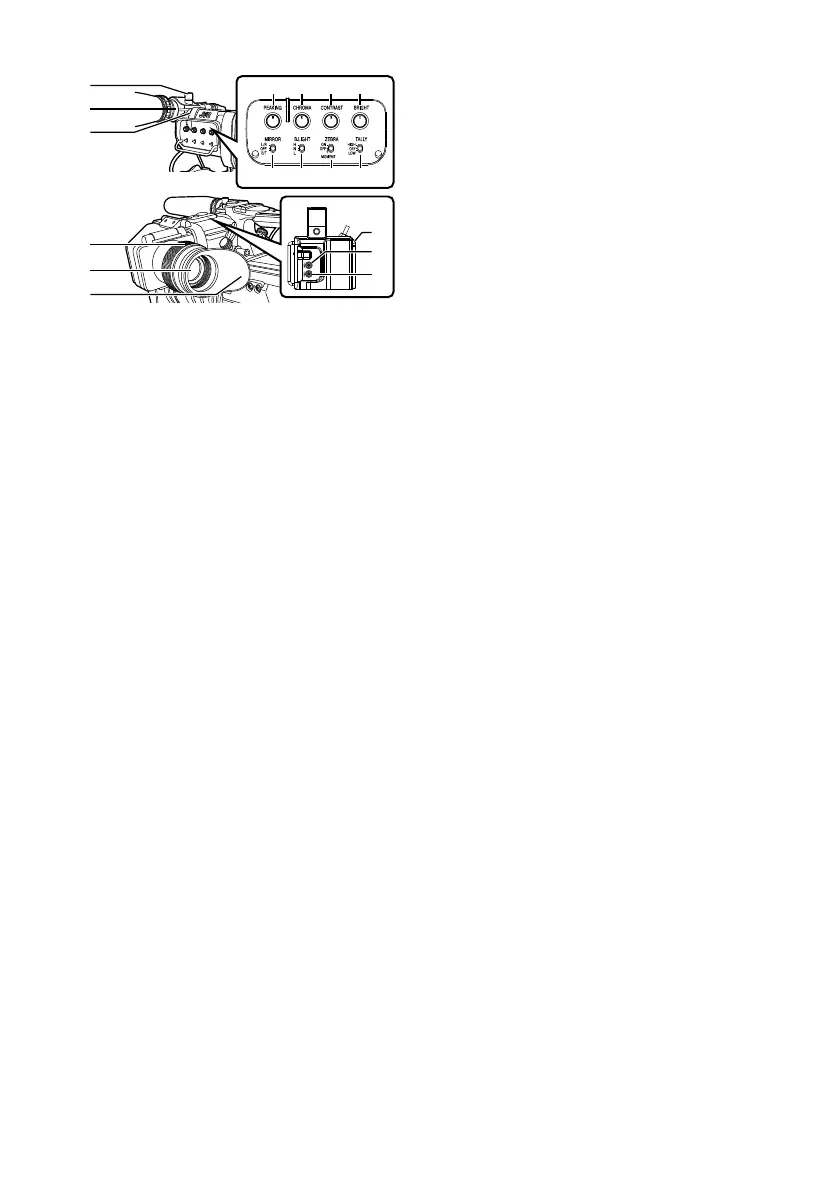
Names of Parts
.
A
Microphone Holder Lock Knob
B
Microphone Holder
C
Front Tally Lamp
D
Eyepiece Focus Ring
For adjusting the visibility.
E
Electronic Viewfinder
F
Eyepiece
Prevents external light from entering the
viewfinder screen and cameraman’s vision.
G
[USER1] Button (VF)
It
can be
assigned with a specific menu function.
H
[USER2] Button (VF)
It can be assigned with a specific menu function.
I
Slide Stopper
Use it when mounting or unmounting the
viewfinder.
J
[MIRROR] Switch
Flips the image.
L/R: Flips horizontally; OFF: Normal display; B/
T: Flips vertically
K
[B.LIGHT] Switch
For configuring the brightness of the viewfinder.
H: Bright; N: Normal; L: Dark
L
[ZEBRA] Switch
Displays the zebra pattern.
ON: Turns on zebra pattern; OFF: Turns off
zebra pattern; MOMENT: “Turns on zebra
pattern” for a specific time interval while the
switch is being pressed.
M
[TALLY] Front Tally Switch
For configuring the front tally lamp.
HIGH: Bright; OFF: Light off; LOW: Dark
N
[BRIGHT] Knob
For adjusting the brightness of the viewfinder.
O
[CONTRAST] Knob
For adjusting the contrast of the viewfinder.
P
[CHROMA] Knob
For adjusting the color of the viewfinder.
Q
[PEAKING] Knob
For adjusting the outline of the viewfinder.
EN 7



 To Next Page