EasyManua.ls Logo

K-array Kommander-KA Series - K-Array Connect Mobile App; Connecting to the Built-In Hot Spot

K-array Kommander-KA Series
28 pages
Print Icon
To Next Page IconTo Next Page
To Previous Page IconTo Previous Page
Loading...
Kommander-KA
User Guide
14
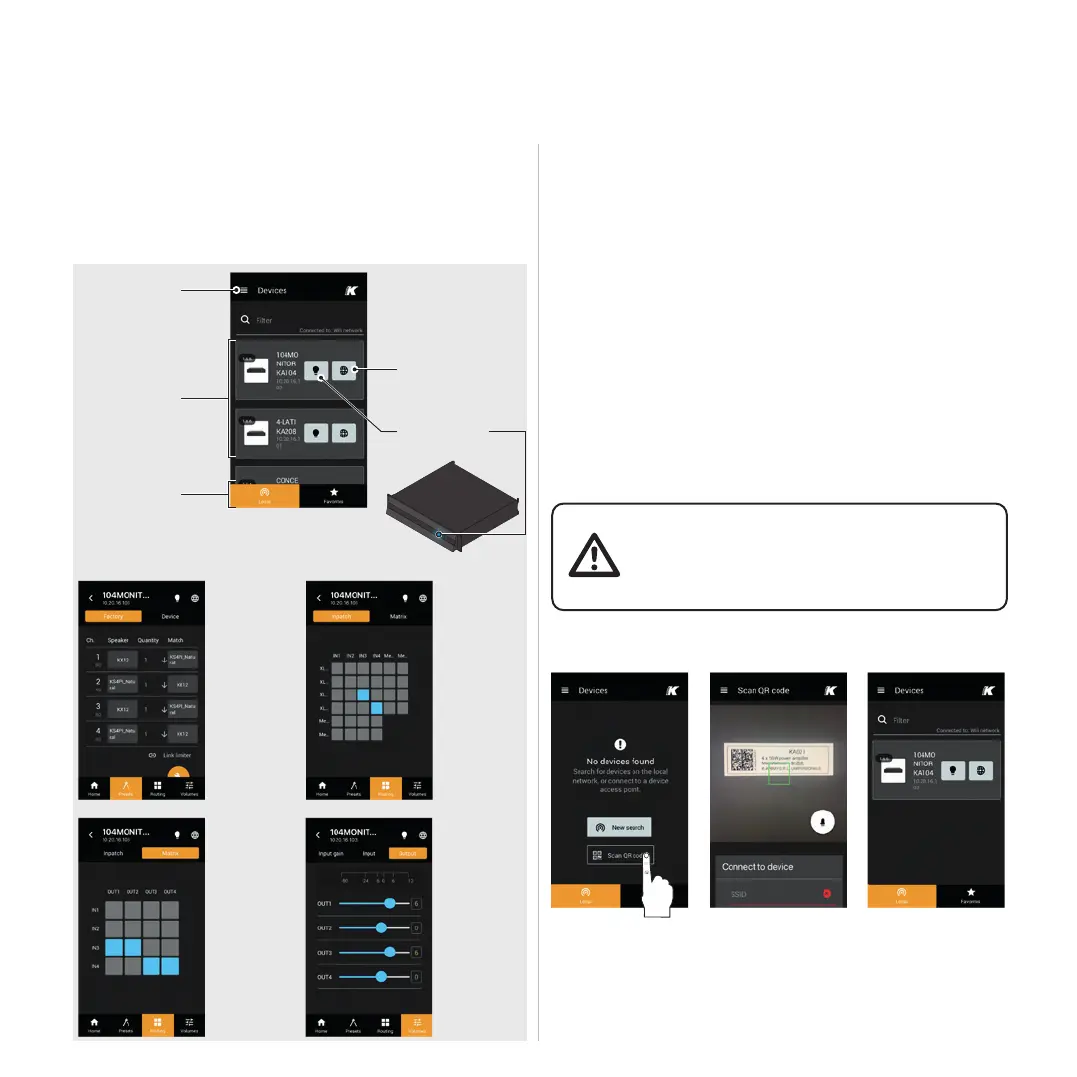
K-array Connect Mobile App
The K-array Connect mobile app allows to access the

established by the built-in hot spot.
Connecting To The Built-In Hot Spot
1. 
2. 
3. 


unit: this provides the mobile device to connect to the

4. Click on the image of the Kommander-KA unit to manage


app.



(case sensitive).

devices in the
network
Main menu
Tab menu
Access the
embedded web app

the list of devices or


the camera in order to
connect the unit
The K-array active unit

code for connecting the
local Wi-Fi: target the
code to establish the
wireless connection
Preset menu

loudspeaker
factory presets
on the output
channels
and manage
the device

presets.
Preset menu
MATRIX

routing from

the output
connectors.
Routing menu
INPATCH
Patch the input
signals to the

Volumes menu
Manage the
the input
and output
volumes.
Connected and

Make the status


Related product manuals