7
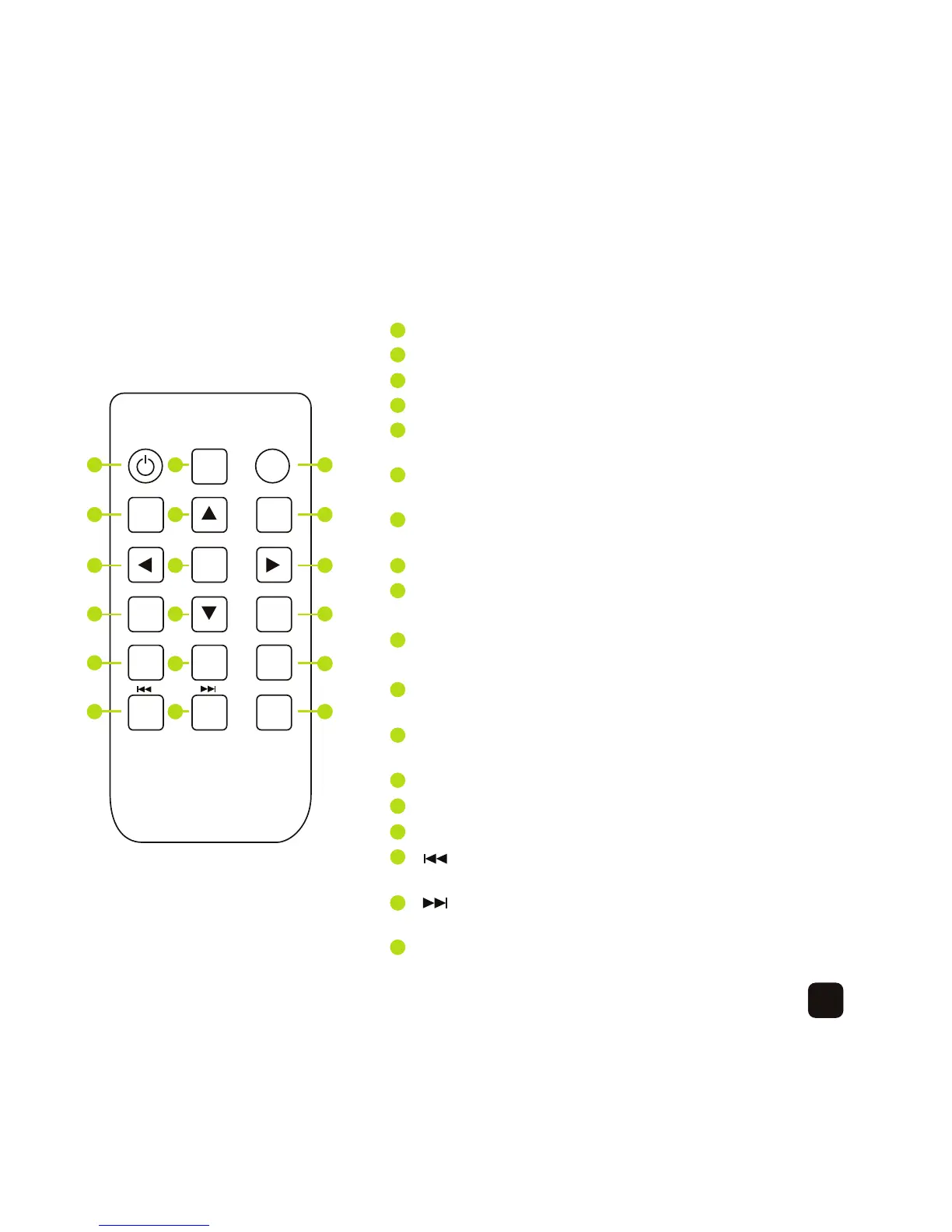
Remote control
POWER Turn the device on or off
BGM Press this button to play a slideshow with music
MUTE Press to mute the audio
MENU Press to access the main menu
UP Directional button, press to display a previous
photo or play a previous music track
RETURN Press to go to the previous screen or to
stop playing a slideshow, music track or video file
LEFT Directional button, press to display a previous
photo or play a previous music track
OK Confirm selection
RIGHT Directional button, press to display the next
photo or play the next music track
SETUP Press to access the on-screen menu when
playing a slideshow or video file
DOWN Directional button, press to display the next
photo or play the next music track
PLAY/PAUSE Play or pause a slideshow,
music track or video file
VOL- Press to decrease the volume
VOL+ Press to increase the volume
ZOOM Press to magnify a photo or video
Press to display a previous photo, play a
previous music track or play a previous video file
Press to display the next photo, play the
next music track or play the next video file
ROTATE Presstorotatethephotoby90°,180°and270°
OK
POWERBGM MUTE
MENU RETURN
SETUP PLAY/PAUSE
VOL- VOL+ ZOOM
ROTATE
1 2 3
4 5 6
7 8 9
10
11 12
13
1114 1215
1016
11
17
1218
1
2
3
4
5
6
7
8
9
10
11
12
13
1114
1215
16
11
17
1218



 To Next Page