Initial Setup
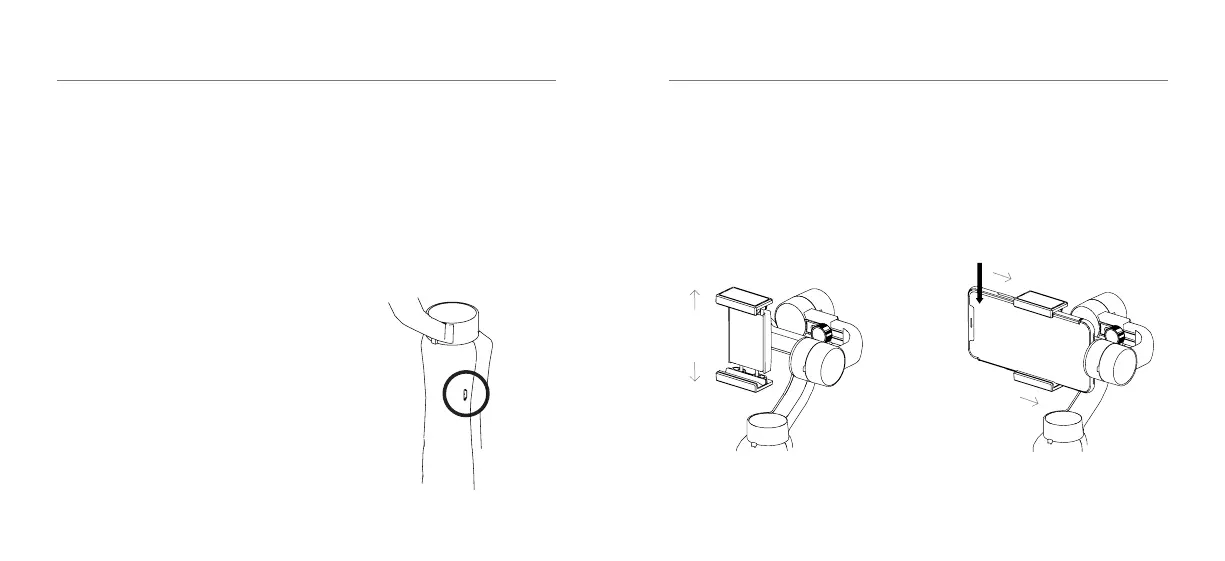
Make sure the Gimbal is fully charged
before use. Connect the USB wall charger
(not included) to the Micro USB charging
port using the supplied charging cable.
The battery status indicator will be red
when the power cable is connected. The
battery is fully charged when the battery
indicator light turns green.
Thebatteryindicatorwillashredwhenthe
battery is low.
Recommended charging time is 3-4 hours.
Maximum runtime is 5 hours.
PREPARING THE S3
05 - ENG
Smartphone
IMPORTANT: Before you switch on and
balance your Gimbal, please mount your
Smartphone.
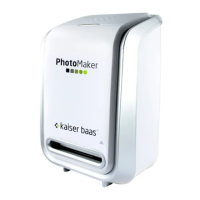
Pull the sides of the holder outwards and
place the Smartphone horizontally in the
holder, then gently release the sides.
Once the phone is in the holder, slide the
phone into the groove of the tilt motor.
MOUNTING AND BALANCING YOUR SMARTPHONE
06 - ENG
Smartphone Screen


 To Next Page