11
EN
X360 | User Guide
Set Up Your X360 Camera
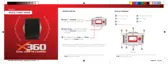
Insert the Micro SD Card*
A Class-6 or Class-10 Micro SD Card up to 32GB is required. The X360
will not support a Micro SD card below class 6. There is only one correct
way to insert the Micro SD Card into the slot. Do not force the card into
the card slot, as it may damage both the X360 and the Micro SD Card.
It is recommended that you format new cards or cards that have been
previously used in other devices. To format the Micro SD card:
• Turn the X360 on, enter the Setup menu by holding
the Wi-Fi button.
• Use the Wi-Fi button to Scroll down and select the Format
option using the Record button.
• Scroll using the Wi-Fi button, select Ye s and press Record
button.
• Hold the Wi-Fi button to exit the menu.
NOTE: Formatting the card will permanently delete contents of the card. Be sure to
save any important files.
* Micro SD cards are also called TF cards.


 To Next Page