CAMERA SETTINGS
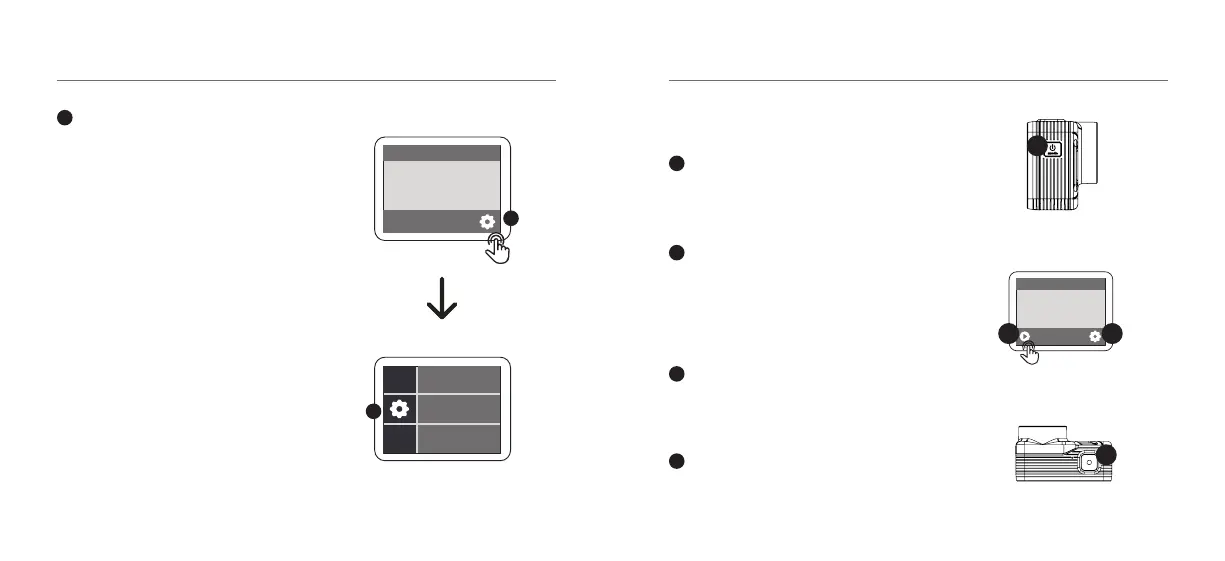
Using your Camera
To turn your camera on/o - hold the
Power/Mode button on the side of your
X600 for few seconds.
Select from the following modes to
capture your footage by scrolling down on
the mode menu page: Video; Photo; Time
Lapse Video; Time Lapse Photo; Slow Mo;
Burst Mode; Self Timer; Photo & Video.
To access settings and change video/
image resolutions, tap the settings icon
on the screen.
To start recording video, press the Record
button on the top of your camera.
1
2
3
4
1
03 - ENG
32
4
Side View
Back View
Top View
GETTING STARTED
02 - ENG
Format your SD Card before using
the camera
Tap on the Settings icon (3) in the
bottom right corner of the screen.
Tap to select the Settings icon the left
of the screen. Scroll down the menu
until you get to Format SD Card. Tap
on Format SD Card. Tap on Conrm
to format your SD Card.
NOTE: This will clear all data on
the card and ensure it is ready for
recording.
3
Format SD Card
3
3



 To Next Page