Need help?
Do you have a question about the KALI AUDIO IN-5 and is the answer not in the manual?
Explanation of safety symbols like lightning bolt for dangerous voltage and exclamation point for important instructions.
Details on the 3-way coincident architecture, output capabilities, low noise port tube, and boundary compensation EQs.
Detailed explanations of the RCA input, XLR/TRS inputs, volume control, power input, and on/off switch.
Configuration settings for boundary compensation EQs based on speaker placement: Free Space, Close to Wall, Against Wall.
Adjusts low frequency response by -2 dB or +2 dB, controlled by dip switches 4 and 5.
Adjusts high frequency response by -2 dB or +2 dB, controlled by dip switches 6 and 7.
Enables or disables the RCA input on the speaker using dip switch 8.
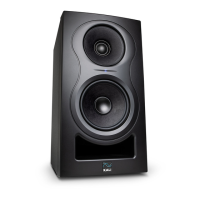
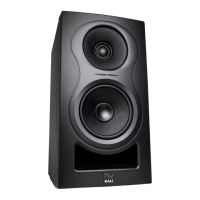
The Kali Audio IN-Series Studio Monitors, specifically the IN-5 and IN-8 models, are designed to provide exceptional accuracy for recording, mixing, and production applications. These monitors are distinguished by their unique 3-Way Coincident Architecture, which positions the midrange driver and tweeter to share the same acoustic center. This design creates an acoustic point source, resulting in an ideal directivity characteristic for studio monitoring. Users can expect a very lifelike stereo image with clearly and consistently placed details, as off-axis lobing, a common issue in 2-way systems, is virtually eliminated.
The "IN" in the product name stands for "Project Independence," a nod to Kali Audio's practice of naming product lines after California towns. This series shares many components with, and offers improvements over, their Lone Pine series of monitors.
A key feature of these monitors is their robust output capability. The IN-5 and IN-8 are engineered for continuous output at reference levels, with ample dynamic headroom. This ensures that momentary peaks in sound pressure level, such as those from kick drums or effects like gunshots, can be reproduced accurately with minimal distortion. To protect the speakers from unsafe voltage levels, a limiter circuit is integrated. If distortion is audible, it indicates that the speaker is receiving too much input signal, and users should reduce the playback volume.
The IN-Series monitors incorporate a Low Noise Port Tube, a technology shared with Kali's LP-Series. This design aims to deliver the benefits of a front-firing port tube without the associated noise drawbacks. Unlike conventional port tubes where air exits at varying speeds, causing noisy turbulence (often described as "chuffing"), Kali's design ensures that all air leaves the port tube at a uniform velocity. This contributes to a clean, tight bass response, free from additional noise, and enhances the low-end details.
For optimal sound in various acoustic environments, the monitors feature Boundary Compensation EQs. These EQs were developed at The Village Studios in Los Angeles to counteract low-frequency interactions with different surfaces in common speaker placements. Combined with LF (Low Frequency) and HF (High Frequency) trims, these settings allow users to fine-tune the speaker's sound to suit their specific mixing room, ensuring the best possible audio performance regardless of placement.
The rear panel of the monitor provides a comprehensive set of inputs and controls. A Dip Switch Quick Reference Guide is printed directly on the back, allowing users to quickly set the dip switches for their application without needing to consult the manual. The dip switches control various aspects of the speaker's performance, including Boundary EQ, HF and LF Trim, and power to the RCA input. Switches 1-3 manage the Boundary Compensation EQs, offering settings for "Free Space," "On Stands, Close to a Wall," "On Stands, Against a Wall," "Console Bridge," "On a Desk, Away from Walls," "On a Desk, Close to a Wall," "On a Desk, Against a Wall," and "Wall Mount." Switches 4 and 5 control the LF trim, allowing for a +/- 2 dB adjustment in low frequencies, either for personal taste or to address room acoustics. Similarly, switches 6 and 7 control the HF trim, providing a +/- 2 dB adjustment in high frequencies. It's important to note that the trim adjustment switches (5 and 7) only function when their respective engage switches (4 and 6) are in the "UP" (Engaged) position.
Input options include an RCA input (-10 dBV Sensitivity) for consumer devices like record players, laptops, smartphones, and media players. By default, the RCA input is OFF to prevent interference when not in use; it can be enabled by moving switch #8 UP to the ON position. For professional audio devices such as mixers, interfaces, and controllers, the monitors offer an XLR input (+4 dBu Sensitivity) and a TRS input (+4 dBu Sensitivity). Users should avoid connecting both XLR and TRS cables to the same speaker simultaneously. While unbalanced TS 1/4-inch cables can be used, they are more susceptible to noise.
The volume control allows adjustment from -∞ to +6 dB, with a center detent at +0 dB, which Kali recommends as the default setting, preferring level adjustments from the source device. Exceptions include asymmetrical rooms requiring different monitor levels for balance, or when the playback device lacks independent volume control. The power input accommodates the provided power cord, and the IN-Series speakers feature an international switch-mode power supply, eliminating the need for voltage settings. An On/Off Switch is provided, and users are advised to power off the speaker before connecting/disconnecting cables, during lightning storms, or for extended periods of disuse.
For initial setup, users should ensure the power switch is OFF before plugging in the speaker and connecting audio cables. If using RCA, dip switch #8 should be UP; for XLR or TRS, it should be DOWN. Only one audio cable should be connected at a time. The volume knob should be turned fully counter-clockwise before powering on the speaker. Playback material should start at a low volume, gradually increasing the speaker's volume to the +0 dB detent. Finally, the boundary EQ should be set according to the application, and these steps repeated for all speakers.
Regarding maintenance, the IN-8 studio monitor's enclosure is constructed from MDF wood and wrapped in vinyl. This material is sensitive to heat and humidity, so the product should be used in a climate-controlled environment. Exposure to direct sunlight, moisture, or consistent humidity above 65% can cause the vinyl to peel and wrinkle, which is not covered under warranty. Cleaning should be done with a dry cloth after powering down and unplugging the product. Ventilation openings must not be blocked and should be kept free of dust. The apparatus should not be installed near heat sources, and no naked flame sources should be placed on the product. The power cord should be protected from being walked on or pinched. Only manufacturer-specified attachments and accessories should be used. The apparatus should be unplugged during lightning storms or when unused for long periods.
Troubleshooting guidance is provided for common issues. If the speaker is damaged upon receipt, the dealer should be contacted immediately. For no sound, users should check power, volume, cable connections, audio source, and the RCA input dip switch setting. If distortion occurs, reducing the speaker's volume is recommended. For cracks, hums, or buzzing, users should consider if RCA cables are being used (unbalanced connections are prone to noise), ensure dip switch #8 is OFF if not using RCA, check for nearby electronics causing interference, and inspect the room for loose objects vibrating with bass frequencies. If these steps don't resolve the issue, users are advised to isolate the problem by testing cables and playback devices with another speaker before contacting their dealer for a return.
 General
| Configuration | 3-way |
|---|---|
| Tweeter Size | 1" |
| HF Power | 40 W |
| HF Driver | 1" tweeter |
| Input Impedance | 10 kΩ |
| Input Types | XLR, TRS |
| Input Connectors | XLR, 1/4" TRS |

 To Next Page